
Quick answer: To switch email platforms without hurting deliverability, clean and re-engage your list before you move, keep your sending domain and from-address the same, re-verify SPF, DKIM and DMARC on the new platform, and send to your most engaged subscribers first. Your IP changes when you switch, so inbox providers re-evaluate you — but most senders recover within four to six weeks (EmailOctopus).
Rising costs, a cluttered dashboard, features you never use — there are good reasons to move email platforms. The honest truth is that switching affects deliverability in the short term, but a thoughtful migration keeps the dip small and temporary. Here is how.
Disclosure: Bluey Email, mentioned below, is my own product; I tested its migration tooling first-hand for this guide.
Why switching platforms affects deliverability
Your sender reputation is tied to three things: your sending IP address, your sending domain, and your from-address. The IP is provided by your platform, so it stays behind when you leave. Your domain and from-address, however, are yours — and if you keep them the same, you carry over much of the reputation you have built. Because the IP changes, inbox providers like Gmail, Outlook and Yahoo detect a new sender and re-evaluate you cautiously, which is why the first few campaigns from a new platform can dip. As EmailOctopus’s Hollie Youlden puts it, sending to engaged subscribers first “is the single most effective thing you can do to get your reputation off to a strong start” (EmailOctopus).
Before you leave your current platform
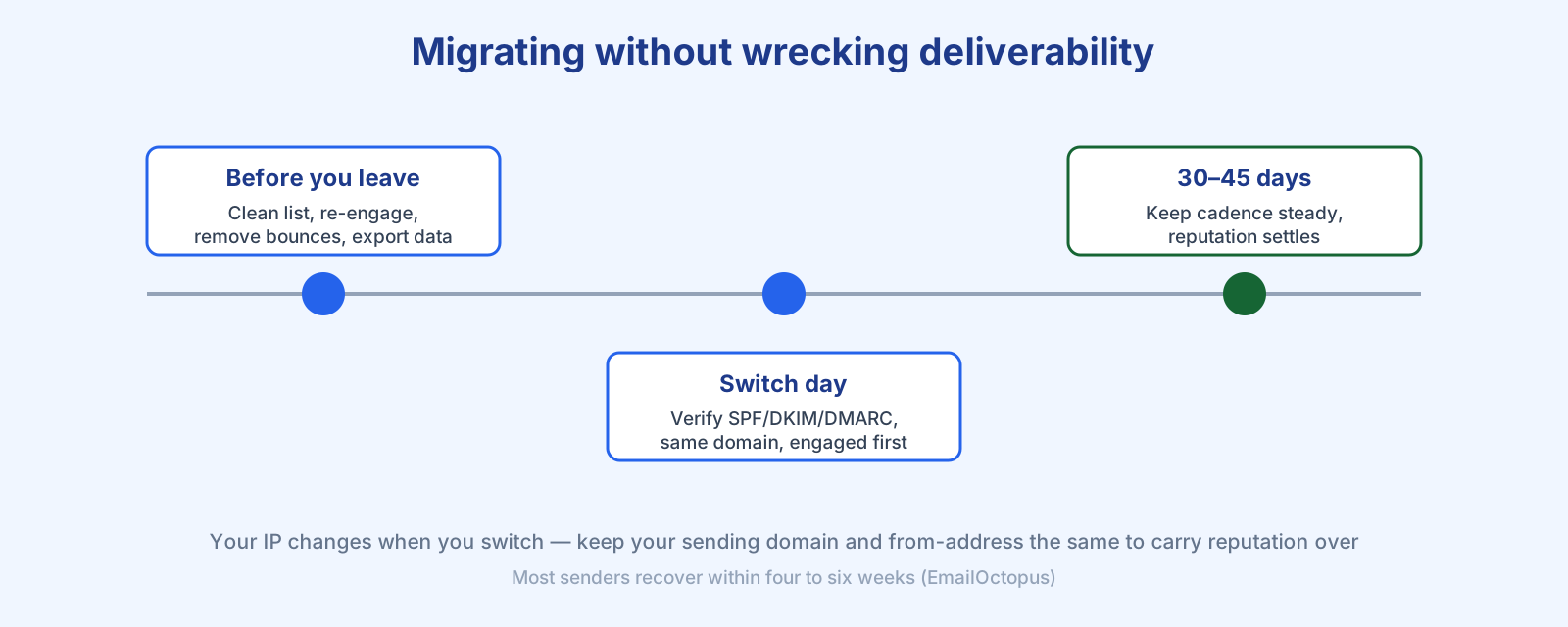
Arrive at the new platform with the cleanest, most engaged list you can. First, identify your most engaged subscribers — those who have opened and clicked recently — and mark them; they are your greatest asset on day one. Second, run a re-engagement campaign to the inactive segment and manually unsubscribe anyone who does not respond. Third, remove recurring soft bounces and any hard bounces your platform has not already purged — see email bounce rate and email list cleaning. Finally, export your list with full engagement data and note your current open, click and bounce benchmarks so you can compare fairly later.
Setting up the new platform
Re-verify your domain in full — SPF, DKIM and DMARC, not just the from-address. This matters more than ever: since February 2024 Google and Yahoo have required bulk senders to have DMARC, and Microsoft followed in May 2025 (EmailOctopus). Our SPF, DKIM and DMARC explainer walks through each record. Then import your contacts with their engagement segments intact, double-checking that previously unsubscribed people are not re-imported as active — getting that wrong risks spam complaints and GDPR or CAN-SPAM violations. Keep the same domain and from-address so inbox providers have fewer changes to scrutinise.
Good platforms make export and import structured rather than manual. When I tested Bluey Email’s migration tooling for this guide, requesting a guide for a source platform returned a step-by-step export walkthrough with the exact CSV columns to map — the same idea applies whether you move to Bluey or anywhere else: follow a documented path rather than eyeballing a spreadsheet.
Your first sends and the settling period
Do not blast your whole list first. Start with your most active subscribers — high engagement on early sends tells inbox providers you are trustworthy on the new IP. Use that first email to tell readers you have switched and ask them to add you to their safe senders. Then maintain your existing cadence; a sudden spike or a long silence followed by a bulk send are both red flags. Expect the first 30 to 45 days to be a recalibration period and monitor bounces and spam complaints closely. If you are moving to a dedicated IP, follow a structured domain warm-up instead. For ongoing health, keep the deliverability guide handy.
Frequently asked questions
Will switching email platforms hurt my deliverability? Temporarily, yes — because your IP changes and inbox providers re-evaluate you. Keeping your domain and from-address the same, cleaning your list, and sending to engaged contacts first keeps the dip small; most senders recover in four to six weeks.
Can I keep my sender reputation when I move? Partly. Reputation tied to your domain and from-address carries over if you keep them; the portion tied to your old platform’s IP does not, since that IP stays behind.
Should I clean my list before or after migrating? Before. Moving a bloated, unengaged list damages your reputation on the new IP from day one. Re-engage, remove bounces, and drop never-actives first.
Do I need to warm up again after switching? On a shared IP, sending to your most engaged subscribers first is usually enough. On a dedicated IP, follow a full structured warm-up.
References
- Hollie Youlden, EmailOctopus — How to switch email marketing platforms without ruining deliverability: https://emailoctopus.com/blog/how-to-switch-email-marketing-platforms-without-hurting-deliverability
— Shivam
Also worth reading: Zoho Campaigns alternatives.
What it actually costs: Mailchimp pricing explained.
Ready to switch? how to migrate from Mailchimp — step by step, without wrecking your deliverability.