
Quick answer: DKIM (DomainKeys Identified Mail) is an email authentication standard that uses public-key cryptography to add a tamper-proof signature to your messages. Your sending server signs each email with a private key; receiving servers verify it against a public key you publish as a DNS TXT record. If it matches, the message passes DKIM and is treated as authentic — which, per Postmark, makes emails “appear more legitimate to your recipients and are less likely to end up in the junk or spam folders” (Postmark).
DKIM is one of the three pillars of email authentication, alongside SPF and DMARC. Here is what it is, how it works, and why mailbox providers now expect it — explained without the jargon.
What is DKIM?
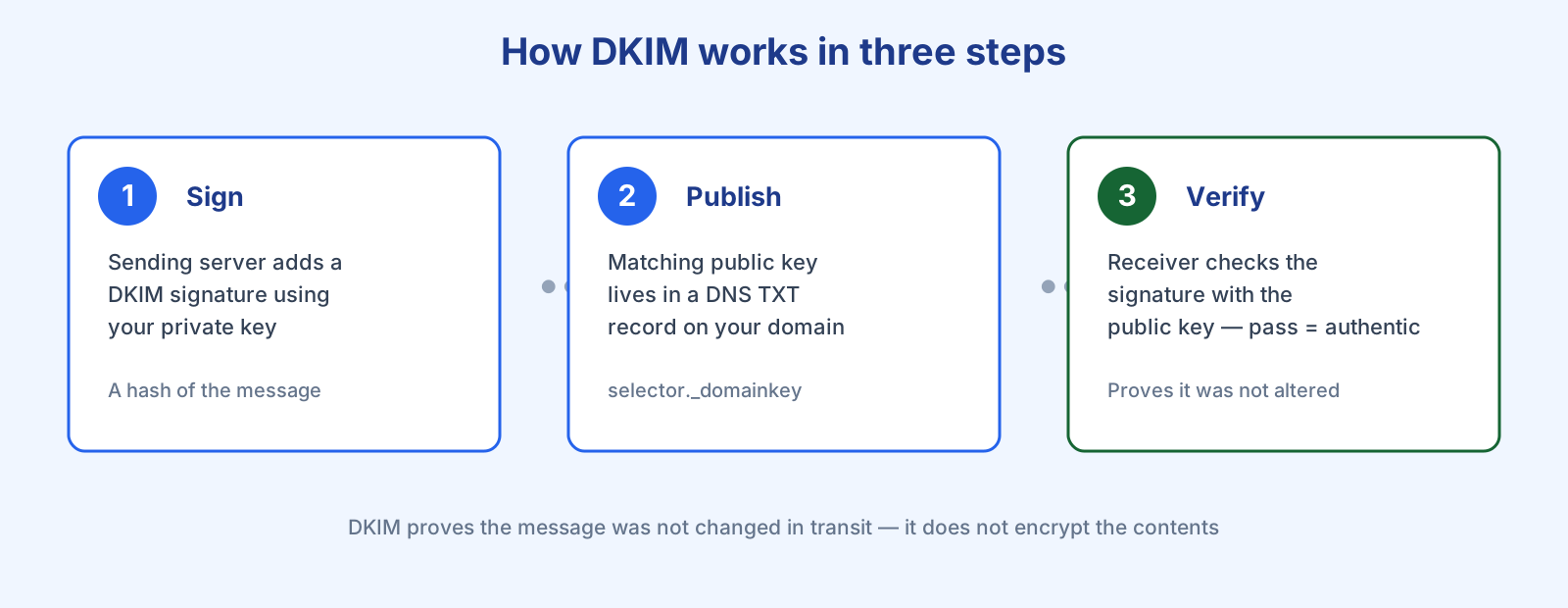
DKIM is an email security standard that helps detect whether a message was altered between the sending and receiving mail servers. It works with public-key cryptography: as your email leaves the sending server, a DKIM signature — a unique hash of parts of the message — is added and secured with your private key. The receiving server looks up the matching public key published in your domain’s DNS and checks the signature. “Once the signature is verified with the public key by the recipient server, the message passes DKIM and is considered authentic,” explains Postmark’s Shane Rice in the company’s DKIM guide (Postmark).
What is a DKIM record?
A DKIM record is a specially formatted DNS TXT record that stores the public key a receiving server uses to verify your signature. It contains a name, a version, the key type, and the public key itself, and is usually generated for you by whatever platform sends your email. Because each key uses a different selector, a single domain can carry multiple DKIM records at once (for example, one per sending service).
Why is DKIM important?
Two reasons. First, it confirms your legitimacy as a sender: spoofing a trusted domain is a favourite phishing technique, and DKIM makes that far harder, which is why signed mail is less likely to be filtered as spam. Second, it builds long-term reputation — ISPs like Gmail, Yahoo, and AOL use DKIM to attribute your sending history to your domain over time, so consistent, well-authenticated mail steadily improves your deliverability.
It is also increasingly non-optional. Since 2024, Google requires every sender to authenticate with SPF or DKIM, and bulk senders (5,000+ messages a day to Gmail) must have SPF, DKIM, and DMARC all in place (Google). DKIM sits at the centre of that trio — see the full SPF, DKIM and DMARC explainer for how they fit together.
What DKIM does not do
DKIM verifies that a message was not tampered with — it does not encrypt the contents. Anyone who intercepts the mail can still read it unless a separate transport encryption like TLS is used. And it is not a magic deliverability switch: DKIM is necessary but not sufficient. You still need clean lists, good engagement, and a warmed-up domain. See our domain warm-up guide, the email deliverability audit, and the deliverability guide.
One historical note on key length: a 2012 vulnerability let a researcher factor short 512-bit DKIM keys, but the standard already required a minimum of 1024 bits, so it was the short keys — not DKIM itself — that were weak (Postmark). Most providers now sign with 1024- or 2048-bit keys. A good email service provider handles all of this for you.
Frequently asked questions
Do I need a certificate to use DKIM? No. DKIM lets domain owners create, set up, and destroy keys without any certificate authority.
Does DKIM encrypt my emails? No. DKIM is a signature that proves the message was not altered in transit; it does not provide end-to-end encryption.
Can one domain have more than one DKIM record? Yes. Each key uses its own selector, so you can run several DKIM keys at once — commonly one per sending platform.
Is DKIM required? Technically optional, but effectively mandatory: Gmail and Yahoo require authentication, and bulk senders must have DKIM alongside SPF and DMARC to reach the inbox.
References
- Shane Rice, Postmark — What is DKIM: https://postmarkapp.com/guides/dkim
- Google — Email sender guidelines: https://support.google.com/a/answer/81126
— Shivam