
Quick answer: DMARC (Domain-based Message Authentication, Reporting & Conformance) is a free, open email standard that tells inbox providers what to do with messages that fail SPF and DKIM checks — deliver them, send them to spam (quarantine), or reject them outright. It stops spammers spoofing your domain and gives you reports on everyone sending email as you (Postmark). Google and Yahoo have required it for bulk senders since February 2024.
If you send email for a business, DMARC is the record that decides whether a scammer can put your domain in the From line of a phishing email. It is also, since 2024, a hard requirement to reach the inbox at scale. Here is what it is, how it works, and how to turn it on without accidentally blocking your own mail.
Disclosure: Bluey Email, mentioned once below, is my own product. I have judged it on the same yardstick as everything else here.
What is DMARC?
DMARC is “a standard that prevents spammers from using your domain to send email without your permission — also known as spoofing,” as Postmark founder Chris Nagele explains in Postmark’s DMARC guide. Spammers can forge the From address so a fraudulent email looks like it came from your domain — classic PayPal-style phishing. DMARC lets you publish a rule, in DNS, that tells receiving servers to block those forgeries before anyone sees them. It also sends you reports on who is sending email on behalf of your domain. As Nagele puts it, “DMARC is open and free for anyone to use, allowing you to secure your domain’s emails and gain control of your email delivery.”
DMARC does not work alone. It sits on top of two older standards you should set up first: DKIM, which cryptographically signs your mail, and SPF, which lists the servers allowed to send for your domain. DMARC checks the results of those two and enforces a policy. Our full SPF, DKIM and DMARC explainer walks through all three together.
What are the three DMARC policies?
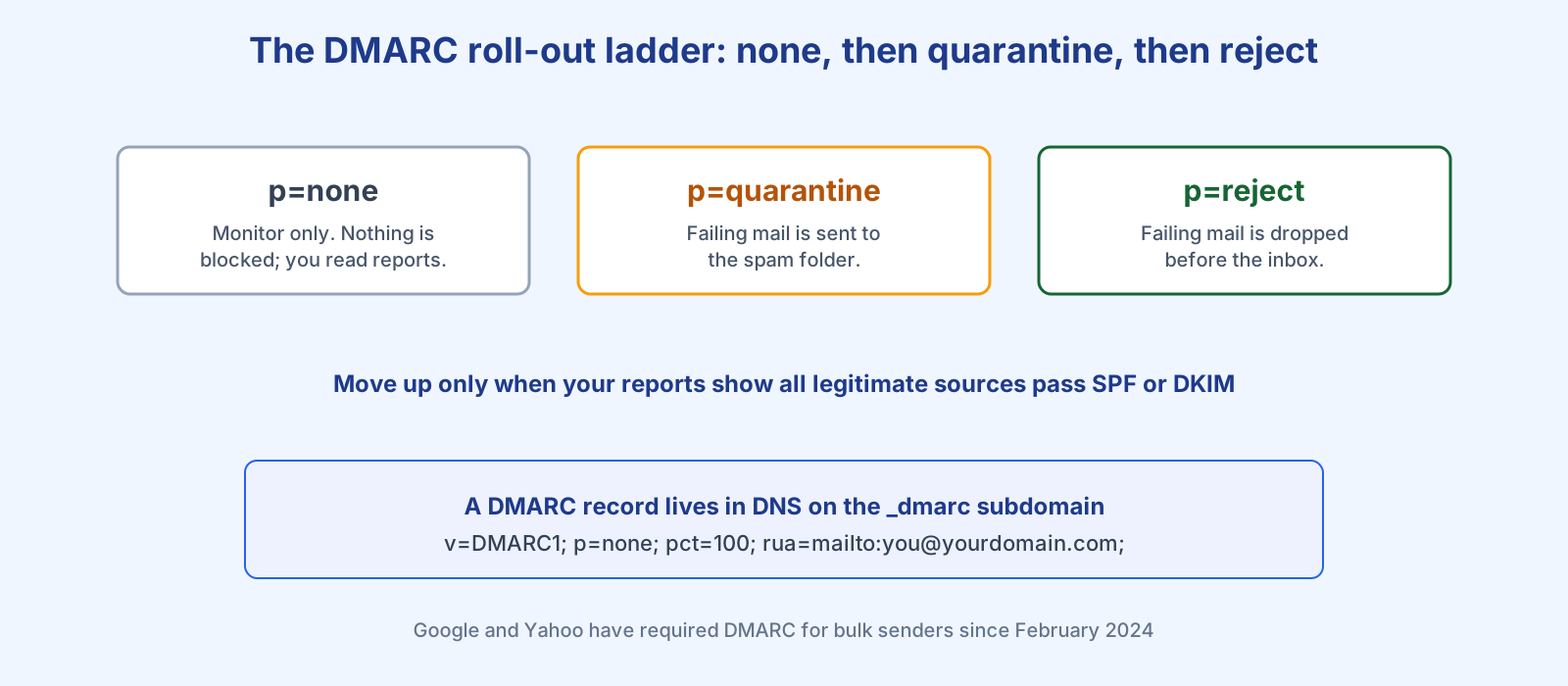
The policy lives in the p= tag of your DMARC record and can take one of three values. This is the single most important choice you make:
| Policy | What receivers do with mail that fails | When to use it |
|---|---|---|
| p=none | Nothing changes — mail is delivered as normal. You simply receive reports. | Start here to monitor, before enforcing anything. |
| p=quarantine | Failing mail is treated as suspicious and moved to the spam folder. | Once your reports show legitimate mail passes. |
| p=reject | Failing mail is dropped completely — it never reaches the inbox or spam. | The end goal, for full protection against spoofing. |
A typical record looks like v=DMARC1; p=none; pct=100; rua=mailto:you@yourdomain.com;. The pct= tag controls what share of failing messages the policy applies to, and rua= is the address where the daily XML reports are sent.
Why does DMARC matter in 2026?
Two reasons: security and deliverability. On security, an enforced DMARC policy stops criminals impersonating your brand. PayPal is the textbook case — its reject policy helped block an estimated 25 million spoofing attacks in the 2013 holiday season alone, according to a report by Agari cited in Postmark’s guide. On deliverability, DMARC is no longer optional: since February 2024, Google and Yahoo have required anyone sending more than 5,000 messages a day to publish a DMARC record, per Google’s sender guidelines. No DMARC, no bulk inbox.
How do you roll out DMARC safely?
The risk with DMARC is blocking your own legitimate mail — server alerts, your CRM, your help desk, your marketing platform. So you climb the ladder gradually. Start at p=none and read the reports for a few weeks until you can see every source that sends as you. Align each one with SPF and DKIM. Only then move to p=quarantine, and Postmark recommends easing in with the percentage tag — quarantine 25%, then 50%, then 100%. Once quarantine has run cleanly for a while, graduate to p=reject the same way. Rushing straight to reject is how companies accidentally black-hole their own invoices.
A good sending platform removes most of this pain by handling SPF and DKIM for you. On Bluey Email I checked our own sending domains directly for this article: all sit at DMARC p=quarantine with 2048-bit DKIM keys and aligned return-paths — the alignment DMARC needs is set up automatically rather than left to hand-edited DNS. Whichever platform you use, that automation is what makes reaching enforcement realistic. For the wider picture, our deliverability guide ties DMARC into the rest of inbox placement, and once you are at enforcement you can add a logo to your emails with BIMI.
Frequently asked questions
Does DMARC improve deliverability? Indirectly, yes. It lets you find and fix authentication gaps, and preventing spoofed mail lowers spam complaints and protects your domain reputation with ISPs. It is also now a gatekeeping requirement for bulk senders at Google and Yahoo.
Do I need SPF and DKIM before DMARC? Yes. DMARC evaluates the results of SPF and DKIM, so both must be in place and aligned to your From domain before an enforcement policy makes sense.
What is the difference between quarantine and reject? Quarantine sends failing mail to the spam folder; reject drops it entirely so it never appears anywhere. Reject is stronger protection but riskier to enable before your own mail reliably passes.
Is DMARC free? Yes. The standard is open and the DNS record costs nothing. Paid tools only add easier reporting on top of the free XML reports ISPs already send you.
References
- Chris Nagele, Postmark — DMARC: What is it and why do you need it? https://postmarkapp.com/guides/dmarc
- Google — Email sender guidelines (bulk sender requirements): https://support.google.com/a/answer/81126
— Shivam