
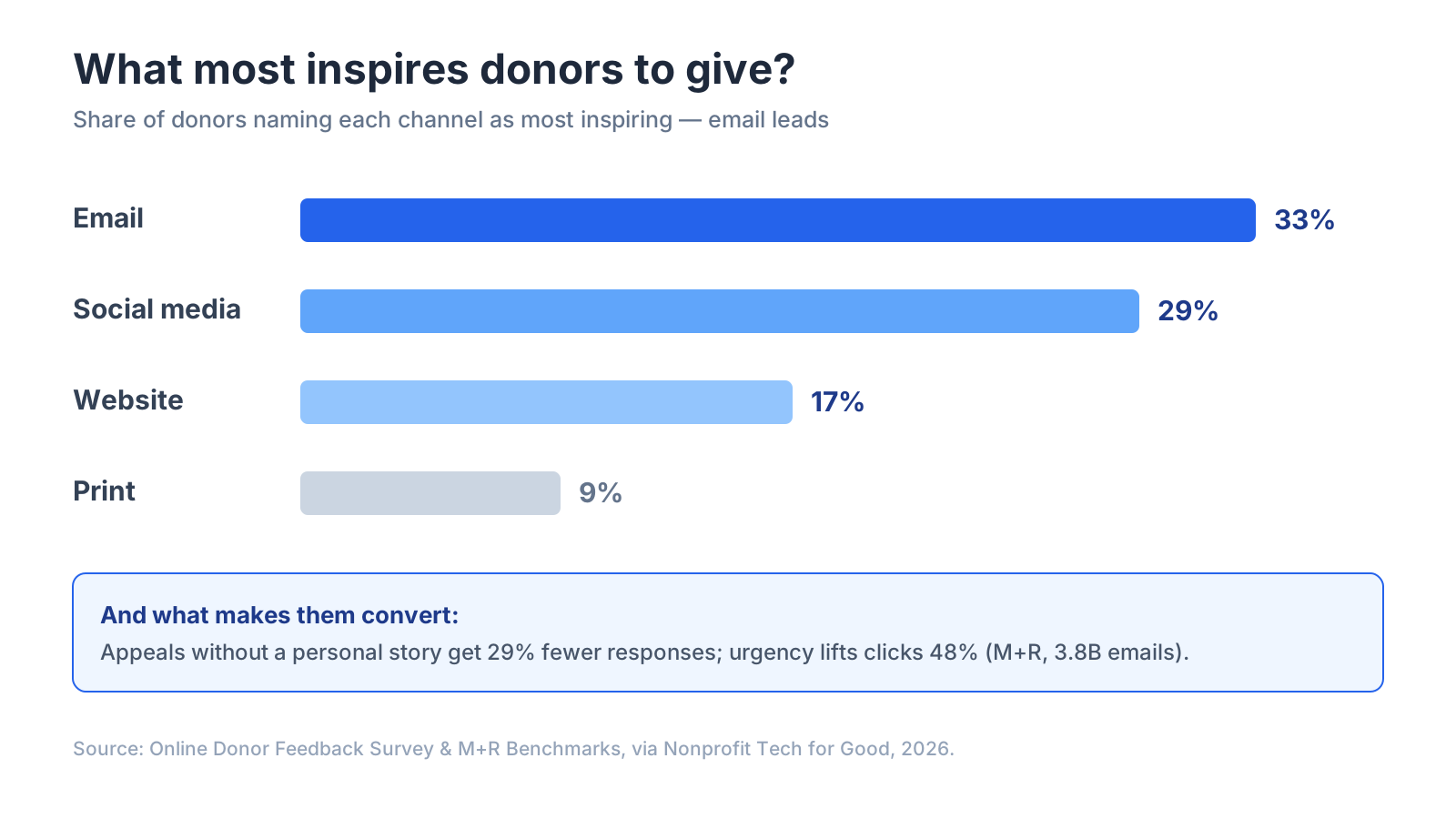
Quick answer: Email is the highest-return digital channel in fundraising: it drives about 11% of all online revenue for nonprofits, and for every 1,000 fundraising emails sent, organizations raise roughly $54 (M+R Benchmarks). It’s also what donors want — 33% say email is the tool that most inspires them to give, ahead of social media at 29% (Nonprofit Tech for Good). The counterintuitive part: nonprofit email doesn’t behave like corporate email — M+R’s AI analysis of 3.8 billion emails found appeals without a personal story get 29% fewer responses. Full disclosure: Bluey Email is my own product; this guide is tool-agnostic and I flag plainly where Bloomerang and Neon One lead for donor management.
If you run a nonprofit, your email list is the most valuable asset you own — more than your social following, which a platform can throttle overnight. This is the practical playbook: why email out-raises every other digital channel, the sends that actually convert donors, and how to pick a tool without paying to store a list you email a few times a month.
Why is email nonprofits’ highest-ROI fundraising channel?
Because donors both prefer it and act on it. Email drove about 11% of all online revenue in 2025, and email revenue grew 16% year over year — strong growth for a mature channel (M+R Benchmarks). On a per-person basis, nonprofits raised an average of $2.40 per email subscriber over the year, up sharply from $1.87 (M+R). And donors say plainly where they want to hear from you: 48% cite email as their preferred channel for updates and appeals, far ahead of direct mail at 21% (Neon One via Nonprofit Tech for Good).
The other reason: you own the list. A social algorithm decides who sees your Facebook post; nobody stands between your email and a donor’s inbox. That’s why 83% of nonprofits use email marketing (2026 Nonprofit Tech for Good Report) — it’s the one channel where reach isn’t rented.
What actually makes a fundraising email convert?
Here’s where nonprofit email diverges from every “best practices” listicle written for SaaS or ecommerce. M+R built an AI platform, Scout AI, to analyze five years of content across 3.8 billion nonprofit emails — the largest study of its kind. As M+R’s Jonathan Benton, who leads the firm’s analytics team, framed it: “Until now, the only tool in our toolbox to answer questions like these has been A/B testing” (M+R). What the data showed:
- Personal stories are non-negotiable. Fundraising emails without a personal story got 29% fewer responses (M+R via Nonprofit Tech for Good). Lead with one person’s story, not your org’s mission statement.
- Urgency works. Appeals with urgency language earned 48% higher click-through rates. Real deadlines — a match expiring, a year-end cutoff — move donors.
- Send from the organization, not always a named person. Counterintuitively for nonprofits, emails sent from an individual had a 32% lower response rate than emails from the organization — the reverse of what works in SaaS onboarding.
Add the fundamentals that hold everywhere: personalized subject lines are 26% more likely to be opened (Campaign Monitor), and a welcome email — the first thing a new subscriber gets — averages an 80% open rate (Mailmodo). That welcome is your single best-read message; use it to tell an impact story.
Which emails should a nonprofit actually send?
Five core sends carry a nonprofit email program:
- Welcome series — fires on signup; introduces the mission through one concrete story and points to a first action. Highest open rate you’ll ever get.
- The appeal — the fundraising ask, built around a single beneficiary’s story with a specific, urgent reason to give now. Nonprofits send an average of 31 of these a year (M+R).
- The thank-you / receipt — immediate, warm, and specific about impact. Retention starts the second the gift lands.
- Impact newsletter — shows donors what their money did. Roughly 9 of a subscriber’s 50 annual emails (M+R); keep it story-first.
- Re-engagement / lapsed-donor — wins back quiet supporters before you suppress them. Only 14% of nonprofits run these (Nonprofit Communications Trends Report) — an easy edge.
A note on list size: the average nonprofit raises $1.11 per email contact, but small nonprofits raise $6.15 per contact versus $0.88 for large ones (Neon One). A small, engaged list beats a big, cold one — which matters for how you should pay for your tool.
How much should nonprofit email cost — and which platform?
Nonprofits have a specific cost problem: big lists, infrequent sends. Tools that charge per stored contact punish you for holding a list you email a few times a month. The honest, by-need breakdown:
Bluey Email — best for big lists on a nonprofit budget. Send-based pricing means storing contacts is free: a free plan (500 contacts / 500 sends), and Grow at $30/mo with unlimited contacts. For an organization with a 20,000-person list it emails twice a month, paying by sends rather than by contacts stored is dramatically cheaper. Best for nonprofits that want low, predictable cost and a built-in CRM. Where it’s not the pick: if you need deep donor-management and gift tracking, a purpose-built fundraising CRM wins.
Bloomerang / Neon One — best when email lives inside donor management. These are fundraising CRMs with email attached, so gift history, donor scoring, and appeals sit in one system. More expensive, but the right call if donor retention data drives your sends. Best for established nonprofits with a development team.
MailerLite / Mailchimp — well-known, generalist, nonprofit discounts. Familiar and easy, with nonprofit pricing discounts, but they price per contact — the cost curve steepens as your list grows even if your send frequency doesn’t.
The meta-point: match how you pay to how you send. A nonprofit with a large list and monthly appeals is exactly the case where send-based pricing beats per-contact pricing.
How do I start nonprofit email from scratch?
- Pick a tool that fits your list size and budget, and import your existing supporters.
- Turn on a welcome series first — it’s your highest-open message; lead with one story.
- Build every appeal around a single person’s story with a specific, urgent ask.
- Send a fast, warm thank-you that names the impact of the gift.
- Segment lapsed donors and run a re-engagement send before suppressing them.
- Email consistently — a story-first newsletter between appeals keeps the list warm.
Frequently asked questions
What’s the ROI of email for nonprofits? Email drives about 11% of all online revenue and raises roughly $54 per 1,000 fundraising emails, or about $2.40 per subscriber per year (M+R Benchmarks).
What makes a fundraising email convert? A single personal story (appeals without one get 29% fewer responses), genuine urgency (48% higher click-through), and — unusually for email — sending from the organization rather than a named individual (M+R).
Do donors actually prefer email? Yes — 33% say email most inspires them to give and 48% name it their preferred channel for appeals, ahead of social media and direct mail (Nonprofit Tech for Good).
How often should a nonprofit email? The average subscriber receives about 50 messages a year, 31 of them fundraising appeals (M+R). Consistency matters more than the exact number.
What’s the best email platform for a nonprofit? For donor management plus email, Bloomerang or Neon One; for a familiar generalist, MailerLite; for large lists on predictable send-based pricing, Bluey Email. Match the tool to your list size and how you pay.
The verdict
Email is the highest-ROI, fully owned channel in fundraising — but only if you send the way donors respond: one personal story, real urgency, from the organization, consistently. Start with a story-first welcome series, build appeals around a single beneficiary, and thank fast. For the tool: Bloomerang or Neon One for CRM-plus-email, MailerLite for a simple generalist, and Bluey Email for large lists on predictable send-based pricing. New to the fundamentals? Read the complete email marketing guide and email marketing by industry; comparing tools? See Best Email Marketing Software in 2026. Run a SaaS or store instead? See email marketing for SaaS and email marketing for ecommerce.
— Shivam
Free tools for this
Put this into practice with our free, no-signup tools — everything runs in your browser:
Browse all 15 free tools →