
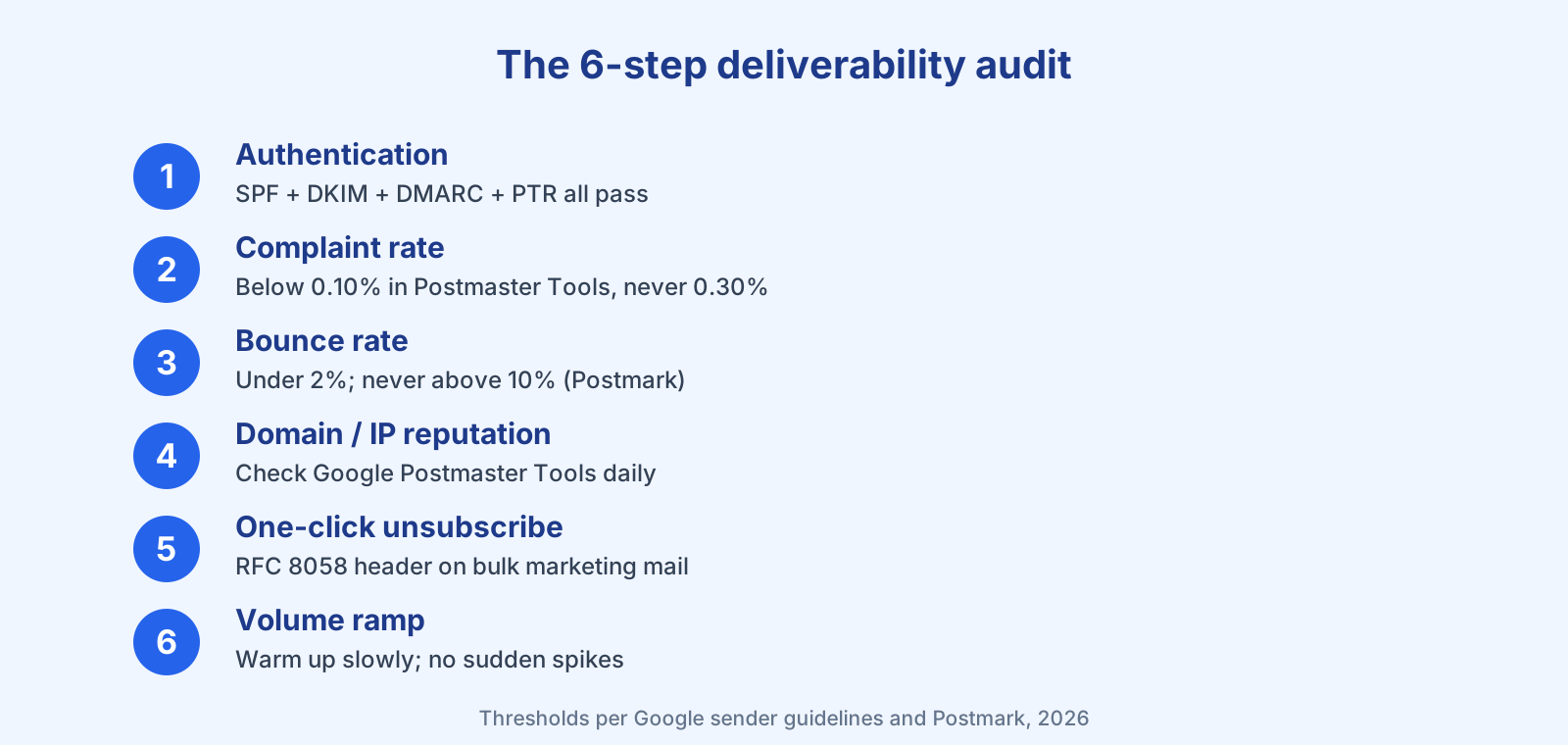
Quick answer: An email deliverability audit is a six-step check — verify SPF, DKIM, DMARC and PTR authentication, keep your spam-complaint rate below 0.10% (never 0.30%), keep bounce rate under control, monitor domain and IP reputation in Google Postmaster Tools, confirm one-click unsubscribe on bulk mail, and ramp sending volume gradually. Google requires bulk senders (5,000+/day) to have SPF, DKIM and DMARC in place (Google).
When your open rates slide or mail starts landing in spam, guesswork wastes weeks. A deliverability audit turns it into a checklist. Here are the six things to check, in priority order, with the exact thresholds mailbox providers enforce. I run this same list on my own sending domains.
Step 1: Verify your authentication (SPF, DKIM, DMARC, PTR)
This is the foundation. Google requires all senders to set up SPF or DKIM, and requires bulk senders (more than 5,000 messages/day to Gmail) to have SPF, DKIM, and DMARC, plus valid forward and reverse DNS (PTR) records (Google). Google also notes that “sending to personal Gmail accounts requires a DKIM key of 1024 bits or longer” and recommends 2048-bit.
Checking this today on my own account, Bluey’s domain dashboard reported SPF pass, DKIM pass, DMARC pass, and return-path pass across five live domains, each with a 2048-bit DKIM key and a DMARC policy set to quarantine. That is exactly the passing state your audit is looking for. If any of the four is failing, fix it first — our SPF, DKIM and DMARC explainer walks through each record.
Step 2: Check your spam-complaint rate
This is the metric Gmail enforces hardest. “Keep spam rates reported in Postmaster Tools below 0.10% and avoid ever reaching a spam rate of 0.30% or higher,” Google states, adding that a high rate “leads to increased spam classification” (Google). Log into Google Postmaster Tools and read your spam rate; if it is near or above 0.30%, treat it as an emergency, not a trend.
Step 3: Check bounce rate and clean the list
High bounces tell mailbox providers you are mailing stale or purchased addresses. Postmark’s guidance is blunt: your bounce rate “should never exceed 10%” (Postmark), and healthy senders sit far below that. If yours is climbing, run email list cleaning and see the full email bounce rate guide. Validating addresses before you send is the cheapest fix there is.
Step 4: Monitor domain and IP reputation
Postmaster Tools reports your domain and IP reputation and whether messages are authenticated. Google recommends you “regularly monitor server responses, spam rate, and the sending domain’s reputation” (Google). If you send on a shared IP, one bad neighbor can drag you down — check the shared IP is not on a blocklist.
Step 5: Confirm one-click unsubscribe and permission
For bulk marketing mail, Google requires a working one-click unsubscribe using the List-Unsubscribe headers defined in RFC 8058, plus a visible unsubscribe link (Google). Beyond compliance, easy unsubscribes protect you: Google notes that “letting people opt out of your messages can improve open rates, click-through rates, and sending efficiency.” Oracle’s Chad S. White has long argued the same logic — suppress your never-actives rather than keep hammering them. Pair this with sensible email frequency.
Step 6: Ramp volume gradually
Sudden spikes look like spam. Google warns that “immediately doubling previously sent volumes suddenly could result in rate limiting or reputation drops” and advises you to “start with a low sending volume to engaged users, and slowly increase the volume over time” (Google). On a new domain or IP, follow our domain warm-up guide.
How often should you audit?
Check complaint and bounce rates weekly, authentication whenever you change sending infrastructure, and run the full six-step pass quarterly or before any migration. Deliverability is not a one-time setup; it is a maintained state. For the bigger picture, see the email deliverability guide and track the right numbers with our email marketing metrics explainer.
Frequently asked questions
What is an email deliverability audit? A structured review of the factors that decide whether your email reaches the inbox: authentication, complaint and bounce rates, sender reputation, unsubscribe compliance, and sending volume patterns.
What spam-complaint rate is too high? Google wants bulk senders below 0.10% and says never to reach 0.30%. Above that, expect messages to land in spam.
Which tools do I need? Google Postmaster Tools for spam rate and reputation, a DNS/authentication checker for SPF/DKIM/DMARC/PTR, and your ESP’s bounce and complaint reporting. Many ESPs, including Bluey, surface authentication status per domain.
Does open rate tell me about deliverability? Not reliably. Google states it does not track open rates and that “low open rates aren’t necessarily an accurate indicator of deliverability.” Use complaint and bounce rates instead.
References
- Google — Email sender guidelines: https://support.google.com/a/answer/81126
- Postmark — Email bounces guide: https://postmarkapp.com/guides/email-bounces
- Google Postmaster Tools: https://gmail.com/postmaster
— Shivam
1 thought on “How to Run an Email Deliverability Audit (6-Step Checklist, 2026)”