
Quick answer: Connecting Bluey Email to HubSpot keeps one contact record in sync across your CRM and your email platform, so a status change in HubSpot updates the subscriber in Bluey and vice versa — two-way sync lands changes within about 10 minutes (HubSpot). Use HubSpot as the sales/CRM system of record and Bluey as the send engine, and you avoid HubSpot Marketing Hub’s steep costs — Professional runs $890/mo plus a mandatory $3,000 onboarding fee (2026 HubSpot Pricing Guide, Cargas). Full disclosure: Bluey Email is my own product; I say plainly below where HubSpot is the better pick.
Plenty of teams love HubSpot as a CRM but choke on what its Marketing Hub charges to actually send email. Pairing HubSpot’s CRM with Bluey’s send-based pricing is a common, honest way to keep the pipeline data you need without the contact-tier bill. This guide covers what the integration does, how to wire it up, and when you should just stay inside HubSpot.
What does the Bluey + HubSpot integration do?
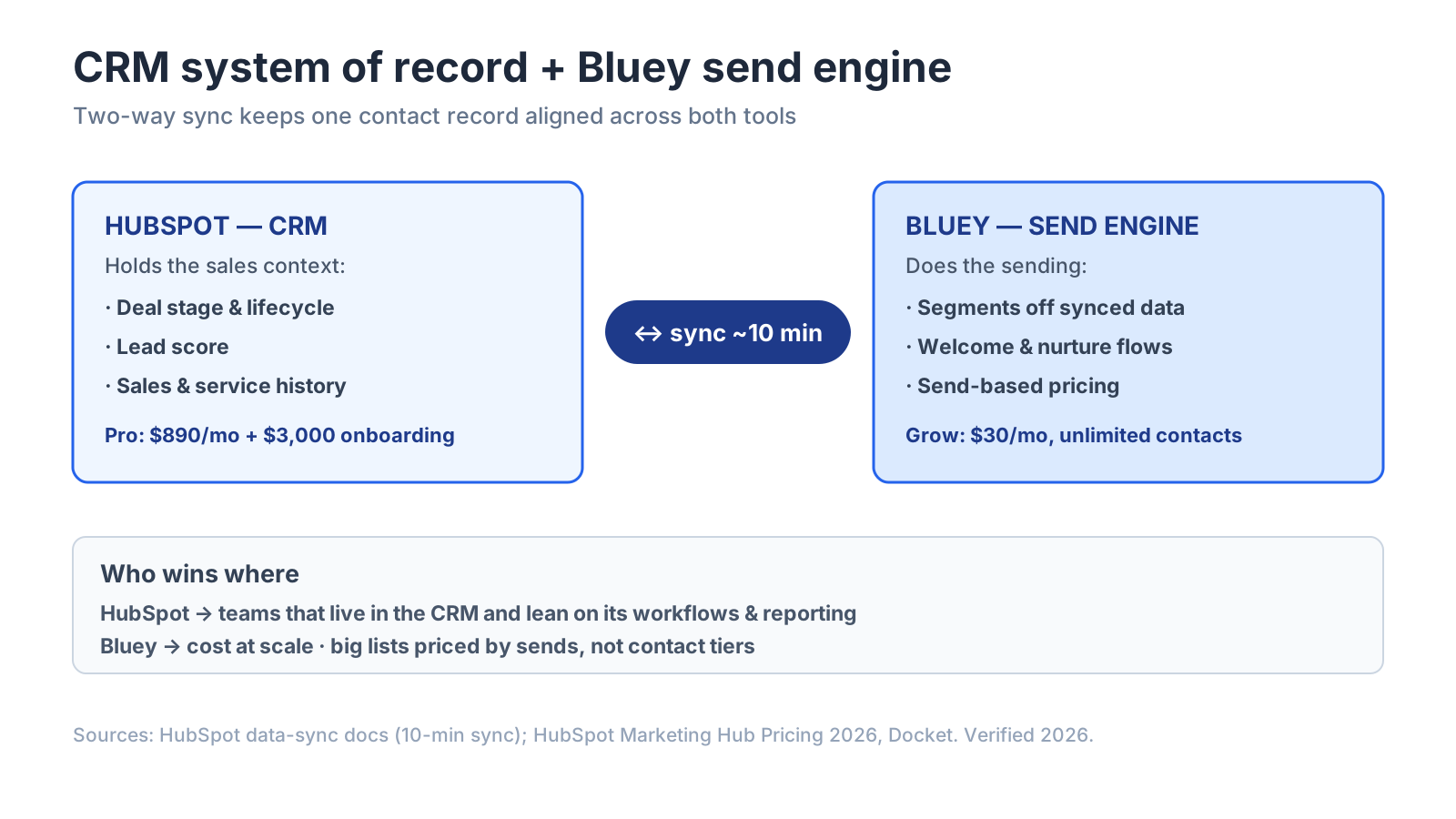
It creates a two-way contact sync between HubSpot’s CRM and Bluey, so both systems share one up-to-date view of each person. A new lead captured in HubSpot flows into the right Bluey segment; an unsubscribe or engagement event in Bluey writes back to the HubSpot record. HubSpot’s own data-sync docs note that after the initial sync, records update within about 10 minutes of a change (HubSpot).
The payoff is a single, consistent customer profile. As Neil Patel, co-founder of Neil Patel Digital, puts it, the win from getting your data right is that “when you send personalized, relevant content, your open rates and engagement will skyrocket” (GetResponse) — and clean CRM data is exactly what powers that personalization. With HubSpot holding deal stage, lead score, and lifecycle fields, Bluey can segment sends off real sales context instead of guesswork.
How do I connect Bluey to HubSpot?
There are two clean paths, depending on how tight you need the sync:
- Native / data-sync connection — connect the two accounts, map the fields that matter (email, name, lifecycle stage, tags), and choose one-way or two-way. Two-way keeps both systems honest; one-way (HubSpot → Bluey) is simpler if HubSpot is the only place contacts are created.
- Zapier or Make — for event-driven moves (“new HubSpot contact in list X → add to Bluey segment and start a flow”), no-code middleware is fast to build. Expect polling lag of a minute or more, which is fine for CRM sync but not for real-time store events.
Map your fields once, run a test contact through, and confirm it lands in both systems before turning the sync on for your whole database.
Which Bluey + HubSpot workflows are worth building?
The highest-value syncs put HubSpot’s sales data to work inside Bluey’s sends:
Lifecycle-stage segmentation — sync HubSpot’s lifecycle stage so Bluey sends leads, MQLs, and customers different content automatically.
Lead-score triggers — when a contact crosses a HubSpot lead-score threshold, tag them in Bluey and start a nurture or sales-handoff flow.
Closed-loop suppression — push unsubscribes and hard bounces from Bluey back to HubSpot so sales never emails a dead address.
Deal-stage nurtures — move a contact into a Bluey re-engagement flow when a HubSpot deal stalls, and out of it when the deal closes.
When should I just stay inside HubSpot?
This is the honest part. HubSpot wins outright when email and CRM are inseparable for your team:
You live in the CRM all day. If sales, service, and marketing all work inside HubSpot and you want email natively attached to the deal record with no sync to maintain, HubSpot’s all-in-one design is genuinely smoother — one platform, one login, zero field mapping.
You need HubSpot’s reporting and workflows. HubSpot’s attribution, sequences, and workflow automation are deep and mature; a synced external sender won’t reproduce all of it.
Where Bluey wins is cost at scale and contact-based pain. HubSpot Marketing Hub prices on marketing contacts and caps monthly sends at a multiple of your tier (Starter allows 5x contacts — 1,000 contacts = 5,000 emails/month) (HubSpot Marketing Hub Pricing 2026, Docket), and there’s a 44x jump from Starter ($20/mo) to Professional ($890/mo), plus that $3,000 onboarding fee — the single most-cited pricing surprise in HubSpot’s G2 reviews (Docket). Bluey’s Grow plan is $30/mo with unlimited contacts and send-based pricing, so a big-but-quiet list doesn’t inflate the bill. Keep HubSpot for the pipeline; send from Bluey.
| Bluey Email | HubSpot Marketing Hub | |
|---|---|---|
| Pricing basis | Send-based (unlimited contacts on Grow) | Marketing-contact tiers |
| Entry cost | Grow $30/mo | Starter $20/mo (1,000 contacts) |
| Pro tier | Business $300/mo | Professional $890/mo + $3,000 onboarding |
| Best at | Low-cost sending at scale | Full CRM + sales + marketing in one |
Frequently asked questions
Does Bluey integrate with HubSpot? Yes — via a two-way data-sync connection or through Zapier/Make, so contacts and engagement events stay aligned across both systems.
Can I use HubSpot as my CRM and Bluey to send email? Yes, and it’s a popular setup: keep HubSpot as the system of record for sales, sync contacts to Bluey, and send from Bluey to avoid Marketing Hub’s contact-tier costs.
How fast does the sync run? HubSpot’s data sync updates records within about 10 minutes of a change after the initial sync (HubSpot); Zapier/Make paths poll on their own schedule.
Is HubSpot’s email expensive? It can be. Professional is $890/mo with a mandatory $3,000 onboarding fee, and sends are capped at a multiple of your contact tier (Docket).
Which should I pick? Stay all-in on HubSpot if you need email natively attached to the CRM and use HubSpot’s workflows heavily; pair it with Bluey if send costs are your pain point.
The verdict
The Bluey + HubSpot integration lets you keep HubSpot as your CRM system of record while sending from Bluey — one synced contact record, sales context feeding your segments, and a send bill based on volume rather than how many contacts sit in your database. If your team lives inside HubSpot and leans on its workflows and reporting, stay there. If Marketing Hub’s contact-tier pricing and $3,000 onboarding fee are the problem, sync the CRM and send from Bluey. New to connecting your stack? Start with the complete email marketing integrations guide; comparing platforms? See Best Email Marketing Software in 2026 and the complete email marketing guide.
— Shivam