
Quick answer: Your email platform is only as good as the tools it talks to. The integrations that matter most are your store (Shopify/WooCommerce), your CRM, an automation connector (Zapier/Make), your forms and landing pages, your ad audiences, and your analytics — plus a clean API/webhooks layer underneath. The catch nobody mentions: on per-contact platforms, every contact an integration syncs in raises your bill, whether you email them or not. On a send-based platform like Bluey Email (my own product, disclosed up front and reviewed honestly here), syncing a big store or CRM does not inflate what you pay.
Most best-email-tool decisions are made on features and price. Then, three weeks in, the real question shows up: does it actually connect to the rest of my stack? Integrations are where email platforms quietly win or lose, because a campaign is only as smart as the data flowing into it — orders, browsing behavior, support tickets, ad spend, and CRM stage. An email tool that cannot see the rest of your business can only send generic blasts.
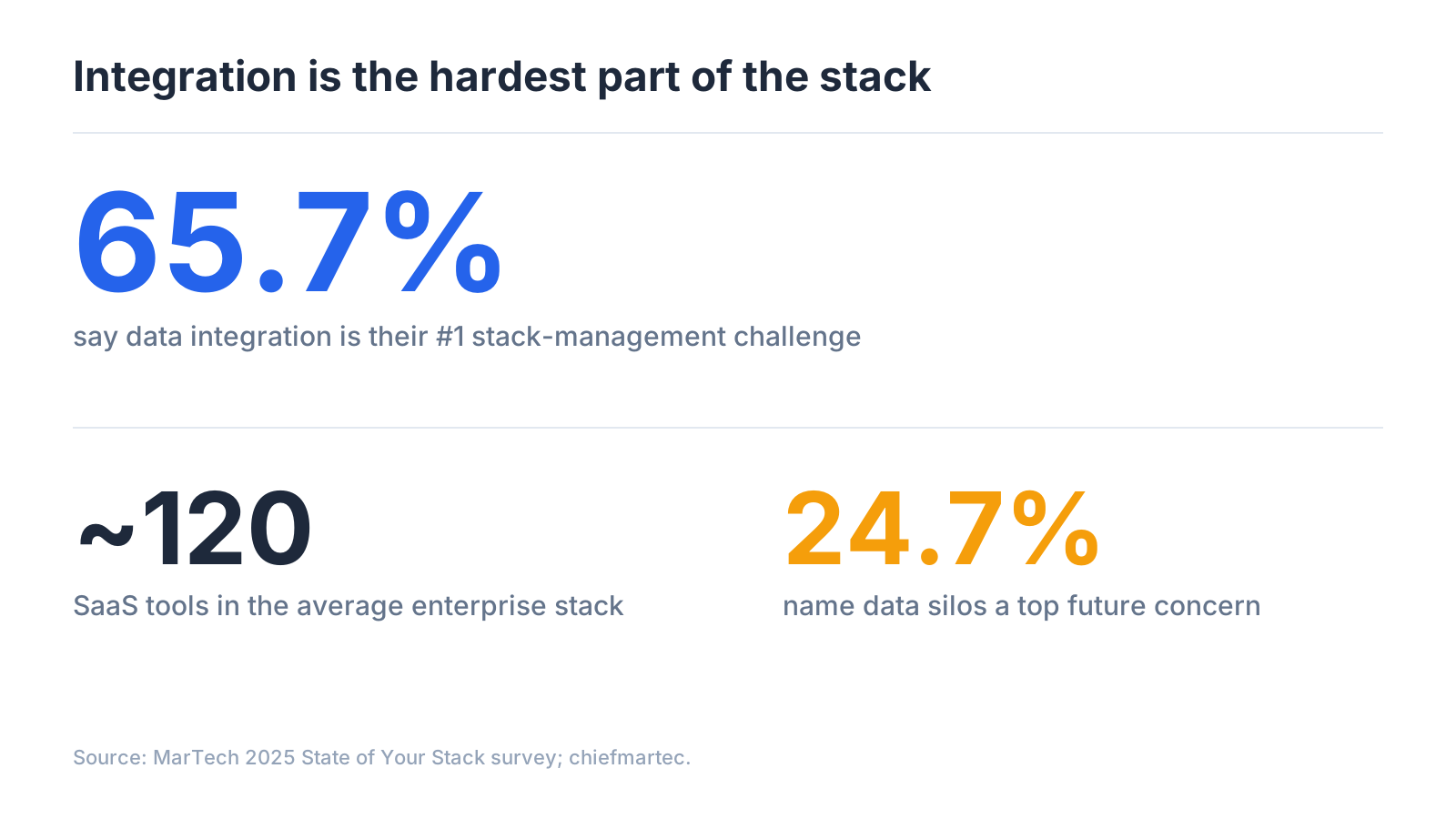
And this is not a niche concern. In MarTech’s 2025 State of Your Stack survey, data integration was the single biggest stack-management challenge, cited by 65.7% of respondents — ahead of budget, skills, and tool complexity. The average enterprise marketing stack now runs on roughly 120 SaaS tools, and getting them to talk to each other is the hard part. Data silos were named a top future concern by another 24.7%.
Few people have watched this longer than Scott Brinker, VP of Platform Ecosystems at HubSpot and editor of chiefmartec.com. His position is blunt: “I’m a big advocate for integration,” he told CDP.com, because integration is what lets you experiment with new technologies at relatively low risk. His one-line rule: “Architecting your tech stack matters.”
The seven integration types that actually matter
You do not need a hundred connectors. You need the right seven categories wired correctly.
1. Ecommerce platform (Shopify, WooCommerce, BigCommerce)
What it does: syncs orders, customers, products, and cart/browse events so you can trigger flows (abandoned cart, browse abandonment, post-purchase, win-back) and segment by real purchase behavior. Why it matters: for any store this is the integration — the difference between newsletters and revenue. What to look for: real-time (not hourly) sync, full event coverage, and historical backfill. Bluey ships pre-built cart, browse, and win-back flows. Common mistake: shallow or delayed sync, so your abandoned-cart email fires an hour too late. (Spokes: Bluey + Shopify, Bluey + WooCommerce.)
2. CRM and sales tools (HubSpot, Salesforce, Pipedrive)
What it does: keeps contacts, deal stages, and lifecycle data in sync between sales and marketing. Why it matters: for B2B and SaaS the CRM is the source of truth; without sync you email the wrong people at the wrong stage. A platform with a built-in CRM (Bluey, ActiveCampaign, Brevo) removes this integration entirely for many teams. What to look for: two-way sync, field mapping, and stage triggers. Common mistake: one-way syncs that silently drift out of date. (Spokes: Bluey + HubSpot, Salesforce, Pipedrive.)
3. Automation connectors (Zapier, Make)
What it does: the universal glue — connects your email tool to the thousands of apps without a native integration. Why it matters: no platform integrates natively with everything; Zapier and Make are the pressure-release valve for the long tail. What to look for: rich triggers and actions. Common mistake: building business-critical, high-volume syncs on Zapier when they belong on a native integration or the API. (Spokes: Bluey + Zapier, Bluey + Make.)
4. Forms, popups, and landing pages
What it does: captures new subscribers straight into the right list and segment with the right tags. Why it matters: list growth is the top of the funnel; a broken form-to-list sync silently loses subscribers and breaks welcome flows. What to look for: native builders plus clean handoff from third-party tools. Common mistake: collecting emails in a tool that does not pass source or tags through. (Spoke: Bluey forms and landing pages.)
5. Ads and audience sync (Meta, Google, TikTok)
What it does: pushes email segments to ad platforms as custom and lookalike audiences, and suppresses existing customers from acquisition. Why it matters: your list is your best ad-targeting asset; syncing engaged subscribers turns owned data into cheaper paid reach. What to look for: automatic, refreshing sync, not a weekly CSV. Common mistake: treating it as a one-time export so audiences rot. (Spoke: Bluey + Meta/Google Ads audiences.)
6. Analytics and BI (GA4, Looker, warehouses)
What it does: ties email performance to downstream outcomes — sessions, revenue, LTV. Why it matters: opens and clicks do not pay the bills; revenue attribution does, and scattered data with no clean export becomes a silo. What to look for: automatic UTM tagging, GA4 revenue tie-in, and the ability to export your raw data anytime. Bluey’s stance: export everything, no lock-in. Common mistake: discovering at migration time that your data is trapped. (Spoke: Bluey + GA4 / data export.)
7. API and webhooks (the layer under everything)
What it does: lets developers build custom connections and handle real-time events the pre-built integrations do not cover. Why it matters: every integration above rides on this; a clean API and reliable webhooks are what make a platform future-proof and let you leave gracefully. What to look for: a documented REST API, webhooks, sensible rate limits, and a sandbox. Common mistake: assuming you will never need the API, then hitting a wall. (Spoke: Bluey API and webhooks.)
How integrations actually connect: native vs Zapier vs API
Native integration — built by the vendor. Deepest data, real-time, least to break; limited to what the vendor builds. Best for your core systems. Zapier / Make — middleware that connects almost anything, fast, no code; can lag and costs more at volume. Best for the long tail. Direct API / webhooks — you build it; maximum control and effort. Best for custom, high-volume flows. The right architecture mixes all three: native for the two or three systems your business runs on, Zapier/Make for everything else, and the API for the one custom thing that differentiates you.
How the major platforms compare
- Klaviyo — deepest ecommerce integration; narrower elsewhere; bills on active profiles, so a big store sync inflates the bill.
- Mailchimp — broadest app directory (300+); less real-time ecommerce depth; per-contact, counts unsubscribed.
- ActiveCampaign — strong CRM and automation integrations; per-contact pricing.
- Brevo — solid native set plus built-in CRM; send-based pricing.
- Omnisend — ecommerce-focused, Shopify-friendly, cheaper than Klaviyo.
- Bluey Email — pre-built ecommerce flows, a built-in CRM (fewer integrations needed), open API/webhooks, and full export; because it charges by emails sent, connecting a big store or CRM does not raise the bill. See Best Email Marketing Software, Klaviyo alternatives, and Mailchimp alternatives.
The integration cost trap
Integrations are designed to pull in as many contacts as possible — every Shopify customer, every CRM record, every form fill. On a per-contact platform, each synced record is now billable, even the ones you never email, so the better your integrations work, the faster your bill climbs. On a send-based platform the incentive flips: integrate everything, sync your whole world, and you still pay only for the email you send. Integrations become pure upside instead of a metered cost — the core reason Bluey is built on send-based pricing. It is not right for every business, but for anyone whose integrations pull in far more contacts than they actively email, it is decisive.
Your integration checklist
- Native connectors for your two or three core systems, real-time and two-way.
- A strong Zapier/Make footprint for the long tail.
- A documented API and webhooks for anything custom and as exit insurance.
- Self-serve, immediate data export.
- You have modeled what integrations do to your bill.
Frequently asked questions
What is an email marketing integration? A connection that lets your email platform exchange data with another tool — store, CRM, ad accounts, analytics, or thousands of apps via Zapier — so emails can be triggered and targeted by real behavior.
Which integrations should I set up first? Your store or CRM, then an automation connector (Zapier/Make), then ads and analytics.
Native or Zapier? Native for your core real-time systems; Zapier/Make for the long tail. Most good stacks use both, plus the API for custom needs.
Do integrations increase my email bill? On per-contact platforms, yes; on send-based platforms like Bluey, no — you pay for sends, not stored contacts.
What if my tool is not supported natively? Connect it through Zapier or Make, or build it on the API. One missing native connector is not a dealbreaker if the automation/API footprint is strong.
The verdict
Features converge; pricing fluctuates; but the integration layer determines whether your email program is a silo or a system. Pick native connectors for the two or three tools your business runs on, lean on Zapier/Make for the rest, insist on a clean API and real data export, and check what your integrations do to your bill. If you want every connection to be upside instead of a metered cost, that is the case for send-based pricing, and the reason I built Bluey Email the way I did. New to the fundamentals? Start with the complete email marketing guide; comparing platforms? See Best Email Marketing Software in 2026.
— Shivam
Free tools for this
Put this into practice with our free, no-signup tools — everything runs in your browser:
Browse all 15 free tools →
1 thought on “Email Marketing Integrations: The Complete Guide (2026)”