
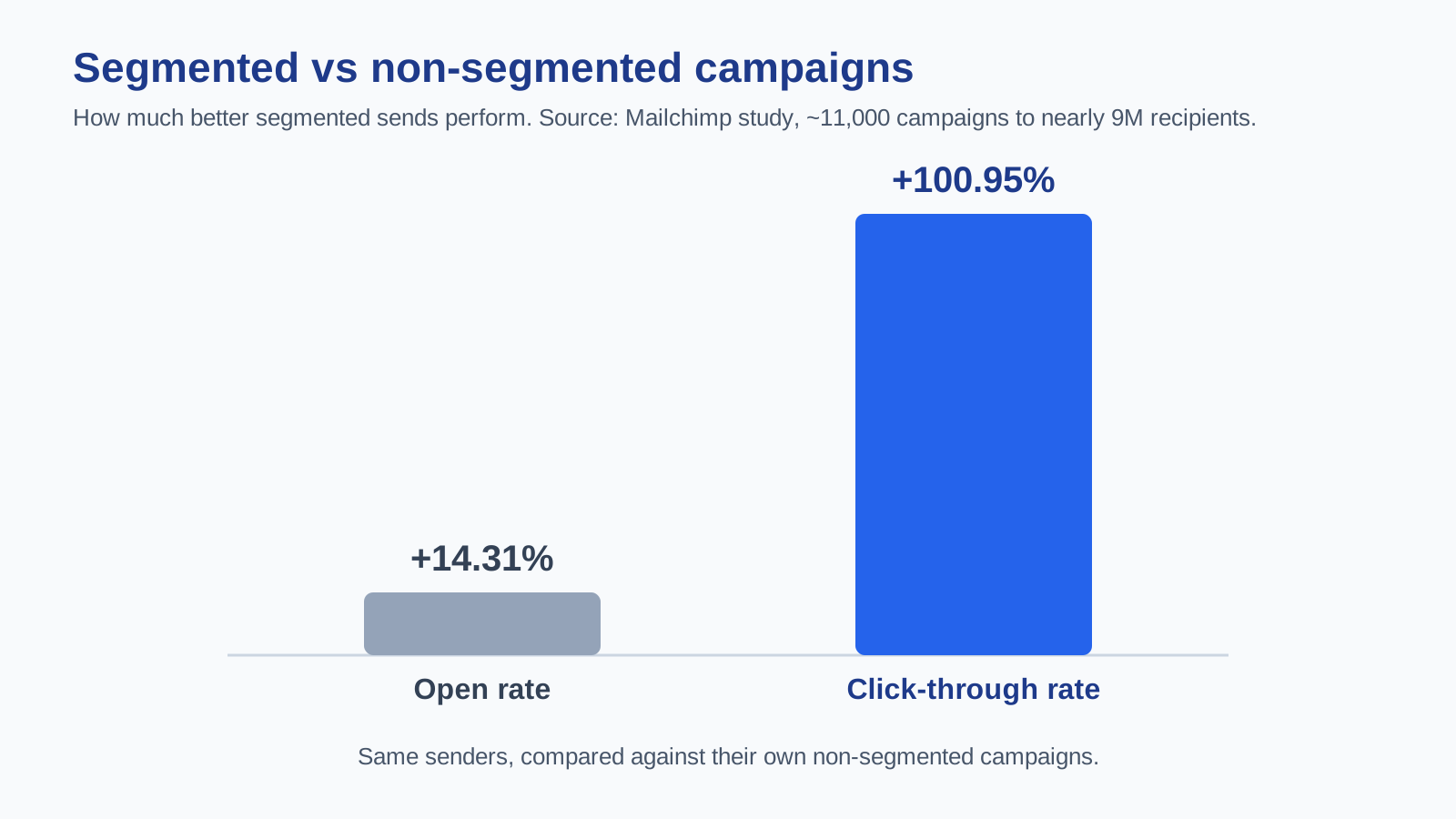
Quick answer: Email segmentation means dividing your list into smaller groups by shared traits — behavior, interests, purchase history, or lifecycle stage — so each group gets more relevant messages. It works: in Mailchimp study of ~11,000 segmented campaigns sent to nearly 9 million recipients, segmented campaigns earned 14.31% higher opens and 100.95% higher clicks than non-segmented sends (Mailchimp). This guide covers the main segment types, a step-by-step setup, and common mistakes. Written with AI assistance and reviewed against primary sources.
Blasting the same email to everyone is the fastest way to train subscribers to ignore you. Segmentation fixes that by matching the message to the person. Here is how to do it well.
What is email segmentation?
Email segmentation is the practice of splitting your subscriber list into targeted groups so you can send each group content that fits them. Instead of one message to 50,000 people, you send tailored messages to the slices most likely to care.
The payoff is relevance, and relevance is what modern subscribers expect. As Chad S. White, Head of Research at Oracle Marketing Consulting, puts it, “email marketers need to focus on managing subscribers, not campaigns” — using personalization, segmentation, and automation to send the right content at the right time (ZeroBounce interview).
Does segmentation actually work?
Yes, and the numbers are consistent. Beyond Mailchimp opens-and-clicks study, roughly 90% of marketers report that segmentation improves email performance, and segmentation and personalization are credited with driving a large share of total email revenue in multiple industry surveys (InboxAlly stats roundup).
Mailchimp own analysis compared the same senders segmented and non-segmented campaigns, so the lift is not a comparison between different companies — it is the same senders doing better simply by targeting (Mailchimp).
The main types of email segmentation
Demographic — age, location, job title, company size. Simple, and useful for basic relevance such as time-zone send times.
Behavioral — what people do: opens, clicks, pages visited, products viewed. Usually the highest-impact segment type because intent is a strong signal.
Purchase history — first-time vs. repeat buyers, average order value, product categories. Powers cross-sells and win-backs.
Lifecycle stage — new subscriber, active, lapsing, inactive. Lets you send a welcome series to newcomers and a re-engagement campaign to the quiet ones.
Engagement level — how recently and often someone opens or clicks. Segmenting out chronically inactive contacts protects your deliverability.
How to segment your list, step by step
1. Clean and organize your data first. Segmentation is only as good as the fields you collect. Capture the right data at signup (see how to build an email list) rather than guessing later.
2. Start with one high-value segment. Do not build twelve segments on day one. Pick the one most tied to revenue — often recent buyers or highly engaged openers — and message it well.
3. Set clear rules. Define each segment with explicit conditions, such as clicked in the last 30 days and never purchased. Most tools let you build these as saved segments that update automatically.
4. Tailor the message, not just the subject line. A real segment deserves a different offer, angle, or product — not the same email with a swapped first name.
5. Automate where it repeats. Turn recurring segments into automated flows: welcome, abandoned cart, and win-back. See the email marketing automation guide.
6. Measure against a control. Compare segmented sends to your old broadcast baseline so you can prove the lift, the way Mailchimp did.
Common segmentation mistakes
Over-segmenting. Dozens of tiny segments create work without payoff and can leave groups too small to matter. Start broad, then split when the data justifies it.
Segmenting on data you do not have. If you never collected purchase history or interests, you cannot segment on them — fix collection first.
Ignoring inactive contacts. Letting dead weight sit on your list drags open rates and deliverability. Segment the inactive and either re-engage or remove them.
Set-and-forget. Segments drift as behavior changes. Use dynamic segments that re-evaluate automatically instead of static lists you built once.
Frequently asked questions
What is email segmentation in simple terms? Splitting your list into smaller groups by shared traits so each group gets more relevant emails.
How much does segmentation improve results? In Mailchimp study, segmented campaigns saw 14.31% higher opens and 100.95% higher clicks than non-segmented ones (Mailchimp).
What is the best first segment to build? Usually your most engaged subscribers or recent buyers — the group closest to revenue.
Is segmentation the same as personalization? No. Segmentation groups people; personalization tailors content to an individual. They work together.
Do I need a special tool to segment? Most modern email platforms include segmentation. Bluey Email offers dynamic segments and automation on its paid tiers.
Getting started
Segmentation is the highest-leverage change most senders can make: same list, same content effort, better results — the Mailchimp data shows the same senders doubling their click rates just by targeting. Start with one revenue-tied segment, tailor the message, automate what repeats, and measure against your old baseline.
For the bigger picture, read the complete email marketing guide, pair segmentation with a strong welcome email series, automate your flows with the email marketing automation guide, or compare tools in Best Email Marketing Software in 2026.
— Shivam
Free tools for this
Put this into practice with our free, no-signup tools — everything runs in your browser:
Browse all 15 free tools →
5 thoughts on “Email Segmentation: A Practical 2026 Guide (With Data)”