
Quick answer: Warming up a new sending domain means starting with a small volume of email to your most engaged recipients and increasing it gradually over 2–4+ weeks, so mailbox providers learn you’re a legitimate sender before you send at full volume. Google’s own guidance is to “start with a low sending volume to engaged users, and slowly increase the volume over time,” and to avoid sudden spikes — “immediately doubling previously sent volumes suddenly could result in rate limiting or reputation drops” (Google). Authenticate first with SPF, DKIM, and DMARC, then ramp slowly.
Send ten thousand emails from a brand-new domain on day one and a good share will land in spam — or get blocked outright. Mailbox providers have no history for a new domain, and a cold domain suddenly blasting volume looks exactly like a spammer. This guide walks through warming up a domain the right way, step by step, with the thresholds that actually matter.
What is email domain warm-up?
A warm-up builds your domain’s reputation by starting small and ramping slowly, giving mailbox providers time to see positive engagement before you scale. Mailgun’s deliverability team uses a fitting analogy: “When you start working out, you want to make sure that you stretch and warm up properly so that you don’t injure yourself. The same is true for when you start sending emails” (Mailgun). Skip it and you risk throttling, greylisting, or outright blocking.
It’s worth separating two things that get blurred. Domain reputation is tied to your sending domain (via its DKIM authority) and follows your brand for years. IP reputation is tied to the sending IP — which matters most on a new dedicated IP; if you send on your provider’s shared IP, it’s already warm. Mailgun notes that mailbox providers like Gmail place growing importance on domain reputation because it’s specific to the sender (Mailgun).
Step 1: Authenticate before you send anything
Warm-up efforts are far less effective without authentication in place. Set up SPF, DKIM, and DMARC for your sending domain first — Google requires SPF or DKIM for all senders, and SPF, DKIM, and DMARC for anyone sending over 5,000 messages a day to Gmail (Google). Without them, your mail can be bounced for looking unauthenticated no matter how carefully you ramp. Our SPF, DKIM, and DMARC explainer walks through each record.
Step 2: Start small, and start with your most engaged recipients
Begin with a low daily volume and send only to the people most likely to open, click, and reply. Mailgun’s explicit tip: “target your most engaged recipients during the warm-up process… Sending to engaged recipients gives a huge boost to reputation because of initial positive reactions,” and for Gmail especially, “Gmail uses engagement as one of its main metrics to determine mailbox placement” (Mailgun). Early positive signals are the whole point; sending to stale addresses on day one poisons the process.
Step 3: Ramp gradually on a daily schedule
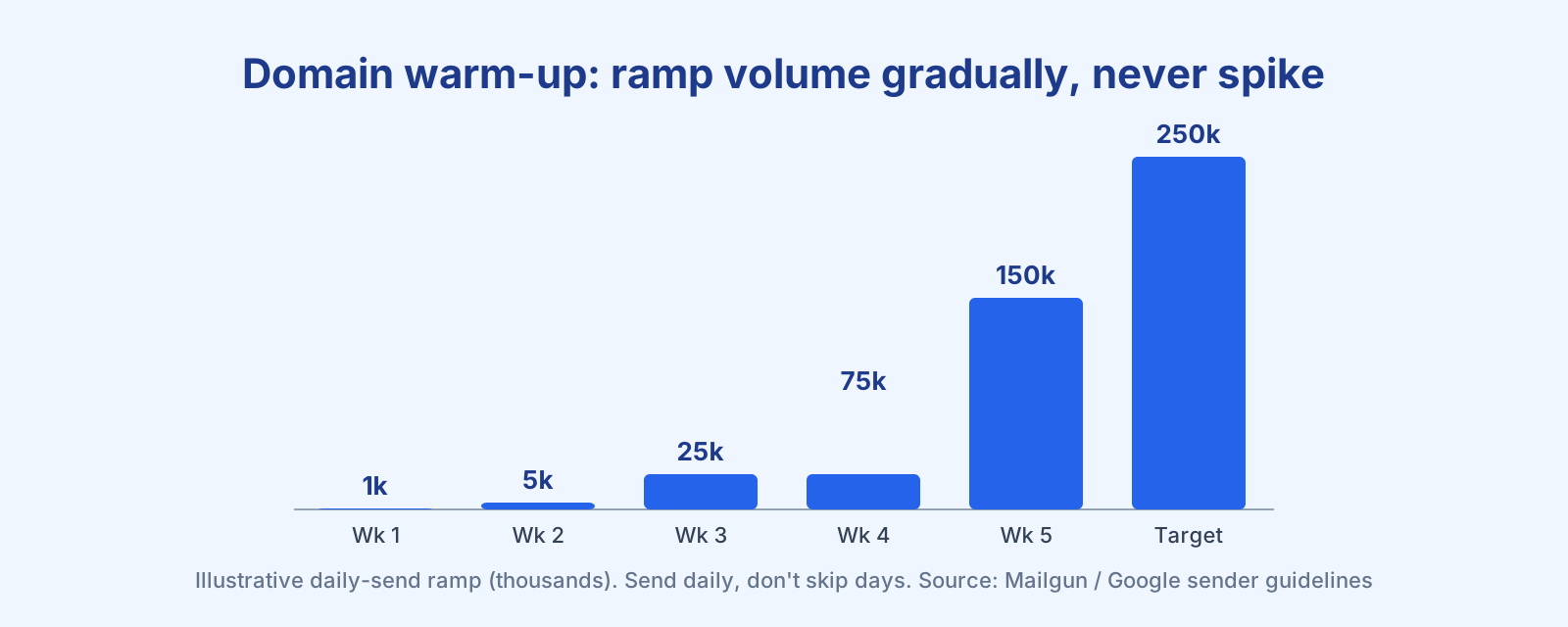
Increase volume in steps over days and weeks, not all at once. A representative manual plan runs across roughly 15 stages, starting near 1,000 sends a day and climbing toward your target over the ramp. Two rules matter more than the exact numbers:
- Send daily and don’t skip. A daily plan assumes daily sending — if you send the day 1–5 limits then pause for two days, you can’t resume at the day 8 number. As Mailgun puts it, “slow and steady wins the race” (Mailgun).
- Don’t spike. Google warns that suddenly doubling your volume can trigger rate limiting or reputation drops. Increase gradually, and if you change your email format, ramp the new-format volume separately (Google).
How long it takes depends on list size — a 50,000-contact list might warm in about a week, while a million could take weeks. Slower is safer.
Step 4: Monitor spam rate and reputation as you go
Watch the scoreboard at every stage. Keep spam complaints in Postmaster Tools below 0.10% and never let them reach 0.30% (Google). Watch your bounce rate too — Google’s advice if messages start bouncing or deferring is to reduce volume until the error rate drops, then increase slowly again. Use Google Postmaster Tools to see your domain and IP reputation as Gmail sees them.
Step 5: Separate your streams with subdomains
If you send both transactional and marketing mail, warm and run them on separate subdomains (for example mail. for marketing and notify. for transactional). This keeps a promotional stumble from dragging down your receipts, and vice versa — the reasoning is covered in the transactional email guide.
Warm-up tips that make the difference
- Send consistently. Avoid bursts; a steady daily rhythm builds reputation faster than lumpy sending.
- Suppress the unengaged during warm-up. Add lower-engagement segments only after the early stages succeed — the logic behind a good re-engagement strategy.
- Keep the list clean. Validate and prune before you start; bad addresses sabotage a warm-up. See email list cleaning.
- Don’t cold-email during warm-up. Unsolicited mail spikes complaints and undoes your progress.
Frequently asked questions
How long does it take to warm up an email domain? It depends on list size and how aggressively you ramp — roughly a week for ~50,000 contacts, up to several weeks for a million. Sending slower than the minimum plan improves long-term deliverability.
Do I need to warm up a new domain if my IP is already warm? Usually yes. A new domain has no reputation of its own even on an established IP, so ramp it gradually to avoid a poor domain reputation.
What’s the difference between IP warm-up and domain warm-up? IP warm-up builds reputation for a sending IP (mainly relevant for a new dedicated IP); domain warm-up builds reputation for your sending domain via its DKIM authority. On a new domain and new IP, warm both together.
Who should I send to during warm-up? Your most engaged recipients — people who reliably open and click. Early positive engagement is the strongest signal to mailbox providers like Gmail.
What spam rate should I stay under? Keep spam complaints below 0.10% in Google Postmaster Tools and never let them reach 0.30%, or you risk reduced inbox placement.
References
- Google — Email sender guidelines: https://support.google.com/a/answer/81126
- Mailgun — Domain warm-up and reputation (Renate Burns): https://www.mailgun.com/blog/deliverability/domain-warmup-reputation-stretch-before-you-send/
— Shivam