
Quick answer: Sender Score is a free reputation rating from 0 to 100 that Validity assigns to your sending IP address. As Validity puts it, it “operates much like a credit score” — higher is better. It reflects spam complaints, invalid addresses, spam-trap hits, blocklist presence and sending consistency. You can check yours free at senderscore.org (Validity).
If you have ever wanted a single number that summarises how mailbox providers see you, Sender Score is the closest thing that exists. It won’t tell you everything — and, as we’ll see, it isn’t the whole story of deliverability — but it is a useful, free gauge of your sending reputation. Here is what it is and how to read it honestly.
Disclosure: Bluey Email, mentioned near the end, is my own product; the guidance here applies to any sender on any platform.
What is a Sender Score?
Sender Score is a metric created by Return Path, now part of Validity. In Validity’s own words, it is “a numerical score (1-100) for your IP address which operates much like a credit score. The lower your score, the worse it is for your reputation at that IP.” The score is dynamic — calculated on a rolling window and recomputed regularly — and it is drawn from Validity’s cooperative data network of mailbox and security providers. Crucially, it is tied to your sending IP address, not your domain, which matters for how you interpret it.
How is it calculated?
Validity determines the score “by factoring a sender’s performance across key reputation metrics important to both mailbox providers and your email receivers.” The main inputs it lists include:
| Metric | What it measures |
|---|---|
| Complaints | Recipients clicking “spam” or “junk,” measured against mail sent. |
| Unknown users | Mail sent to addresses that never existed or were abandoned (5xx errors) — an invalid-address rate. |
| Spam traps | Pristine and recycled trap addresses hit, a sign of poor list hygiene. |
| Blocklists | Whether the IP appears on known spam blocklists. |
| Volume | Sending patterns, consistency and cadence over time. |
| Infrastructure | Technical setup such as reverse DNS and host type. |
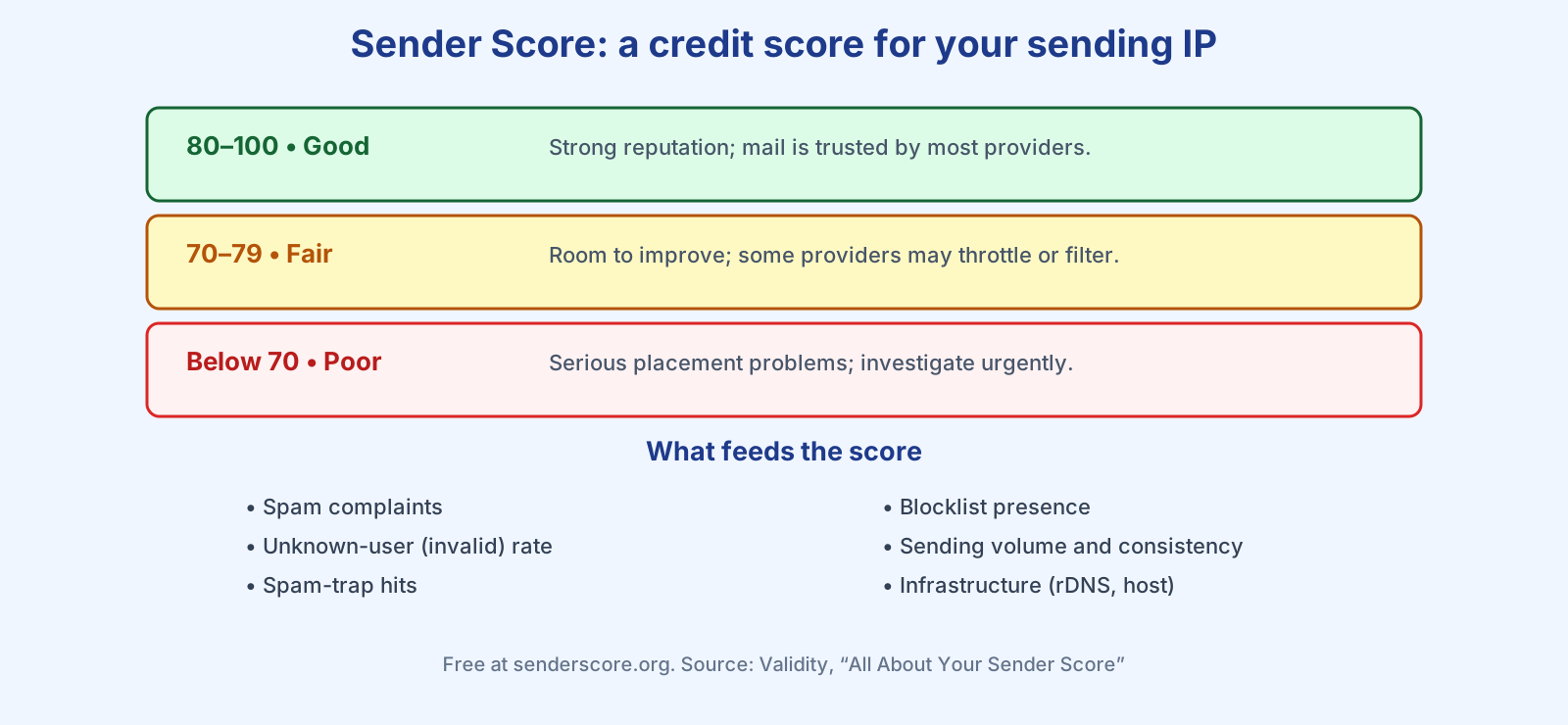
As a rule of thumb, scores above 80 signal a healthy reputation, the 70s suggest room to improve, and anything below 70 points to problems worth investigating. Because the same behaviours feed it, a strong Sender Score and a strong sender reputation tend to move together — complaints, spam-trap hits and blocklist listings all drag both down.
Does a good Sender Score guarantee inbox placement?
No — and Validity is refreshingly honest about this. “It is important to understand that sender score and deliverability are two separate entities. Although they often correlate with each other, they are not the same thing.” Many providers look at an IP’s Sender Score at the gateway, but “all mailbox providers are unique and will weight IP reputation differently.” There is a further wrinkle: Sender Score is IP-based, so if you send from a shared IP pool (as most senders on shared infrastructure do), the score partly reflects your neighbours’ behaviour, not just yours. That is why Gmail and Microsoft lean heavily on domain reputation, tracked through Google Postmaster Tools and Microsoft SNDS, which is specific to you. Treat Sender Score as one gauge among several, not the verdict.
How do you improve your Sender Score?
Validity’s advice is to fix the big reputation issues first: “Reducing complaints, reducing unknown users, and getting rid of spam traps (especially pristine traps) will help in the quest to improve sender score,” along with keeping volume consistent and spikes rare. In practice that is the same discipline good deliverability always demands — only mail people who opted in, clean your list so bounces and dead addresses don’t pile up (see list cleaning), authenticate your domain with SPF, DKIM and DMARC, and raise volume gradually. Our deliverability audit pulls these steps together.
A capable platform gives you the authenticated foundation the score depends on. Checking Bluey Email’s own sending domains for this article, all are verified with SPF, DKIM and DMARC passing and DMARC set to p=quarantine — exactly the infrastructure signals Validity counts. Get that baseline right, then let clean, wanted sending do the rest, and the number tends to take care of itself.
Frequently asked questions
What is a good Sender Score? Above 80 is generally considered good, the 70s fair, and below 70 poor. Higher is always better on the 0-to-100 scale.
How do I check my Sender Score for free? Enter your sending IP address at senderscore.org. It is a free tool from Validity.
Is Sender Score the same as sender reputation? Not exactly. Sender Score is one vendor’s IP-based numerical estimate of reputation; your overall sender reputation also includes domain reputation, which providers like Gmail weight heavily and which Sender Score does not directly measure.
Why is my Sender Score low if I follow best practices? If you send from a shared IP, your neighbours’ sending affects the IP’s score. Focus on your own domain reputation via Google Postmaster Tools, and consider your platform’s IP setup.
References
- Validity — All About Your Sender Score: https://www.validity.com/blog/all-about-your-sender-score/
- Google — Email sender guidelines: https://support.google.com/a/answer/81126
— Shivam
1 thought on “Sender Score Explained: What It Is and How to Improve It (2026)”