
Quick answer: An email blocklist (or blacklist) is a database of IP addresses and domains flagged for sending spam. Receiving mail servers check incoming email against these lists and reject or filter anything from a listed sender. Spamhaus, the best-known provider, has compiled DNS blocklists “for over 25 years.” Getting listed almost always points to a list-hygiene or authentication problem — fix the cause, then request delisting (Spamhaus).
Landing on an email blocklist is one of the fastest ways to stop reaching the inbox — sometimes for every message you send, not just the one that caused it. Yet most senders don’t know what blocklists are or how to get off one. Here is how they work and what to do if you’re listed.
Disclosure: Bluey Email, mentioned near the end, is my own product; the guidance here is platform-agnostic.
What is an email blocklist?
A blocklist — also called a blacklist or, in technical form, a DNS blocklist (DNSBL) — is a published list of IPs and domains associated with spam or abuse. Spamhaus describes its purpose: for over 25 years it has “been compiling DNS Blocklists (DNSBLs) to help email administrators filter emails and protect their users.” The lists contain “IPs and domains that are seen to be associated with malicious behavior, including phishing, malware, spam, and more” — as well as IP addresses that are legitimate but simply “shouldn’t be sending emails,” such as home routers and Internet-of-Things devices.
How do blocklists work?
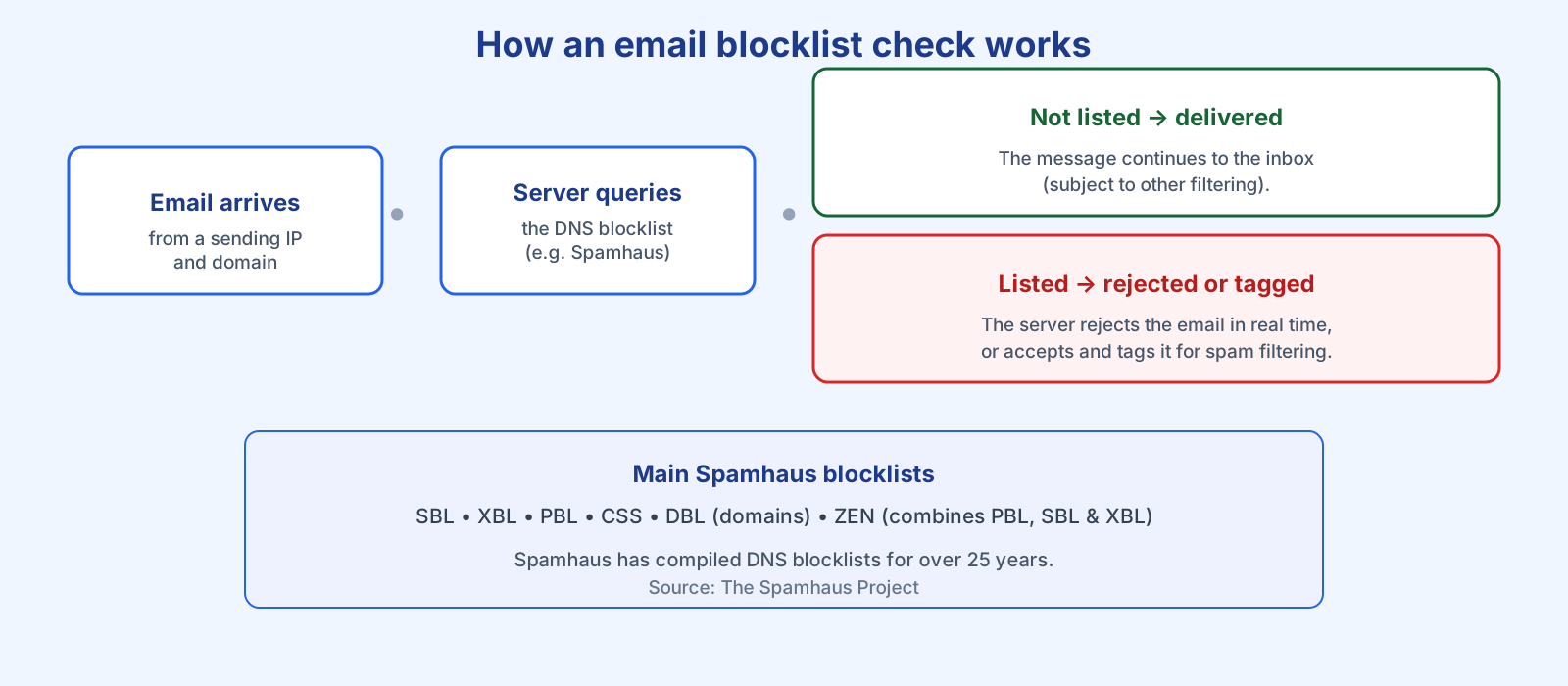
The mechanism is simple. When an email arrives, Spamhaus explains, “the IPs, domains, or hashes associated with an email can be queried against a DNSBL to see if they’re listed.” The receiving administrator can then either “reject the email in real-time, with an appropriate delivery code,” or “accept the message and tag it for additional filtering.” Different lists apply at different stages — IP-based lists at the initial connection, domain-based lists during content filtering. The result is the same to you: listed senders get bounced or buried.
The main Spamhaus blocklists
Spamhaus runs several lists, each with a different focus:
| List | What it covers |
|---|---|
| SBL (Spamhaus Blocklist) | IP addresses observed sending spam. |
| XBL (Exploits Blocklist) | Hijacked or compromised machines and exploited devices. |
| PBL (Policy Blocklist) | IP ranges that shouldn’t send direct-to-inbox mail, e.g. home connections. |
| CSS (Combined Spam Sources) | IPs involved in sending low-reputation or snowshoe spam. |
| DBL (Domain Blocklist) | Domains with poor reputation, used at the content-filtering stage. |
| ZEN | Combines the PBL, SBL and XBL into a single query. |
Why do senders end up on a blocklist?
Rarely by accident. The usual causes are the same behaviours that damage sender reputation: hitting spam traps from bought or scraped lists, high complaint rates, sudden volume spikes that look like a compromised host, poor authentication, or an actually compromised account being used to send spam. In other words, a listing is a symptom. Spamhaus is emphatic that chasing the symptom is the wrong move: “Attempting to locate and remove traps only treats the symptom and not the underlying problem.”
How do you get off a blocklist?
Three steps. First, confirm the listing — Spamhaus offers a free reputation checker at check.spamhaus.org, and Google Postmaster Tools shows Gmail-side reputation. Second, and most important, fix the root cause: stop mailing unengaged and unpermissioned addresses, clean your list, tighten authentication, and secure any compromised account. Third, once the cause is genuinely fixed, use the provider’s removal process to request delisting. If you delist without fixing the underlying problem, you will simply be relisted. Our deliverability audit, list-cleaning guide and SPF, DKIM and DMARC explainer cover each fix.
Prevention is far easier than removal. A reputable platform keeps you off blocklists by authenticating your mail, processing bounces and suppressing complaints automatically. Checking Bluey Email’s own domains for this article, all five pass SPF, DKIM and DMARC with a p=quarantine policy — the authenticated baseline that keeps a sender in good standing. Combine that with permission-based lists and steady sending, and blocklists stay a problem you read about rather than one you live. See our deliverability guide for the complete playbook.
Frequently asked questions
What’s the difference between a blocklist and a blacklist? They mean the same thing. “Blocklist” is the modern, preferred term for the database of IPs and domains that mail servers use to filter or reject email.
How do I know if I’m on a blocklist? Check your sending IP and domain against a reputation checker such as check.spamhaus.org, and watch for a spike in bounces citing a blocklist in the rejection message.
How long does it take to get delisted? It varies by provider and cause. Some lists expire automatically once bad behaviour stops; others require a removal request. Either way, delisting only sticks if you have fixed the underlying problem.
Can one blocklisting affect all my email? Yes. If your sending IP or domain is listed, mail servers that use that blocklist can reject or filter everything you send from it — not just the campaign that triggered the listing.
References
- The Spamhaus Project — Spamhaus’ Blocklists: https://www.spamhaus.org/blocklists/
- The Spamhaus Project — Spamtraps: fix the problem, not the symptom: https://www.spamhaus.org/resource-hub/deliverability/spamtraps-fix-the-problem-not-the-symptom/
— Shivam