
Quick answer: An email bounce is a mail server telling you a message wasn’t delivered. Bounces split into hard bounces (permanent — the address doesn’t exist, SMTP code 5.X.X) and soft bounces (temporary — full mailbox or server issue, code 4.X.X). Your bounce rate is bounces divided by emails sent. Postmark’s guidance is clear: your bounce rate “should never exceed 10%,” and getting close to that is a sign something is seriously wrong (Postmark). Aim far lower — well under 2% — and remove hard-bouncing addresses immediately.
If a chunk of your emails bounce, it isn’t just those messages that suffer — mailbox providers watch bounces as a signal of who you are as a sender, and a high rate can get all your mail filtered or blocked. This explainer covers what a bounce is, the difference between hard and soft bounces, what rate is acceptable, and how to bring it down.
What is an email bounce?
A bounce is a response from a mail server or mailbox provider telling the sender that an email wasn’t delivered — the digital equivalent of a letter returned to sender with a sticker explaining why. Every email sent over SMTP gets a response code back: 250 means accepted and delivered, while an error code means the delivery failed. As Postmark’s Bettina Specht explains, those codes don’t just say there was a problem — they tell you why, which is how you fix the root cause (Postmark).
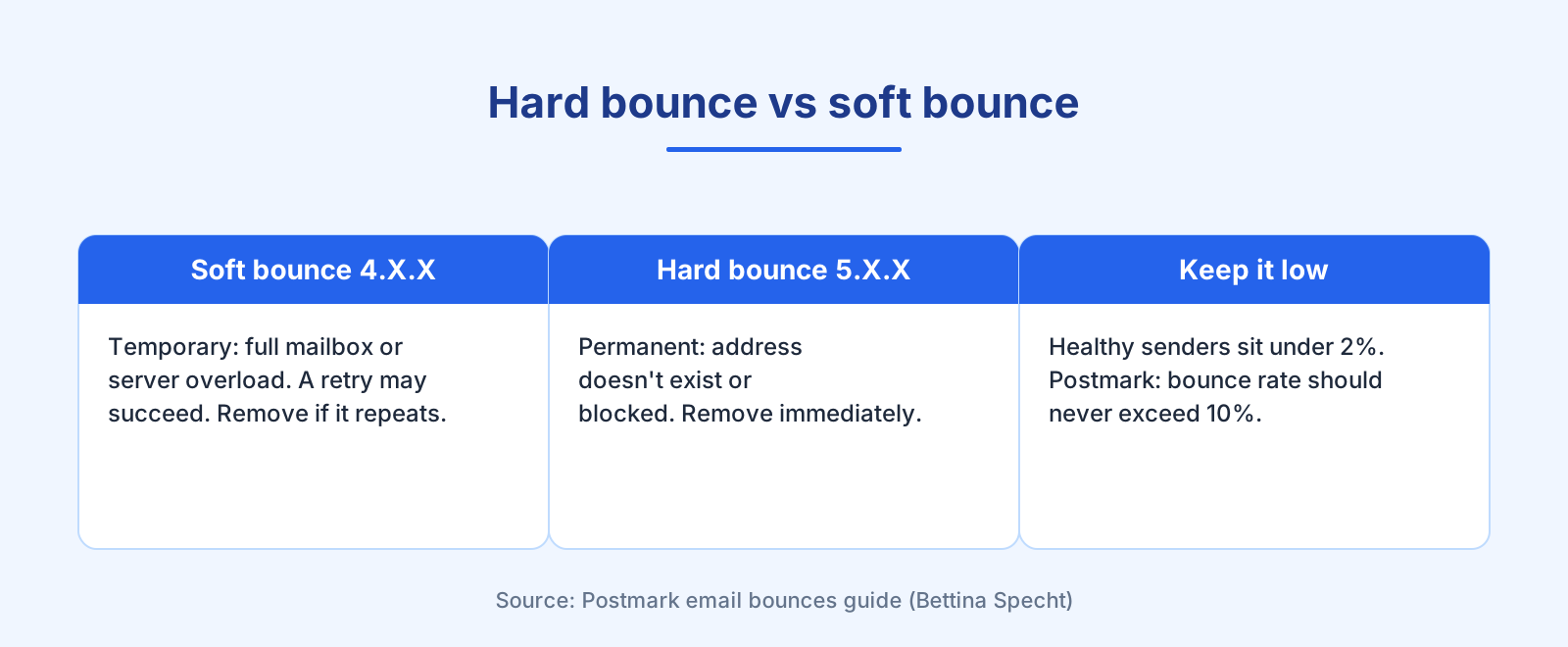
Bounce codes follow a pattern worth memorising: codes starting 4.X.X are temporary failures (soft bounces), and codes starting 5.X.X are permanent failures (hard bounces). That single digit tells you how worried to be.
Hard bounce vs soft bounce: what’s the difference?
The two categories call for different responses:
Soft bounces happen when there’s a temporary problem — the recipient’s mailbox is full, the server is overloaded, or the message was deferred. A retry later might succeed, and a good email service will automatically retry a delayed message for you. But if the same address soft-bounces repeatedly, treat it like a dead inbox and remove it.
Hard bounces happen when there’s a permanent problem — the address or domain doesn’t exist, or the message was rejected for authentication or reputation reasons. Resending won’t help and can hurt you. As Postmark puts it plainly, “hard bounces are more serious than soft bounces,” so pay close attention to them (Postmark). Some services, including Bluey and Postmark, automatically deactivate addresses that don’t exist so you can’t keep sending to them.
| Type | SMTP code | Cause | What to do |
|---|---|---|---|
| Soft bounce | 4.X.X | Full mailbox, server overload, temporary defer | Let your ESP retry; remove if it repeats |
| Hard bounce | 5.X.X | Address doesn’t exist, auth failure, blocklist | Remove immediately; investigate the cause |
What is an acceptable email bounce rate?
Postmark is honest that firm benchmarks are hard — a few bounces on a transactional password reset to existing users is troubling, while collecting addresses at an event guarantees some typos. But the ceiling is clear: your bounce rate should never exceed 10%, and anything near that threshold means something is seriously wrong (Postmark). In practice, healthy senders sit far below that — a total bounce rate under about 2%, with hard bounces a small fraction of that.
Watch the trend, not just the total. A sudden spike in bounces is an early warning even if the overall number still looks fine. And watch the composition: a rising hard-bounce rate points to list-quality problems, while a soft-bounce spike often means a temporary server issue on the receiving side.
How do bounces hurt deliverability?
Bounces are how mailbox providers grade your list hygiene. If you keep sending to invalid Gmail addresses, Gmail notices the wasted attempts and may start blocking your mail — even to valid addresses. Reputation and spam-related bounces are the most serious: Gmail regularly turns a DMARC-related or low-reputation bounce into a full block. That’s why authentication matters — get SPF, DKIM, and DMARC right so your legitimate mail isn’t bounced for looking unauthenticated.
Google’s own sender rules tie this together: bulk senders must keep spam complaints in Postmaster Tools below 0.10% and never reach 0.30%, and if messages start bouncing or being deferred, Google’s advice is to reduce sending volume until the error rate drops (Google). Bounces and spam complaints together are the scoreboard.
How do I reduce my email bounce rate?
Three moves do most of the work:
Clean your list. Remove hard bounces immediately and validate addresses at signup. This is the core of email list cleaning — the single biggest lever on bounce rate.
Use confirmed opt-in. Confirming addresses before subscribing stops typos and fake addresses entering your list in the first place. That’s what double opt-in is for.
Authenticate and monitor. Set up SPF, DKIM, and DMARC, and watch your bounce reports for spikes. Full detail in the email deliverability guide.
Frequently asked questions
What is a good email bounce rate? As low as possible — healthy senders sit under about 2% total. Postmark’s hard ceiling is that your bounce rate should never exceed 10%; near that number, something is seriously wrong.
What’s the difference between a hard and soft bounce? A hard bounce is a permanent failure (address doesn’t exist, code 5.X.X) — remove it. A soft bounce is temporary (full mailbox or server issue, code 4.X.X) — a retry may succeed, but remove it if it repeats.
Do bounces hurt my sender reputation? Yes. Mailbox providers read bounces as a sign of list quality. Keep sending to invalid addresses and providers may block your mail broadly, not just the bad addresses.
Should I remove soft bounces? Not on the first occurrence — let your ESP retry. But if the same address soft-bounces repeatedly, treat it as dead and remove it.
How do I lower my bounce rate? Remove hard bounces immediately, validate addresses with double opt-in, authenticate with SPF/DKIM/DMARC, and monitor your bounce reports for spikes.
References
- Postmark — Email bounces: why they happen & how to handle them (Bettina Specht): https://postmarkapp.com/guides/email-bounces
- Google — Email sender guidelines: https://support.google.com/a/answer/81126
— Shivam