
Quick answer: Your complaint rate (or spam rate) is the share of delivered emails that recipients mark as spam. It is the single fastest way to damage your deliverability. Google’s bulk-sender guidelines tell senders to keep it below 0.3% and ideally below 0.1% — and warn you should “avoid ever reaching a 0.3% spam rate” (Google).
Of all the numbers in email marketing, this is the one to watch most closely. A complaint rate creeping toward a few tenths of a percent doesn’t sound like much — but to a mailbox provider it is a loud signal that people don’t want your mail. Here is what the complaint rate is, where the lines are drawn, and how to stay well under them.
Disclosure: Bluey Email, mentioned near the end, is my own product; the guidance here applies to any sender on any platform.
What is a complaint rate?
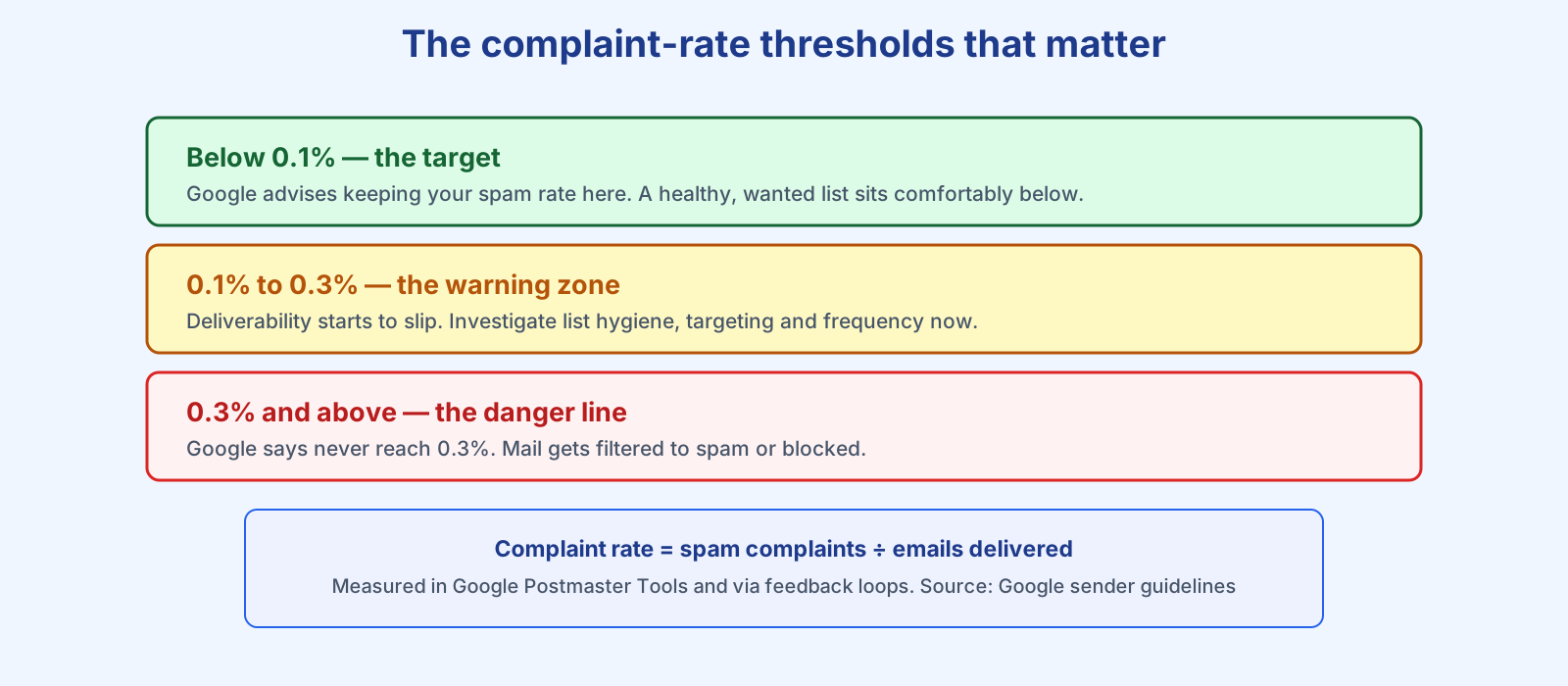
Your complaint rate is the number of spam complaints divided by the number of emails delivered, over a given period, usually expressed as a percentage. A complaint is registered when a recipient clicks the “report spam” or “junk” button in their inbox. Mailbox providers capture those clicks and, for participating senders, report them — Gmail through Google Postmaster Tools, and other providers through feedback loops. Because it is calculated against delivered mail, sending more email doesn’t dilute the problem: if the wrong people are getting your mail, the rate climbs no matter the volume.
What is a good complaint rate?
The benchmark comes straight from Google’s sender requirements, which became mandatory for bulk senders in February 2024. Google is specific: keep the spam rate reported in Postmaster Tools below 0.3%, “avoid ever reaching a 0.3% spam rate,” and ideally keep it below 0.1%. Yahoo introduced a matching 0.3% requirement at the same time. Put simply: 0.1% is the target, 0.3% is the cliff edge, and the gap between them is smaller than it looks — on a 50,000-email send, 0.3% is just 150 complaints.
One caveat on measurement: because Apple Mail Privacy Protection and similar features distort open rates, complaint rate has become one of the more trustworthy engagement signals you have. It is hard to fake and directly reflects how recipients feel. That also makes it unforgiving — which is why it sits at the centre of your sender reputation.
Why does the complaint rate matter so much?
Because providers treat it as a proxy for consent. A high complaint rate tells Gmail or Outlook that a meaningful slice of your audience never wanted this mail — and the provider’s job is to protect those users. The consequence is not a warning; it is filtering. Cross the line and your messages start landing in spam folders or getting rejected outright, and not just for the people who complained: reputation damage affects deliverability for your whole list. Sustained high complaints can also get your domain or IP added to an email blocklist. It is closely related to, but distinct from, your bounce rate: bounces are addresses that don’t exist, complaints are real people who don’t want you.
How do you lower your complaint rate?
Complaints almost always trace back to a permission or expectation gap. Five habits keep the rate low. First, only mail people who genuinely opted in — double opt-in is the strongest safeguard. Second, make unsubscribing easy and obvious; people who can’t find the unsubscribe link hit “spam” instead, which is far more damaging. Third, set expectations at signup and keep to them — sudden changes in frequency or topic drive complaints, so mind your sending frequency. Fourth, keep the list clean and suppress the disengaged; our list-cleaning guide walks through it. Fifth, warm up new domains gradually rather than blasting from day one — see domain warm-up.
A good platform makes the rest automatic. Checking Bluey Email’s own sending domains for this article, all are authenticated with SPF, DKIM and DMARC passing — the baseline that lets providers attribute complaints correctly and reward a clean sender. Whatever tool you use, monitor the number in Google Postmaster Tools, treat any move toward 0.3% as an emergency, and fix the list rather than the symptom. For the wider workflow, see our deliverability guide.
Frequently asked questions
What is an acceptable email complaint rate? Below 0.1% is the target. Google says to keep it under 0.3% and never reach that figure; between 0.1% and 0.3% you should already be investigating.
How is complaint rate calculated? Spam complaints divided by emails delivered, over a period, shown as a percentage. Gmail reports it in Google Postmaster Tools; other providers report via feedback loops.
What happens if my complaint rate is too high? Mailbox providers filter more of your mail to spam or reject it, and the damage extends to your whole list, not just the complainers. Persistent problems can lead to blocklisting.
Is complaint rate the same as unsubscribe rate? No. An unsubscribe is a healthy, low-cost exit; a spam complaint actively harms your reputation. Making unsubscribing easy reduces complaints.
References
- Google — Email sender guidelines: https://support.google.com/a/answer/81126
- The Spamhaus Project — How does email reputation work?: https://www.spamhaus.org/resource-hub/deliverability/how-does-email-reputation-work/
— Shivam