
Table of Contents
The Email Marketing Guide for B2B, SaaS, and D2C: What Actually Works (and What’s a Waste of Time)
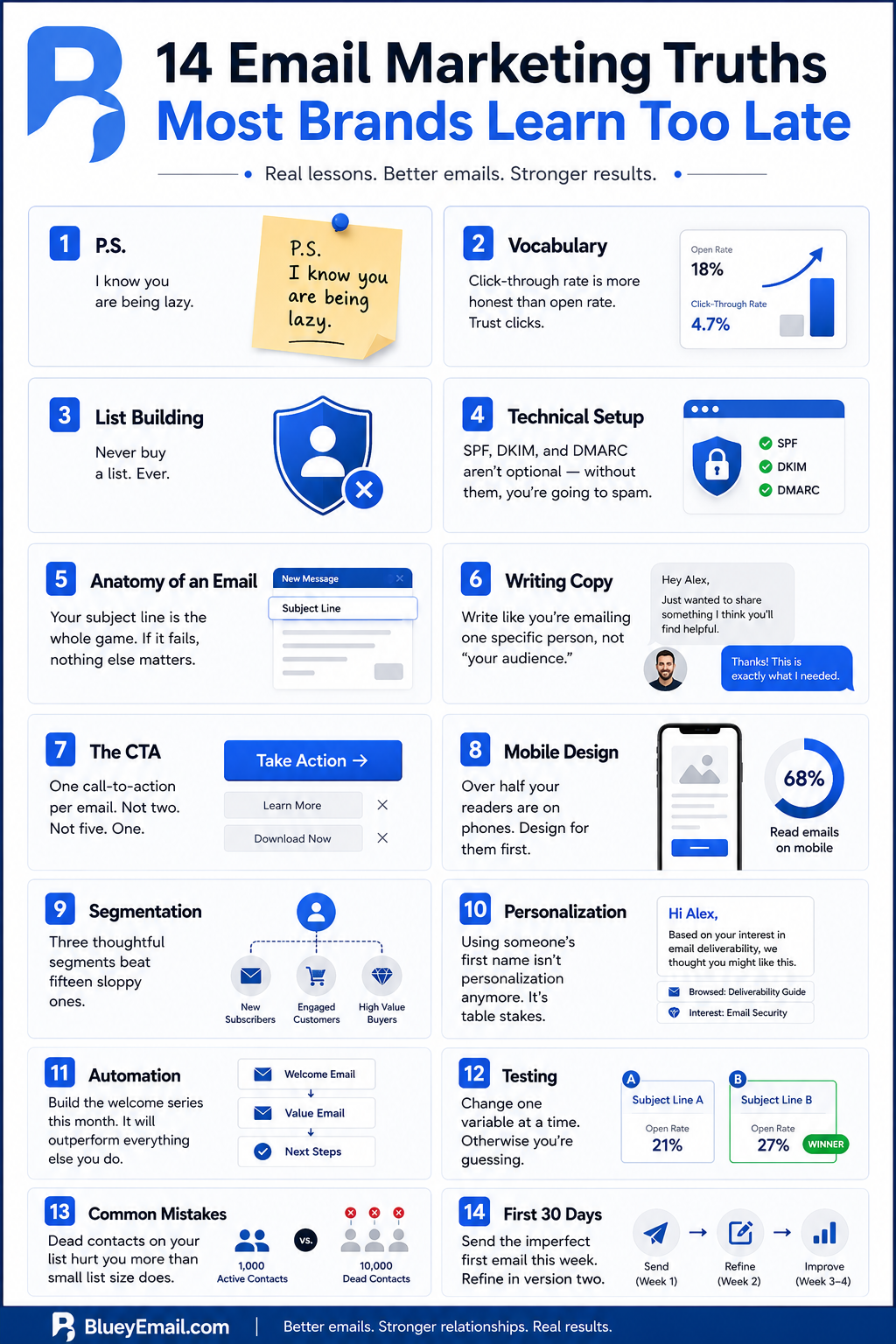
P.S. – I know you are being lazy.
- Vocabulary: Click-through rate is more honest than open rate. Trust clicks.
- List building: Never buy a list. Ever.
- Technical setup: SPF, DKIM, and DMARC aren’t optional — without them, you’re going to spam.
- Anatomy of an email: Your subject line is the whole game. If it fails, nothing else matters.
- Writing copy: Write like you’re emailing one specific person, not “your audience.”
- The CTA: One call-to-action per email. Not two. Not five. One.
- Mobile design: Over half your readers are on phones. Design for them first.
- Segmentation: Three thoughtful segments beat fifteen sloppy ones.
- Personalization: Using someone’s first name isn’t personalization anymore. It’s table stakes.
- Automation: Build the welcome series this month. It will outperform everything else you do.
- Testing: Change one variable at a time. Otherwise, you’re guessing.
- Common mistakes: Dead contacts on your list hurt you more than small list size does.
- First 30 days: Send the imperfect first email this week. Refine in version two.
There’s this myth that refuses to die — the idea that email marketing is somehow on its way out. Every year, someone writes an “email is dead” think-piece, and every year the data quietly tells a different story. Email still delivers better ROI than almost any other channel. It’s still where B2B buyers actually make decisions. It’s still the thing that turns a free trial signup into a $50,000 annual contract.
Here’s why I think the myth persists: most people’s experience with “email marketing” is the bad stuff. The blasts. The generic newsletters they scroll past. The “Hi {FirstName}” disasters from vendors who clearly have no idea what their own product does. If that’s your reference point, yeah, it feels like a dying art.
But for B2B and SaaS companies, email, when done well, is still the highest-leverage channel you have. It’s cheap. It’s measurable. It’s yours — nobody can nerf your reach overnight the way Meta or Google can. And when a decision-maker at a target account opens your email on a Tuesday morning and books a demo, that’s real pipeline.
This guide is written for people who are starting from zero. Or near zero. Maybe you’re a founder who just realized you need a newsletter. Maybe you’re the first marketing hire at a Series A SaaS company, and email got dumped on your plate. Maybe you’ve been dabbling, but you know your campaigns aren’t landing.
I’ll walk you through everything in plain English. Every acronym gets explained. Every tactic comes with the “why” behind it, not just the “what.” And I’ll be honest when something is overhyped, when conventional wisdom is wrong, and when the boring answer is the right one.
Email Marketing 101: The Vocabulary You Actually Need
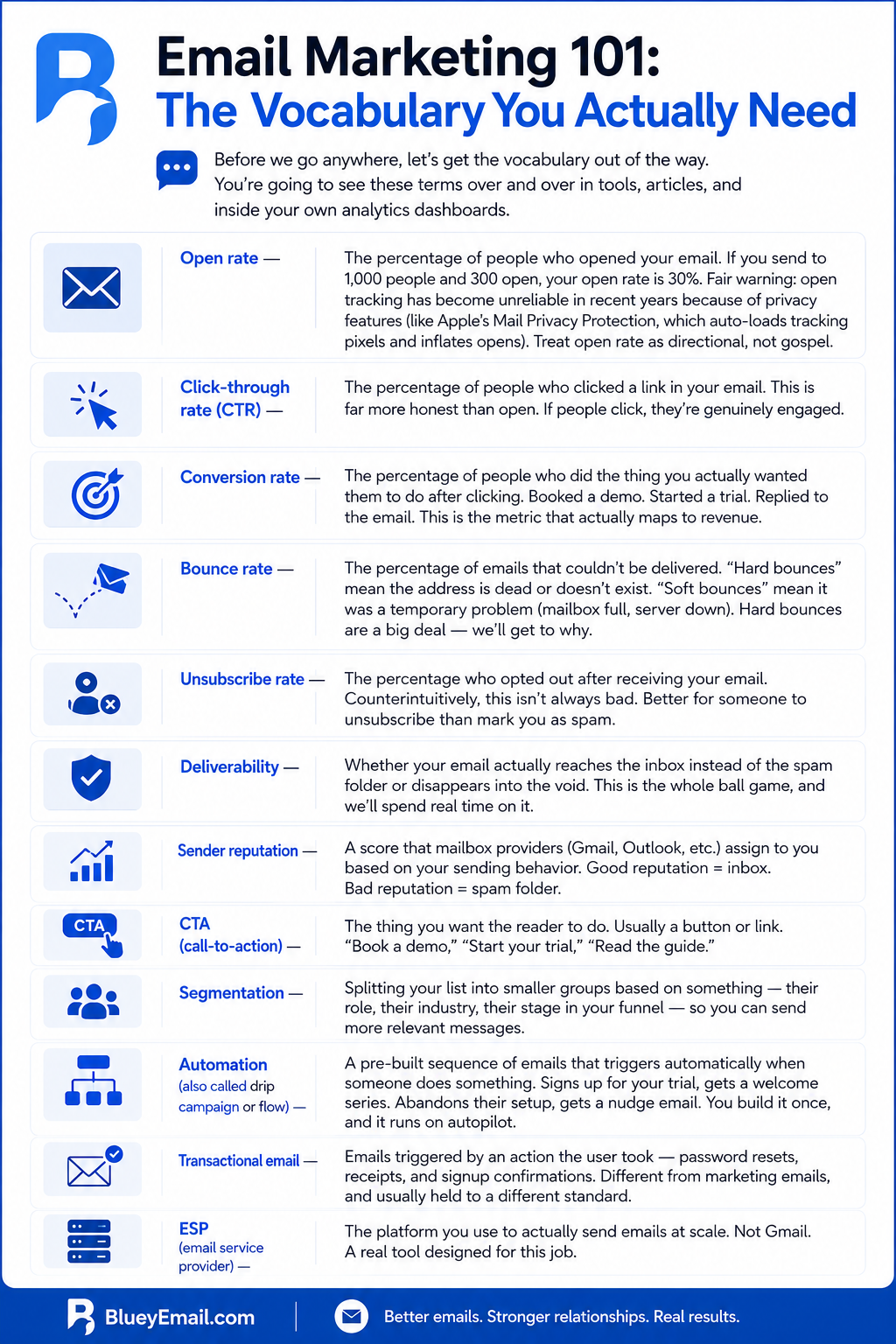
Before we go anywhere, let’s get the vocabulary out of the way. You’re going to see these terms over and over in tools, articles, and inside your own analytics dashboards.
Open rate — The percentage of people who opened your email. If you send to 1,000 people and 300 open, your open rate is 30%. Fair warning: open tracking has become unreliable in recent years because of privacy features (like Apple’s Mail Privacy Protection, which auto-loads tracking pixels and inflates opens). Treat open rate as directional, not gospel.
Click-through rate (CTR) — The percentage of people who clicked a link in your email. This is far more honest than open. If people click, they’re genuinely engaged.
Conversion rate — The percentage of people who did the thing you actually wanted them to do after clicking. Booked a demo. Started a trial. Replied to the email. This is the metric that actually maps to revenue.
Bounce rate — The percentage of emails that couldn’t be delivered. “Hard bounces” mean the address is dead or doesn’t exist. “Soft bounces” mean it was a temporary problem (mailbox full, server down). Hard bounces are a big deal — we’ll get to why.
Unsubscribe rate — The percentage who opted out after receiving your email. Counterintuitively, this isn’t always bad. Better for someone to unsubscribe than mark you as spam.
Deliverability — Whether your email actually reaches the inbox instead of the spam folder or disappears into the void. This is the whole ball game, and we’ll spend real time on it.
Sender reputation — A score that mailbox providers (Gmail, Outlook, etc.) assign to you based on your sending behavior. Good reputation = inbox. Bad reputation = spam folder.
CTA (call-to-action) — The thing you want the reader to do. Usually a button or link. “Book a demo,” “Start your trial,” “Read the guide.”
Segmentation — Splitting your list into smaller groups based on something — their role, their industry, their stage in your funnel — so you can send more relevant messages.
Automation (also called drip campaign or flow) — A pre-built sequence of emails that triggers automatically when someone does something. Signs up for your trial, gets a welcome series. Abandons their setup, gets a nudge email. You build it once, and it runs on autopilot.
Transactional email — Emails triggered by an action the user took — password resets, receipts, and signup confirmations. Different from marketing emails, and usually held to a different standard.
ESP (email service provider) — The platform you use to actually send emails at scale. Not Gmail. A real tool designed for this job.
Okay. Now we can build on something.
What is email marketing?
Email marketing is the practice of sending commercial messages to a group of people via email. It’s used to promote products, share updates, build relationships with customers, and drive sales.
What is a good open rate for email marketing?
A good open rate is typically between 17% and 28%, depending on industry. B2B and SaaS emails average around 21%. Anything above 30% is excellent. Note that open rates have become less reliable since Apple’s Mail Privacy Protection launched in 2021.
What is a good click-through rate for email?
A good email click-through rate is 2-5% for most industries. B2B SaaS averages around 2.5%. Click-through rate is more reliable than open rate because it reflects real engagement.
What does CTA mean in email marketing?
CTA stands for call-to-action. It’s the specific action you want the email recipient to take, usually presented as a button or link (e.g., “Start free trial,” “Book a demo,” “Read the guide”).
What is an ESP in email marketing?
ESP stands for email service provider. It’s the platform you use to send marketing emails at scale, like Mailchimp, Brevo, Bluey, ConvertKit, or HubSpot. Regular email clients like Gmail are not ESPs.
What is the difference between marketing and transactional emails?
Marketing emails promote products or content to a group of people (newsletters, campaigns, promotions). Transactional emails are triggered by a specific user action and sent to one person (receipts, password resets, signup confirmations).
What is a bounce in email marketing?
A bounce is when an email cannot be delivered. A “hard bounce” means the address is invalid or doesn’t exist. A “soft bounce” is a temporary issue (mailbox full, server down). High bounce rates damage your sender reputation.
Building Your List the Right Way: Email Marketing Guide
You can’t do email marketing without an email list, especially if you are a b2c. Shocking, I know. But how you build that list matters more than almost anything else you’ll do.
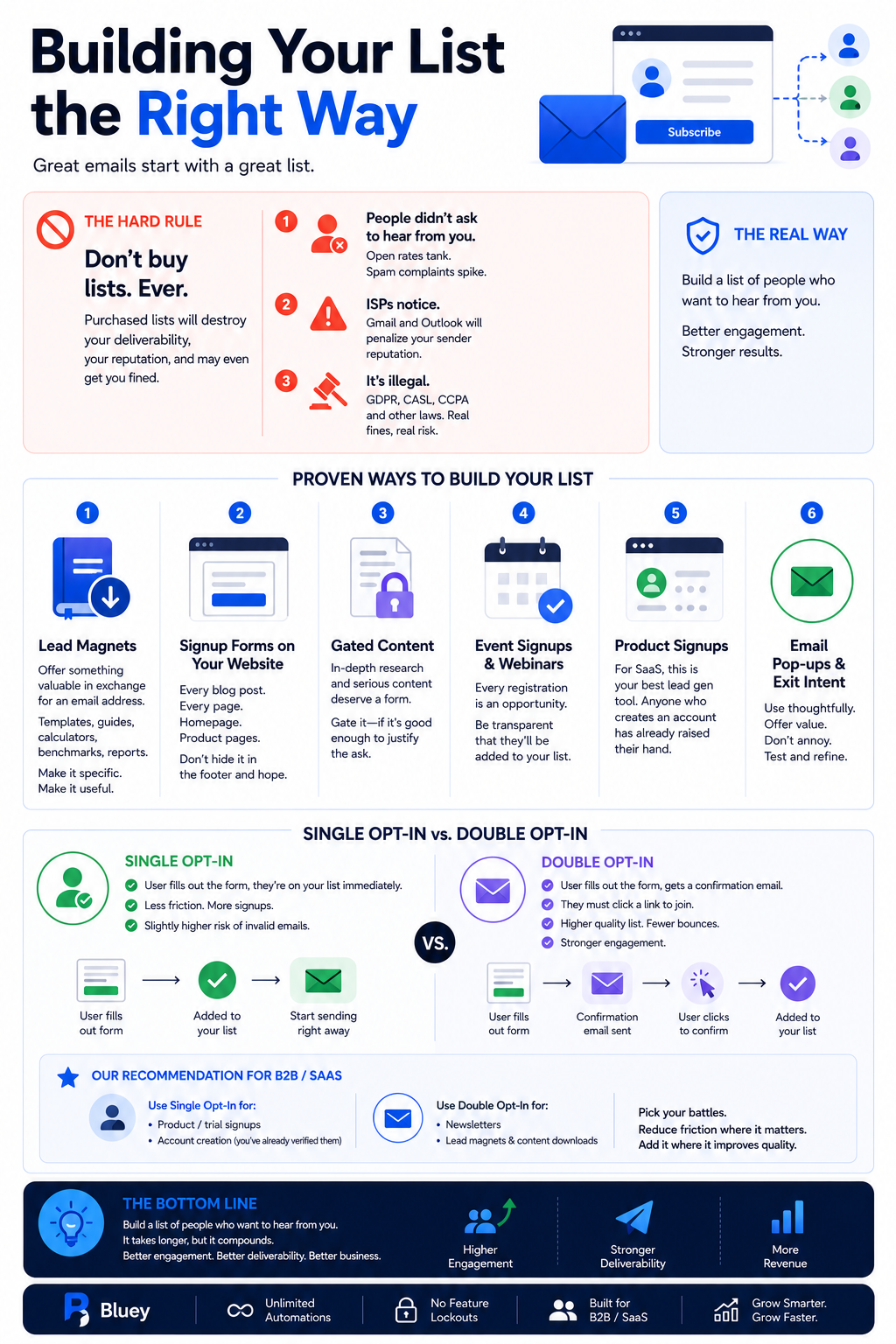
First, the hard rule: don’t buy lists. Ever. I don’t care who’s selling it or how “targeted” they claim it is. Purchased lists are a disaster for three reasons. One, the people on them didn’t ask to hear from you, so your open rates will tank, and your spam complaints will spike. Two, when that happens, Gmail and Outlook notice, and your sender reputation takes a beating that can take months to recover. Three, in most regions — Europe with GDPR, Canada with CASL, California with CCPA — emailing purchased lists is straight-up illegal and can earn you real fines.
So, how do you build a list the real way?
Lead magnets. Offer something valuable in exchange for an email address. A template, a guide, a calculator, a benchmark report. For B2B and SaaS, industry-specific content works well — “The 2026 SaaS Pricing Playbook,” “The Ultimate Sales Ops Checklist,” that kind of thing. The better the asset, the better the list quality.
Signup forms on your website. Every blog post should have a signup option. Your homepage should have one. Your product pages should have one. Don’t just stick a form in the footer and hope.
Gated content. If you produce serious research or in-depth content, gating it behind a form is fair game — provided the content is actually good enough to justify the trade.
Event signups and webinars. Every time someone registers for a webinar or demo, that’s an email opportunity (as long as you tell them they’re being added to your list).
Product signups. If you run a SaaS, the signup form is your best lead gen tool. Anyone who creates an account has already told you they’re interested.
One more thing on list building: the single-opt-in vs. double-opt-in debate.
Single-opt-in means the user fills out your form, and they’re on your list immediately. Double-opt-in means they fill out the form, get a confirmation email, and have to click a link to actually be added. Double-opt-in is more friction, but you end up with a higher-quality list, fewer bounces, and stronger engagement. For B2B/SaaS specifically, I lean toward single-opt-in for trial signups (you’ve already verified them by making them create an account) and double-opt-in for newsletters and lead magnets. Pick your battles.
And for the love of everything, don’t ask for fifteen fields at signup. Ask for an email address. Maybe a first name. That’s it. Every extra field cuts your conversion rate. You can collect the rest later once you’ve earned the right.
How do I build an email list from scratch?
Build an email list by adding signup forms to your website, offering lead magnets (free guides, templates, tools) in exchange for email addresses, running webinars or events, and using your product signup as a list source if you run a SaaS.
Is it illegal to buy an email list?
Buying email lists isn’t always illegal, but emailing purchased lists is illegal in most regions. Laws like GDPR (Europe), CASL (Canada), and CAN-SPAM (US) require explicit consent before sending marketing emails. Violations can result in heavy fines.
What is a lead magnet?
A lead magnet is a free resource (like a guide, template, checklist, or tool) that you offer in exchange for a visitor’s email address. Good lead magnets solve a specific problem and provide immediate value.
What’s the difference between single opt-in and double opt-in?
Single opt-in adds someone to your list immediately after they fill out your form. Double opt-in requires them to click a confirmation link in an email before being added. Double opt-in produces higher-quality lists but with more friction.
How many fields should I have on my email signup form?
Use as few fields as possible — ideally just an email address, optionally a first name. Each additional field reduces conversion rate by 5-10%. You can collect more data later, once they’re on your list.
Should I use double opt-in for my email list?
Use double opt-in for newsletters and lead magnets, where engagement quality matters. Use single opt-in for product signups where you’ve already verified the user. Many marketers default to single opt-in for speed; double opt-in for compliance-heavy regions.
The Technical Setup: Email Account, Authentication, and IP Reputation: Email Marketing Guide
This section is the one most beginners skip. Don’t skip it. I cannot overstate how many “my emails aren’t getting through” problems come down to technical setup that should have been handled on day one.
Let’s walk through it.
Your Sending Domain
First: don’t send marketing emails from a free Gmail or Outlook account. yourcompany@gmail.com is fine for messaging a friend. It is not fine to send to customers.
You need to send from a custom domain — something like hello@yourcompany.com or newsletter@yourcompany.com. Most people route this through a professional email hosting service (Google Workspace, Microsoft 365, Zoho Mail) for day-to-day correspondence, and through an email service provider (ESP) for mass campaigns.
For B2B/SaaS, a common setup is to have a root domain (say, yourcompany.com) that handles regular business email and reserve a subdomain (like marketing.yourcompany.com or email.yourcompany.com) for bulk sending. This keeps your main domain’s reputation insulated from any deliverability blips your marketing volume might cause. It’s a small thing that pays off later when things go wrong — and eventually, they will.
MX Records
MX stands for “Mail Exchanger.” MX records are DNS entries that tell the internet which servers are allowed to receive email for your domain. Think of them as forwarding instructions. When someone sends an email to hello@yourcompany.com, their mail server looks up the MX records for yourcompany.com and says, “Ah, so the mail for this domain goes to Google Workspace” (or wherever).
You set MX records in your domain’s DNS settings — that’s the control panel where you manage your domain, whether that’s GoDaddy, Namecheap, Cloudflare, or whatever registrar you use. Your email provider will give you the exact records to add. This is a one-time setup.
If you’re using an ESP for sending campaigns, the ESP doesn’t need MX records from you — they handle sending from their end. But they will need you to add other DNS records. Which brings us to the three acronyms you absolutely need to understand.
SPF, DKIM, and DMARC – Email Marketing Guide
These are the three pillars of email authentication. Together, they prove to mailbox providers that your emails are really from you and not a scammer pretending to be you. If you don’t have them set up, your emails will probably end up in spam — and under the stricter sender requirements that Gmail and Yahoo rolled out in 2024 and have been tightening since, your emails might not even be accepted at all.
SPF (Sender Policy Framework) is a DNS record that lists which servers are authorized to send email on behalf of your domain. When Gmail gets an email claiming to be from yourcompany.com, it checks the SPF record to see if the sending server is on the approved list. If not, the email is suspicious.
Setting up SPF means adding a TXT record (a type of DNS entry that holds text information) that looks something like v=spf1 include:_spf.yourESP.com ~all. Your ESP tells you exactly what to put in. You copy-paste. That’s it.
DKIM (DomainKeys Identified Mail) is a digital signature attached to your emails. It’s a way of cryptographically proving that the email wasn’t tampered with in transit and really came from your domain. You generate a key pair (a public key and a private key), publish the public key as a DNS record, and your ESP signs outgoing emails with the private key. Receiving servers check the signature against the public key. If it matches, good. If not, suspicious.
DMARC (Domain-based Message Authentication, Reporting, and Conformance) is the policy layer on top of SPF and DKIM. It tells receiving mail servers what to do when an email fails SPF or DKIM checks — ignore it, quarantine it (send to spam), or reject it entirely. It also sends you reports about who’s sending email from your domain, which helps you spot spoofing attempts.
A DMARC record looks like this: v=DMARC1; p=quarantine; rua=mailto:dmarc@yourcompany.com. Start with a p=none policy when you first set it up — this just tells you what’s happening without acting on it. Once you’re confident everything legit is passing, tighten to p=quarantine or eventually p=reject.
I know this sounds like a lot. It is. But here’s the good news: any decent ESP will walk you through this setup step by step. Bluey Email, for example, runs SPF/DKIM/DMARC checks when you connect your domain and provides one-click fixes for common issues, which turns what used to be a multi-hour sysadmin task into something you can finish with your coffee. If you’re evaluating ESPs, this is one of the things to test during your trial.
IP Reputation
Every email is sent from an IP address (a numerical identifier for a server on the internet). Mailbox providers track the sending history of every IP they see and assign it a reputation score — essentially “how much do we trust emails coming from this IP.”
You have two options for sending IPs: shared or dedicated.
A shared IP means your ESP sends your emails from a pool of IPs that many customers use. Your reputation is tied to the collective behavior of everyone in that pool. This is fine — often preferable, actually — when you’re starting out, and your volume is low. The established pool has a reputation; you get to ride on it.
A dedicated IP means you get your own IP address that only you can send from. The upside is total control — your reputation is built by your behavior alone. The downside is you have to build that reputation from scratch, which means you need consistent, high-volume sending (usually tens of thousands of emails a month) to keep the IP warm. If you send sporadically, a dedicated IP will actually hurt you.
My rule of thumb: if you’re sending fewer than 50,000 emails a month, stay on shared. If you’re scaling up, graduate to dedicated. Most quality ESPs offer dedicated IP as a paid add-on on their higher tiers, which is the pattern you’ll see almost everywhere.
Warming Up a New Sending Domain – Email Marketing Guide
If you’re setting up email marketing for the first time on a new domain, don’t send to 10,000 people on day one. Mailbox providers will see a brand-new domain suddenly sending massive volume and assume you’re a spammer. That first send can poison your reputation before you even start.
Instead, “warm up” the domain. Start by sending small volumes to your most engaged contacts (people who’ve actively signed up and will likely open). Gradually increase volume over two to six weeks. This builds a positive sending history and teaches mailbox providers that your domain is a real business, not a fly-by-night operation.
This is especially important for cold outreach — that is, sending to people who haven’t opted in. For cold email, the warm-up process is even more critical because you don’t have the built-in engagement buffer of an opted-in list.
This is exactly the problem Bluey‘s Outreach product is built to solve — it handles domain warm-up, rotates sending across multiple inboxes to stay within provider limits, and monitors deliverability automatically. It’s currently in pre-launch with a waitlist, but worth knowing about if cold outreach is part of your B2B plan.
Quick Technical Checklist: Email Marketing Guide
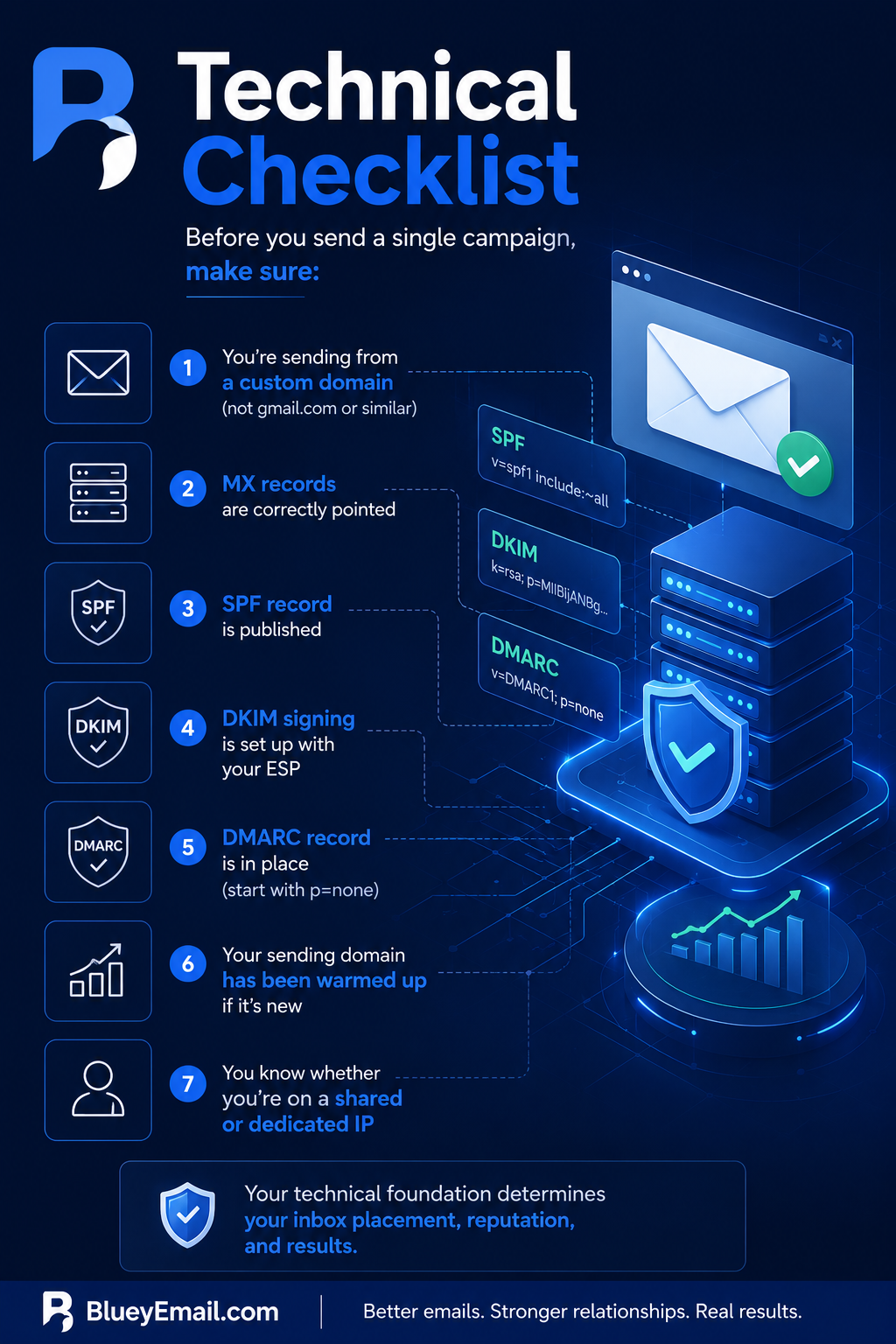
Before you send a single campaign, make sure:
- You’re sending from a custom domain (not gmail.com or similar)
- MX records are correctly pointed
- SPF record is published
- DKIM signing is set up with your ESP
- DMARC record is in place (start with p=none)
- Your sending domain has been warmed up if it’s new
- You know whether you’re on a shared or dedicated IP
Get this right, and most deliverability problems never happen. Get it wrong, and nothing else in this guide will save you.
Can I send marketing emails from a Gmail account?
You can, but you shouldn’t. Free Gmail accounts have strict sending limits, no proper authentication, and can damage your domain’s reputation. Use a custom domain (yourcompany.com) connected to an email service provider for marketing emails.
What are MX records?
MX (Mail Exchanger) records are DNS entries that specify which servers are authorized to receive email for your domain. You set them in your domain’s DNS settings. Your email hosting provider gives you the exact values to add.
What is SPF in email marketing? SPF
(Sender Policy Framework) is a DNS record that lists which mail servers are allowed to send emails on behalf of your domain. It helps prevent spammers from impersonating you. Setting up SPF is required for good deliverability.
What is DKIM, and how does it work?
DKIM (DomainKeys Identified Mail) adds a digital signature to your outgoing emails. The receiving mail server verifies the signature against a public key in your DNS records. If it matches, the email is confirmed as authentic and untampered.
What is DMARC, and why do I need it?
DMARC (Domain-based Message Authentication, Reporting, and Conformance) tells email providers what to do when an email fails SPF or DKIM checks — ignore, quarantine, or reject it. It also sends you reports about who’s using your domain. Gmail and Yahoo require DMARC for bulk senders.
Do I need SPF, DKIM, and DMARC for email marketing?
Yes. All three are required for reliable email deliverability in 2026. Without them, your emails will likely land in spam — and Gmail and Yahoo may reject them entirely under their 2024 sender requirements.
What’s the difference between shared IP and dedicated IP?
A shared IP is used by multiple senders, so your reputation depends partly on their behavior. A dedicated IP is yours alone, giving you full control but requiring consistent high volume to maintain reputation. Most senders under 50,000 emails/month should use shared IPs.
What is email warm-up?
Email warm-up is the process of gradually increasing sending volume from a new domain or IP to build a positive reputation with mailbox providers. It typically takes 2-6 weeks. Skipping warm-up causes emails to land in spam.
How long does it take to warm up an email domain?
Domain warm-up usually takes 2-6 weeks. Start with small volumes to your most engaged contacts, then gradually scale up. For cold outreach, warm-up is even more critical and may take longer.
What is sender reputation?
Sender reputation is a score that mailbox providers (Gmail, Outlook, Yahoo) assign to your sending domain and IP based on factors like bounce rate, spam complaints, engagement, and authentication. High reputation = inbox. Low reputation = spam folder.
Anatomy of an Email That Actually Gets Opened: Email Marketing Guide
Now we’re into the fun part — actually writing emails. Let’s walk through the parts of an email in the order your reader encounters them.
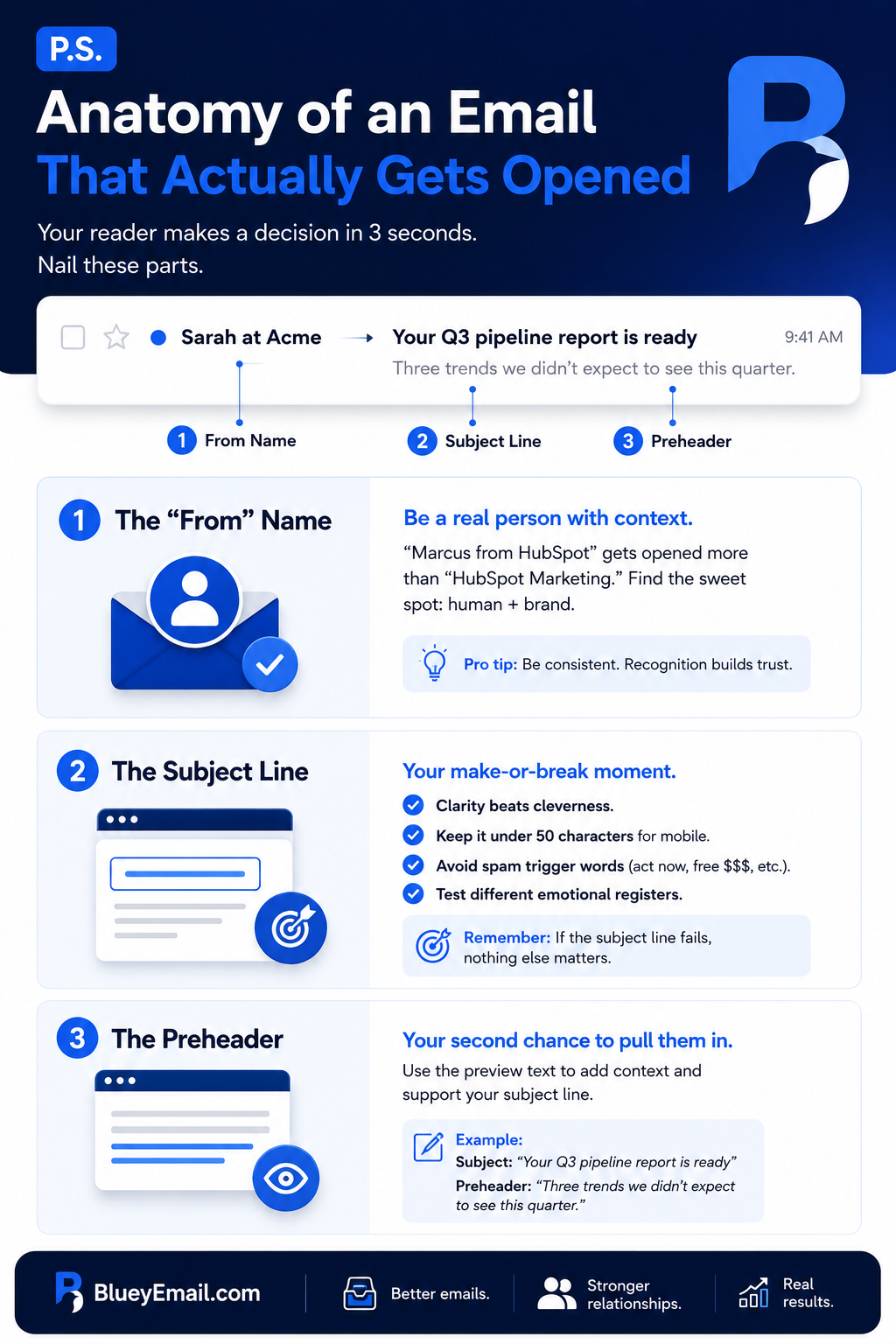
The “From” Name
This is the first thing anyone sees in their inbox. And most B2B marketers mess it up.
If your “from” name is just “Sarah Chen,” nobody knows who you are. If it’s “Acme Inc.,” it feels corporate and faceless. The sweet spot is usually a combination: “Sarah at Acme” or “Sarah from Acme.” It feels personal but gives context. Your reader sees a human attached to a brand they recognize.
For B2B specifically, a real person usually outperforms a brand name. “Marcus from HubSpot” gets opened more than “HubSpot Marketing.” But whatever you pick, be consistent. If every email comes from a different name, your reader never builds recognition.
The Subject Line
The subject line is the single most important piece of copy in your entire email. If the subject line fails, (sing it) “nothing else mattersssss”. You could have the most brilliant pitch in the world inside the email, and it’s worth zero if the recipient never opens it.
A few principles that hold up:
Clarity beats cleverness. I know, I know, everyone wants to write the viral subject line. But for B2B, clear wins. “Your Q3 pipeline report is ready” will always outperform “You won’t believe what we found 👀.”
Keep it under 50 characters for mobile. Most inboxes cut off subject lines around 40–50 characters on mobile devices. Put the important words first.
Avoid spam trigger words. Phrases like “act now,” “free money,” “make $$$,” “risk-free,” and excessive exclamation points flag your email as spam before it even reaches a human. The filters aren’t stupid — if your subject line reads like a 2003 scam, you’re going to spam.
Test different emotional registers. Curiosity (“The one metric we stopped tracking”), urgency (“Last chance to lock in Q4 pricing”), direct value (“How [Competitor] increased activation by 37%”), or personal (“Quick question, [name]”) all work in different contexts. Don’t pick one and stick with it forever — mix it up based on the email.
The Preheader
The preheader (also called preview text) is the snippet of text that appears after the subject line in most inboxes. It’s the most wasted piece of real estate in email marketing. Most emails have a preheader that says something like “View this email in your browser” because nobody bothered to set it.
Use it. Write a second sentence that supports the subject line and pulls the reader in. If your subject is “Your Q3 pipeline report is ready,” your preheader might be “Three trends we didn’t expect to see this quarter.”
Subject + preheader is effectively a one-two punch. Treat them as a pair.
What’s the best “From” name for marketing emails?
The best “From” name combines a real person with your brand — like “Sarah from Acme” or “Marcus at Bluey.” This consistently outperforms generic “Acme Team” or “noreply@” formats in B2B email marketing.
How long should an email subject line be?
Email subject lines should be under 50 characters to display fully on mobile devices. Subject lines of 28-40 characters tend to get the highest open rates. Always put the most important words first in case it gets truncated.
What are spam trigger words I should avoid?
Common spam trigger words include “free money,” “act now,” “guaranteed,” “risk-free,” “make $$$,” “earn cash fast,” and excessive use of “FREE” in all caps. Multiple exclamation points and dollar signs also flag emails as spam.
What is preheader text in email?
Preheader text is the snippet that appears after the subject line in most email clients, giving recipients a preview of the email content. Use it to support and extend your subject line — not waste it on “View this email in browser.”
How long should the preheader text be?
Preheader text should be 40-100 characters. Most email clients display 35-90 characters depending on the device. Treat the subject line and preheader as a one-two punch.
Why are my emails going to spam?
Emails go to spam due to: missing or incorrect SPF/DKIM/DMARC setup, using spam trigger words, low engagement from past recipients, high bounce rate, sending to purchased lists, or using a domain without warm-up history.
Writing Email Copy People Actually Read: Email Marketing Guide
Most business emails are boring because the people writing them are pretending to be something they’re not. They’re writing like a brand, not a person. They’re using words like “leverage” and “solutions” and “cutting-edge” because they think that’s what professional communication sounds like. It isn’t. It’s what bad professional communication sounds like.
The single best piece of advice I can give on email copy is this: write like you’re emailing one specific person you know.
Not your entire list. One person. A real customer, or a composite of several. Write to them directly. Use contractions. Use shorter sentences. Ask questions. Be willing to say “I” and “you.” Be willing to have a point of view.
If you are a B2C company, checkout this b2c email marketing guide as well.
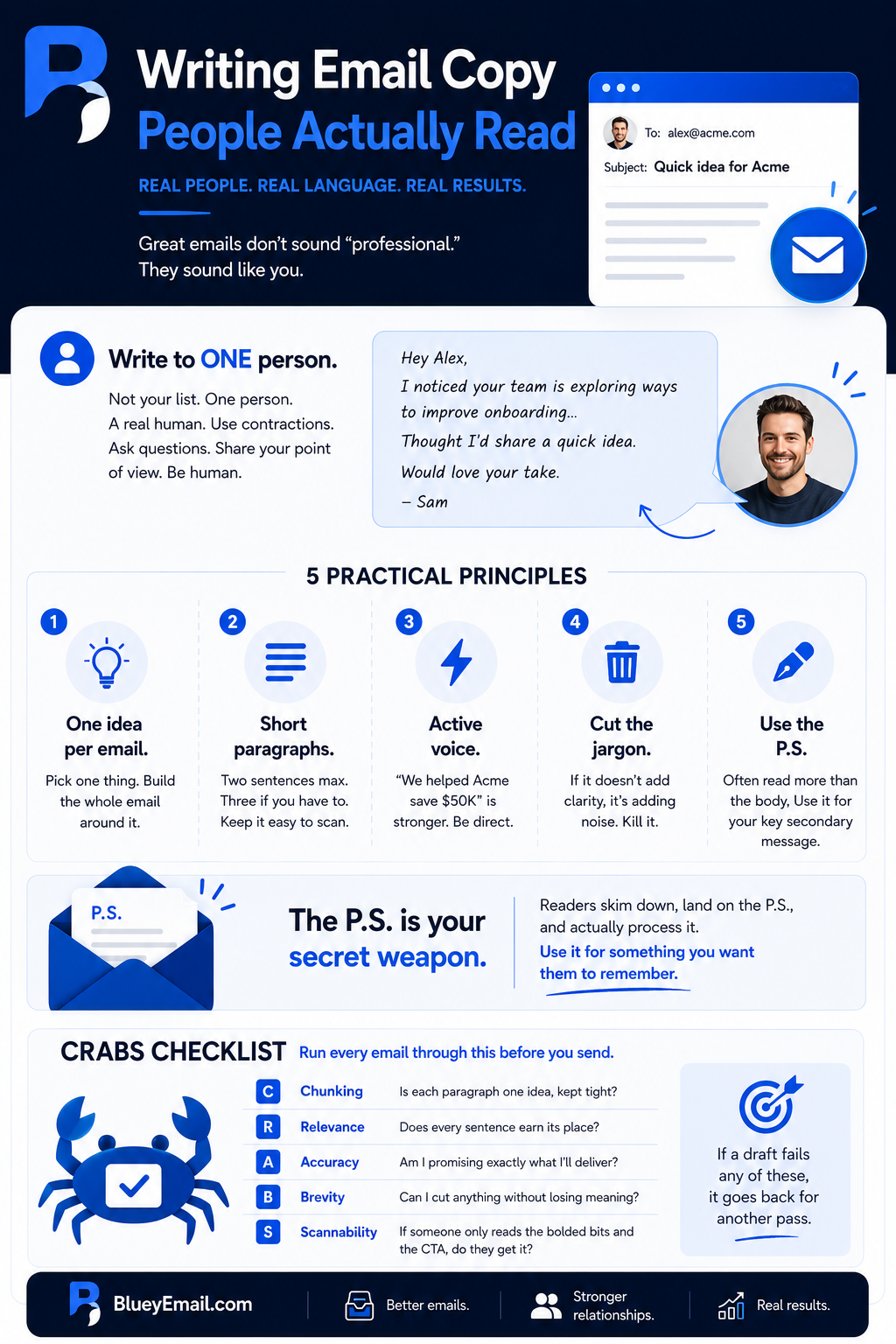
A few practical principles:
One idea per email. If you try to cram a product update, a blog link, an event invite, and a case study into one email, your reader will skim it and take action on none of them. Pick one thing. Build the whole email around it. Save the other three for later.
Short paragraphs. Two sentences max. Three if you have to. Walls of text are where readers go to drown. Every paragraph break is a little pause that keeps them moving.
Active voice. “We helped Acme save $50K” is stronger than “Acme was helped by us to save $50K.” A simple change makes a real difference.
Cut the jargon. Every industry has words that mean nothing to outsiders. In B2B SaaS, it’s especially bad — “leverage,” “synergy,” “disrupt,” “best-in-class,” “thought leadership.” Strip them out. If a word does real work, use it. If it’s filler, kill it.
The P.S. is your secret weapon. Weirdly, the P.S. at the end of an email often gets read more than the body. Readers skim down, land on the P.S., and actually process it. Use it for your most important secondary message — not your main CTA (that goes earlier), but something you want people to remember.
Here’s a little checklist I run every email through before it goes out. I call it CRABS (credit to Dave Chaffey for the original framework):
- Chunking — Is each paragraph one idea, kept tight?
- Relevance — Does every sentence earn its place?
- Accuracy — Am I promising exactly what I’ll deliver?
- Brevity — Can I cut anything without losing meaning?
- Scannability — If someone only reads the bolded bits and the CTA, do they get it?
If a draft fails any of these, it goes back for another pass.
How long should a marketing email be?
Marketing emails should be as short as possible while still being clear. For B2B/SaaS, 50-200 words usually works best. Mobile readers won’t scroll through walls of text. Focus on one idea, one CTA.
How do I write better email copy?
Write better email copy by: writing to one specific person, using one idea per email, keeping paragraphs to 2 sentences, using active voice, cutting jargon, and ending with a single clear call-to-action.
Should I use first names in marketing emails?
Using first names in emails is fine but no longer impressive. It’s table stakes — everyone does it. Real personalization comes from referencing the recipient’s behavior, role, or stage in your funnel, not just their name.
What is the CRABS framework in email writing?
CRABS stands for Chunking, Relevance, Accuracy, Brevity, and Scannability. It’s a checklist for evaluating marketing emails: one idea per paragraph (Chunking), every sentence earns its place (Relevance), promises match delivery (Accuracy), no fluff (Brevity), key points visible to scanners (Scannability).
Should I write marketing emails in plain text or HTML?
Both work. Plain text emails feel more personal and often outperform designed emails for B2B. HTML emails are better for visual content (ecommerce, product launches). For B2B/SaaS, plain-text-styled HTML is often the best of both worlds.
The Call-to-Action: Where Money Is Made or Lost: Email Marketing Guide
The CTA is the point of the whole email. Everything else is set up for this one moment. Get it wrong, and your beautifully crafted message converts nothing.
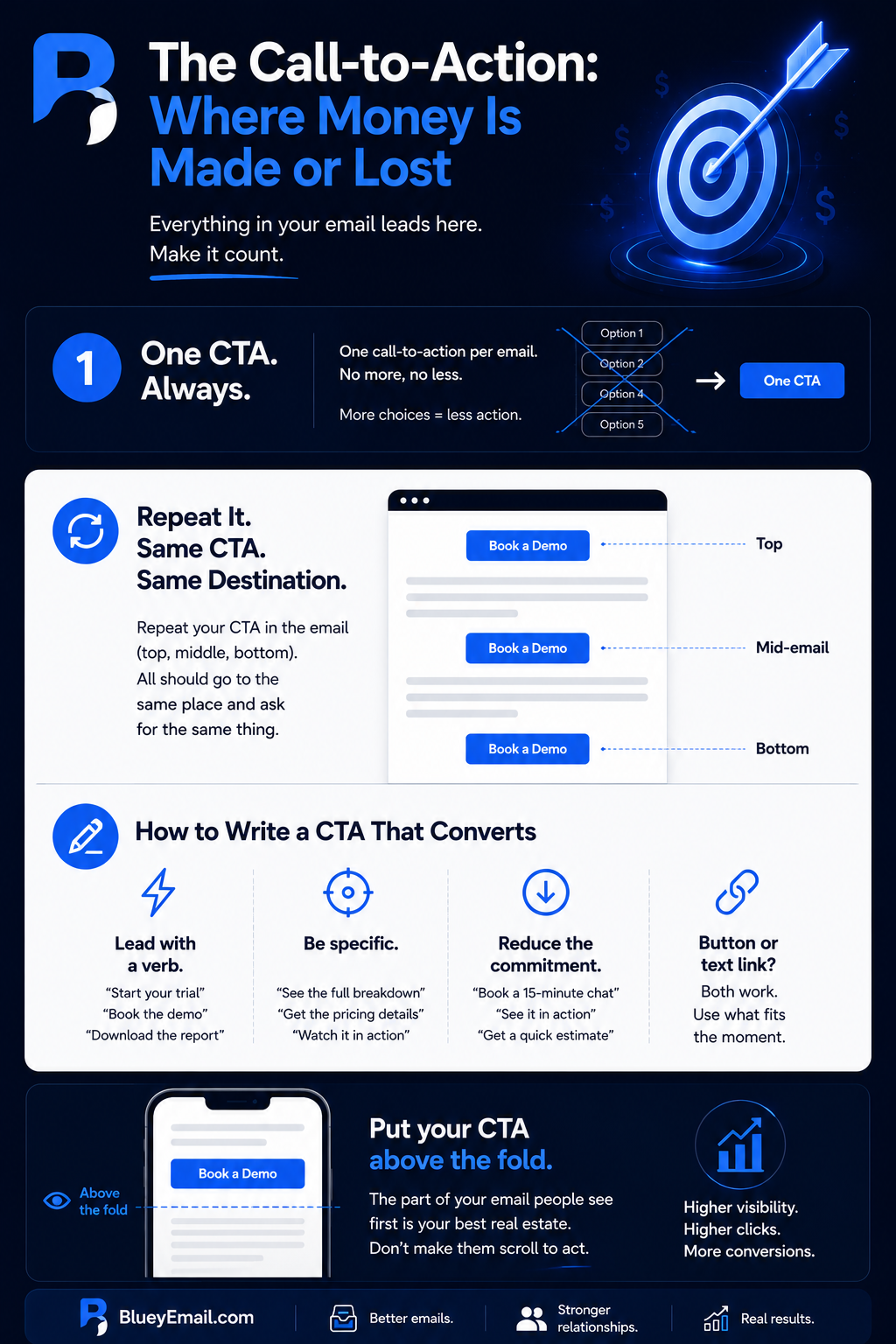
Rule number one: one CTA per email.
I don’t care how tempting it is to add a second. Don’t. Every additional call-to-action splits your reader’s attention and lowers the conversion rate on all of them. This is counterintuitive — it feels like more options means more chances — but it’s consistently been shown to work the opposite way. When you give someone five choices, the most common response is not to choose at all.
You can repeat the same CTA multiple times in the email (button at the top, text link mid-way, button at the bottom) — that’s fine and often helpful. But every one of those should go to the same place and ask for the same thing.
For the CTA itself:
Lead with a verb. “Start your trial,” “Book the demo,” “Download the report,” “Read the playbook.” Active verbs do the work.
Be specific. “Learn more” is almost always wrong. Learn more about what? “See how [Competitor] does it,” “Check out the full breakdown,” “Get the pricing details” — these tell the reader exactly what’s waiting on the other side.
Reduce the perceived commitment. “Book a 15-minute chat” beats “Schedule a sales call.” “See it in action” beats “Request a demo.” People are protective of their time. The more you shrink the ask, the more they say yes.
Button vs. text link? Both work. Buttons are more visually prominent and work better for primary CTAs. Text links feel more conversational and work better inside body copy. I use a button for the main CTA and maybe one reinforcing text link mid-email.
One more thing: put your CTA above the fold whenever you can. “Above the fold” means visible without scrolling — the part of the email the reader sees first. A lot of readers, especially on mobile, never scroll. If your CTA is buried at the bottom of a 600-word email, you’re losing people who would have clicked.
How many CTAs should an email have?
An email should have one primary CTA. Multiple competing CTAs split attention and lower conversion on all of them. You can repeat the same CTA multiple times in one email (button, text link, P.S.) but they should all point to the same action.
What’s a good CTA for marketing emails?
A good CTA uses an action verb, is specific about the destination, and reduces perceived commitment. Examples: “Start your free trial,” “Book a 15-minute call,” “Get the playbook.” Avoid generic phrases like “Click here” or “Learn more.”
Should CTAs be buttons or text links?
Both work depending on placement. Buttons are more visually prominent and work best for primary CTAs. Text links feel conversational and work well inline within copy. Most B2B emails use a primary button plus a supporting text link.
Where should the CTA go in an email?
Place your primary CTA above the fold (visible without scrolling), repeat it once mid-email, and place one final version at the end. Mobile readers often don’t scroll, so the first CTA placement is critical.
Designing for Mobile First: Email Marketing Guide
Over half of all marketing emails are opened on mobile devices. For some B2B audiences, it’s even higher — imagine your buyer checking email on their phone between meetings. If your email looks great on desktop and terrible on mobile, you’re designing for the minority.
Mobile-first doesn’t mean “also works on mobile.” It means you design the mobile version first, then scale up to desktop.
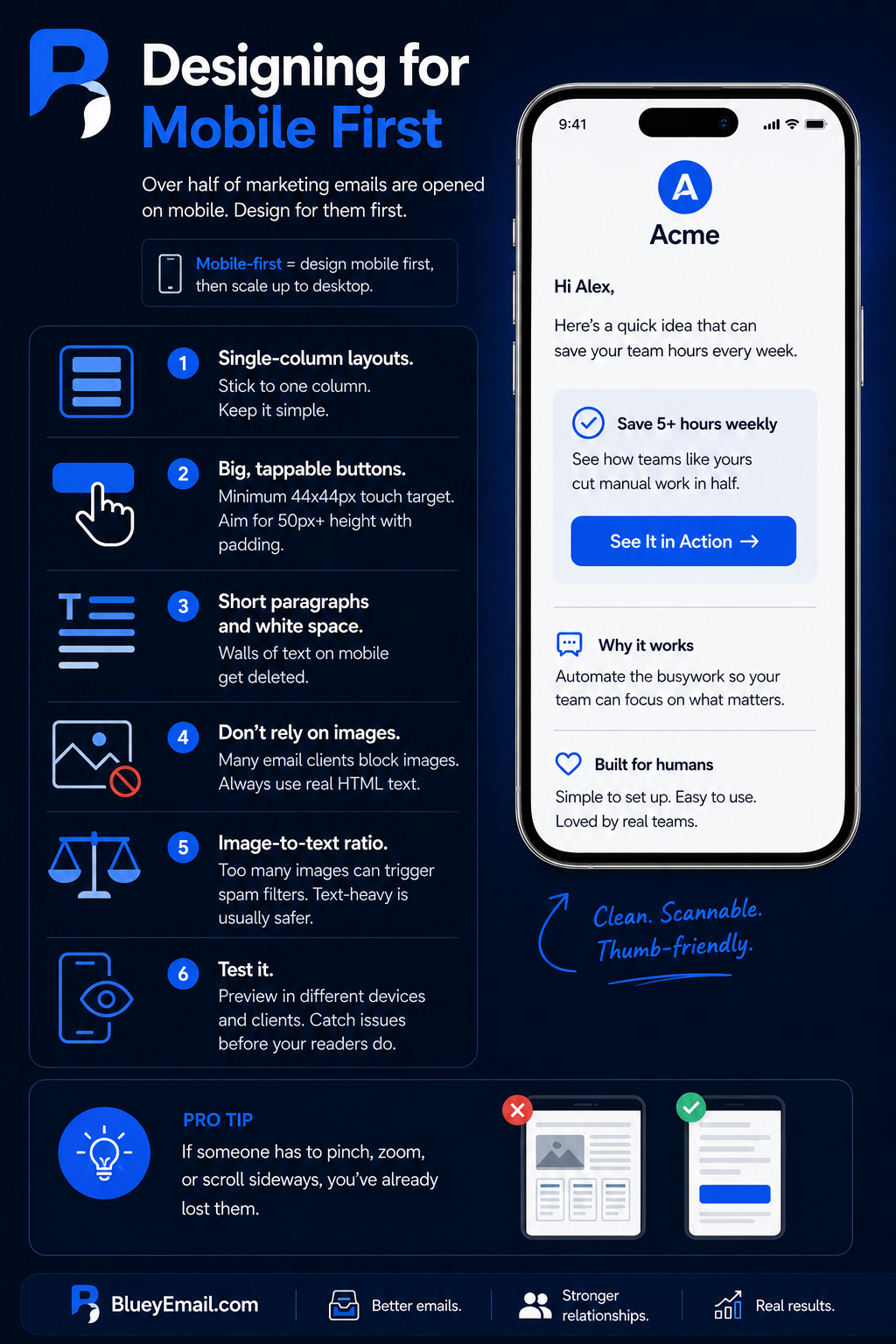
A few practical rules:
Single-column layouts. Multi-column designs get squished on mobile and become unreadable. Stick to one column. Keep it simple.
Big, tappable buttons. A CTA button needs to be big enough that a thumb can hit it without squinting. Apple’s guidelines say at least 44×44 pixels for any touch target. For email buttons, I’d go bigger — 50 pixels tall minimum, with plenty of padding around it.
Short paragraphs and white space. This is more important on mobile than anywhere else. A wall of text on a phone screen is instant delete.
Don’t rely on images. Many email clients block images by default. If the whole email is one big image, the reader sees nothing. Always include real HTML text that carries the message, even if images don’t load.
Image-to-text ratio. Emails that are mostly images (with little text) often get flagged as spam. Keep a healthy balance. Text-heavy is usually safer than image-heavy.
Test it. Every ESP worth using has a preview mode that shows how your email looks on different devices and in different clients (Gmail, Outlook, Apple Mail). Use it. You will catch things that would have embarrassed you.
Why is mobile-first design important for email?
Over 50% of marketing emails are opened on mobile devices. If your email looks bad on mobile, you lose half your audience immediately. Mobile-first design ensures the small-screen experience is the priority, not an afterthought.
What is the ideal email width for mobile?
The ideal email width is 600 pixels for desktop, which scales down responsively on mobile. Use single-column layouts and avoid fixed-width designs over 600px. Buttons should be at least 44 pixels tall for thumb tapping.
How do I make my emails mobile-friendly?
Use responsive email templates, single-column layouts, large readable fonts (16px minimum body text), big tappable buttons (50px tall minimum), short paragraphs, and plenty of white space. Always test on real mobile devices before sending.
Should I use images in marketing emails?
Use images selectively. Many email clients block images by default, so your message must work even without images. Don’t make your whole email a single image. Always include real HTML text and add descriptive alt text.
Segmentation: Stop Sending Everyone the Same Email: Email Marketing Guide
This is probably the single highest-leverage thing a B2B/SaaS company can do to improve email performance — and also the thing most beginners put off because it feels complicated.
It isn’t. You don’t need fifteen segments on day one. You need three or four thoughtful ones.
Your list contains wildly different people. A marketing manager at a 10-person startup has different problems from a VP of Engineering at a 500-person SaaS company. Sending them the same email means one of them is probably getting something irrelevant. Irrelevant emails get ignored, deleted, or reported as spam.
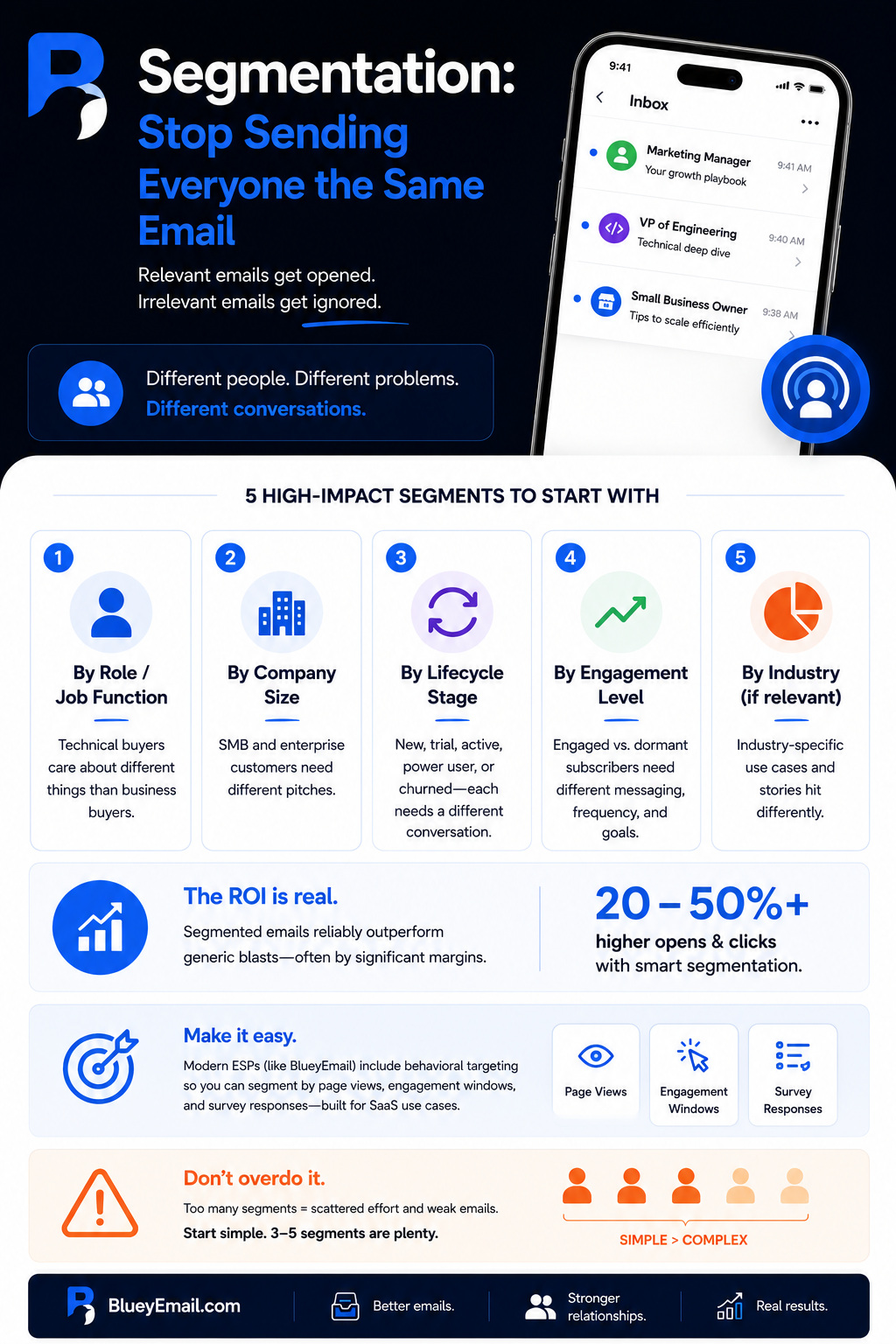
For B2B/SaaS, the segments I’d start with:
By role or job function. Technical buyers care about different things than business buyers. If your product has both, segment accordingly. You can capture a role at signup or infer it from their behavior (the pages they visit on your site, the content they download).
By company size. An SMB (small to medium business) customer has different needs than an enterprise customer. Same product, different pitch.
By lifecycle stage. New signup, trial user, active customer, power user, churned user — each of these groups needs a different conversation.
By engagement level. Separate your engaged subscribers (opens and clicks in the last 30–60 days) from the dormant ones. The messaging, frequency, and goal for each group should be different.
By industry (if relevant). If your product serves multiple verticals and you have industry-specific case studies or use cases, this is worth the effort. “How [Fintech customer] does it” lands differently for a fintech prospect than “How [Retail customer] does it.”
The ROI of segmentation is real. You’ll see it in your metrics almost immediately — open rates and click rates for segmented sends reliably outperform generic blasts, often by significant margins.
Most good ESPs make this easy. Bluey’s platform, for example, includes behavioral targeting that lets you segment by page views, engagement windows, and survey responses specifically tailored for SaaS use cases — which matters because most segmentation tools were originally built for ecommerce and translate awkwardly when you try to apply them to a product-led SaaS motion.
One warning: over-segmentation is also a trap. If you have so many segments that you can’t write quality emails for each one, you’ve gone too far. Start simple. Three to five segments are plenty for most early-stage B2B/SaaS companies.
What is email segmentation?
Email segmentation is the practice of dividing your email list into smaller groups based on shared characteristics — like role, industry, behavior, or lifecycle stage — so you can send more relevant content to each group.
How do I segment my email list?
Start with simple segments: new subscribers, engaged subscribers, dormant subscribers, and customers. Then add segments by role (e.g., decision-maker vs. user), company size, industry, or behavior (e.g., trial users vs. paid users). Use signup forms to collect data.
How many email segments should I have?
Start with 3-5 segments. Over-segmentation makes content creation impossible. Add segments only when you have enough content variation to make them meaningful.
Does email segmentation actually work?
Yes. Segmented campaigns consistently produce higher open rates, click-through rates, and conversion rates than generic blasts. Studies typically show 30-100%+ improvement in engagement when emails are segmented properly.
What is behavioral segmentation in email marketing?
Behavioral segmentation groups subscribers based on what they actually do — pages viewed, links clicked, products purchased, emails opened, features used. It’s more powerful than demographic segmentation because it reflects intent.
Personalization Beyond “Hi [First Name]”: Email Marketing Guide
Using someone’s first name in an email is no longer personalization. It’s table stakes. Every spammer on earth has figured out merge tags. Nobody is impressed that you know their name.
Real personalization is about sending content that reflects what the person has actually done or cares about.
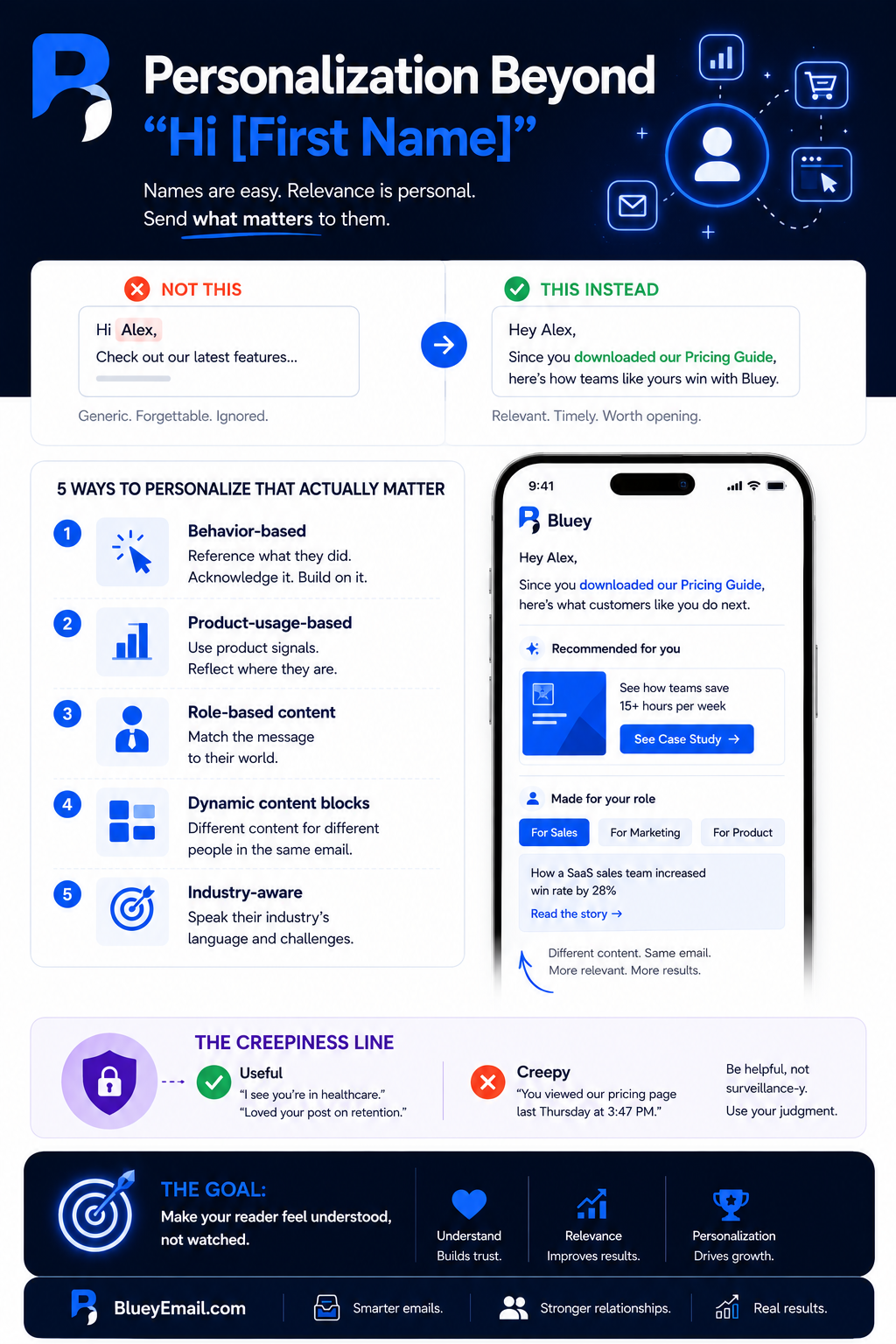
For B2B/SaaS, that means:
Behavior-based personalization. Reference what they did. If someone downloaded your pricing guide, your next email should acknowledge that and take them one step further — not pretend the download never happened.
Product-usage-based personalization. For SaaS specifically, your product generates signals. Someone who’s logged in every day for two weeks is in a different state than someone who hasn’t logged in since they signed up. Your email should reflect that.
Role-based content. Sending a case study about how a VP of Sales closed a big deal works great for a VP of Sales. It does not work for a CMO. Match the content to the reader.
Dynamic content blocks. Advanced ESPs let you show different content inside the same email based on who’s reading it. One section, three versions, swapped based on segment. This sounds complicated, but it is actually straightforward once you’ve done it once.
Now, a word on the creepiness line.
There’s a point where personalization goes from “oh, that’s useful” to “wait, how do you know that?” Mentioning someone’s role and industry? Fine. Referencing the exact pages they looked at on your website last Thursday at 3:47 PM? Weird. Use your judgment. If it’d feel strange coming from a friend, it’ll feel strange coming from a brand.
Good personalization makes the reader feel understood. Bad personalization makes them feel surveilled. The goal is the first.
What is email personalization?
Email personalization is the practice of tailoring email content to individual recipients based on their data, behavior, or preferences. It goes beyond using a first name — including content recommendations, product suggestions, and dynamic content blocks.
How effective is email personalization?
Personalized emails generate significantly higher engagement and revenue than generic emails — research suggests personalization can drive 6x more transactions on average. The effect is strongest when personalization reflects real behavior, not just basic data.
Is using a first name in emails enough personalization?
No. Using a first name is table stakes — every marketer does it. Real personalization references the recipient’s behavior, role, location, past purchases, or stage in your funnel. Without that, you’re not actually personalizing.
What is dynamic content in email?
Dynamic content is email content that changes based on who’s reading it. The same email can show different products, copy, or images depending on the recipient’s segment, behavior, or preferences. Most ESPs support dynamic content blocks.
Can personalization be creepy?
Yes. Referencing someone’s name or role feels fine. Referencing the exact pages they viewed at 3:47 PM last Thursday feels surveillance-level. Stay on the right side of the line: use data to be helpful, not to demonstrate how much you know.
Automation and Trigger-Based Emails: Email Marketing Guide
If you only do one thing after reading this guide, set up these automated email flows. They will do more for your email program than any clever one-off campaign.
Automation means: an email is sent automatically when a specific thing happens. The user doesn’t see a campaign you manually launched — they see an email that arrives exactly when it’s relevant to them.
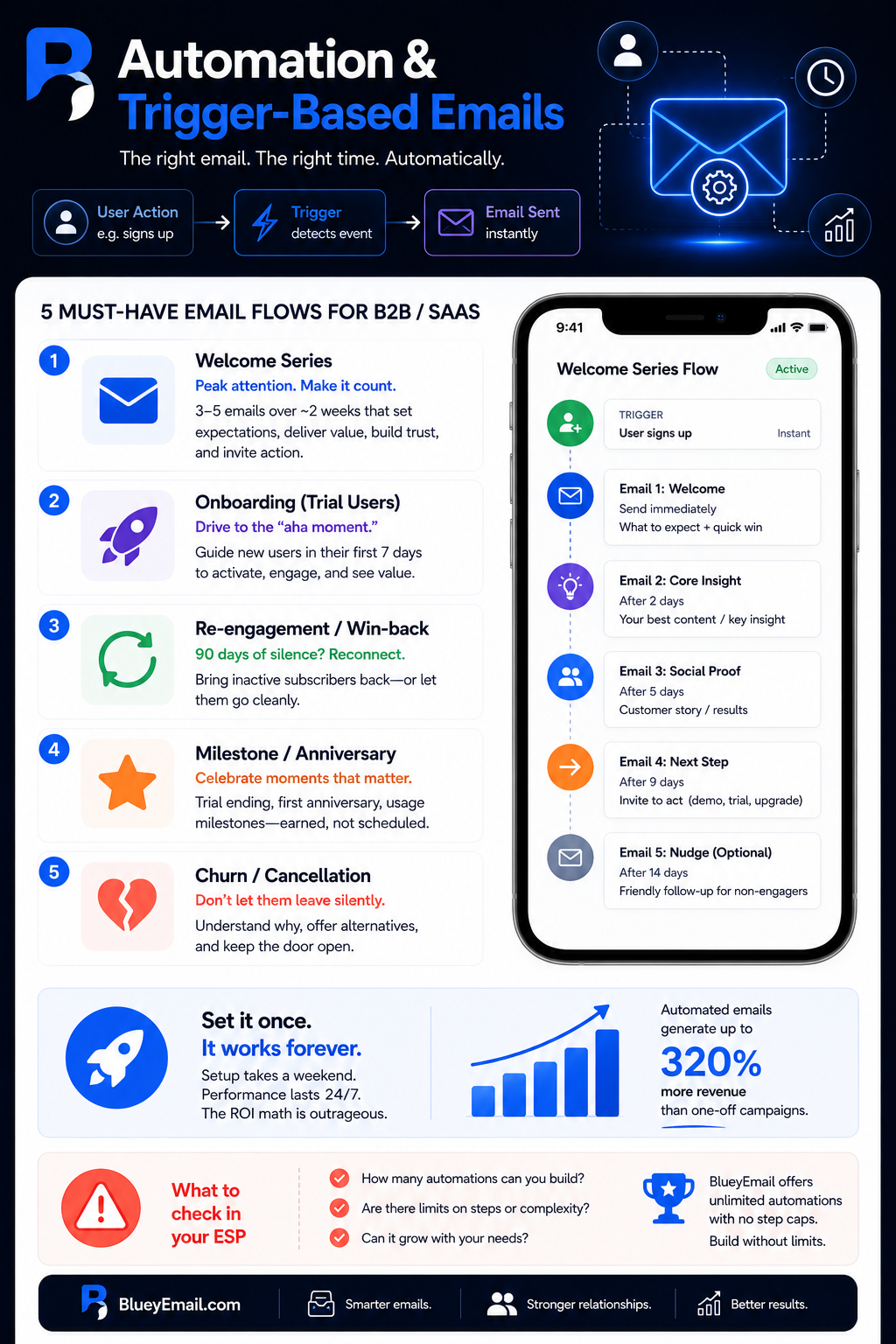
For B2B/SaaS, these are the flows to set up first:
The welcome series. Highest-ROI email you’ll ever build. When someone signs up for your newsletter, your trial, your demo — they are at peak attention. They’re thinking about you right now. This is the moment. Don’t blow it with a generic “Thanks for subscribing!” email.
A good welcome series is three to five emails over about two weeks. Email one: immediate confirmation + what to expect from you. Email two: your most valuable content or the core insight that positions your product. Email three: a customer story or social proof. Email four: an invitation to take the next step (book a demo, start a trial, upgrade). Email five (optional): a friendly nudge for anyone who hasn’t engaged yet.
Onboarding emails (for SaaS trial users). This is its own flow, and it’s critical. A trial user who doesn’t activate the product in the first 7 days rarely converts. Your onboarding emails should guide them through the “aha moment” — the first time they do the thing your product actually makes better. Not feature tours. Outcome focus.
Re-engagement / win-back emails. If someone hasn’t opened your emails in 90 days, send them a dedicated campaign asking if they still want to hear from you. You’ll either bring them back or let them go cleanly. Either outcome beats sending to a dead subscriber forever.
Milestone/anniversary emails. Trial ending, first anniversary, and hit a usage milestone. These create natural conversation points and often outperform regular campaigns because they feel earned rather than scheduled.
Churn/cancellation emails. If you run a SaaS, cancellations are a conversation. A well-designed cancellation flow asks why, offers alternatives, and keeps the door open for the future. Don’t let someone leave silently.
Setting automations takes a weekend. Running it takes zero ongoing effort. The ROI math is outrageous.
One thing to check when you’re picking an ESP: how many automations you’re allowed to build and how complex they can be. Most platforms cap this on their lower tiers — you’ll build your welcome series and then run out of room for the onboarding flow you actually need next. Bluey takes a different approach and offers 25 automations on Grow and unlimited on Business, with no step caps, which matters more than it sounds when you’re actively building.
What is email automation?
Email automation is the process of sending pre-built emails automatically when a specific trigger occurs — like a signup, a purchase, an abandoned cart, or a date. You build the sequence once and it runs without ongoing effort.
What are the most important email automations to set up?
The most important automations for B2B/SaaS are: welcome series (for new subscribers), onboarding sequence (for trial users), re-engagement (for dormant subscribers), and milestone emails (renewal reminders, anniversaries). Ecommerce should add abandoned cart and post-purchase flows.
What is a welcome email sequence?
A welcome email sequence is a series of 3-5 emails sent automatically when someone joins your email list or signs up for a product. It introduces your brand, sets expectations, delivers value, and guides the subscriber toward a conversion action.
What is an abandoned cart email?
An abandoned cart email is an automated message sent to a shopper who added items to their cart but didn’t complete checkout. They typically recover 10-20% of abandoned carts and are one of the highest-ROI emails ecommerce can send.
What is a drip campaign?
A drip campaign is an automated email sequence sent on a scheduled cadence (every few days) to a subscriber. The term “drip” refers to delivering content slowly over time. Drip campaigns are commonly used for nurturing leads or onboarding users.
What’s the difference between drip campaigns and triggered emails?
Drip campaigns send on a schedule (e.g., 1 email every 3 days). Triggered emails send based on user behavior (signup, purchase, inactivity). Most modern email automation combines both — triggered to start, scheduled for the sequence.
Testing, Measuring, and Improving: Email Marketing Guide
Email marketing rewards people who pay attention. A lot of beginners launch their first campaign, feel a burst of dopamine when someone opens it, and then never actually analyze the data.
Don’t be that person. Every campaign is a learning opportunity.
A/B Testing
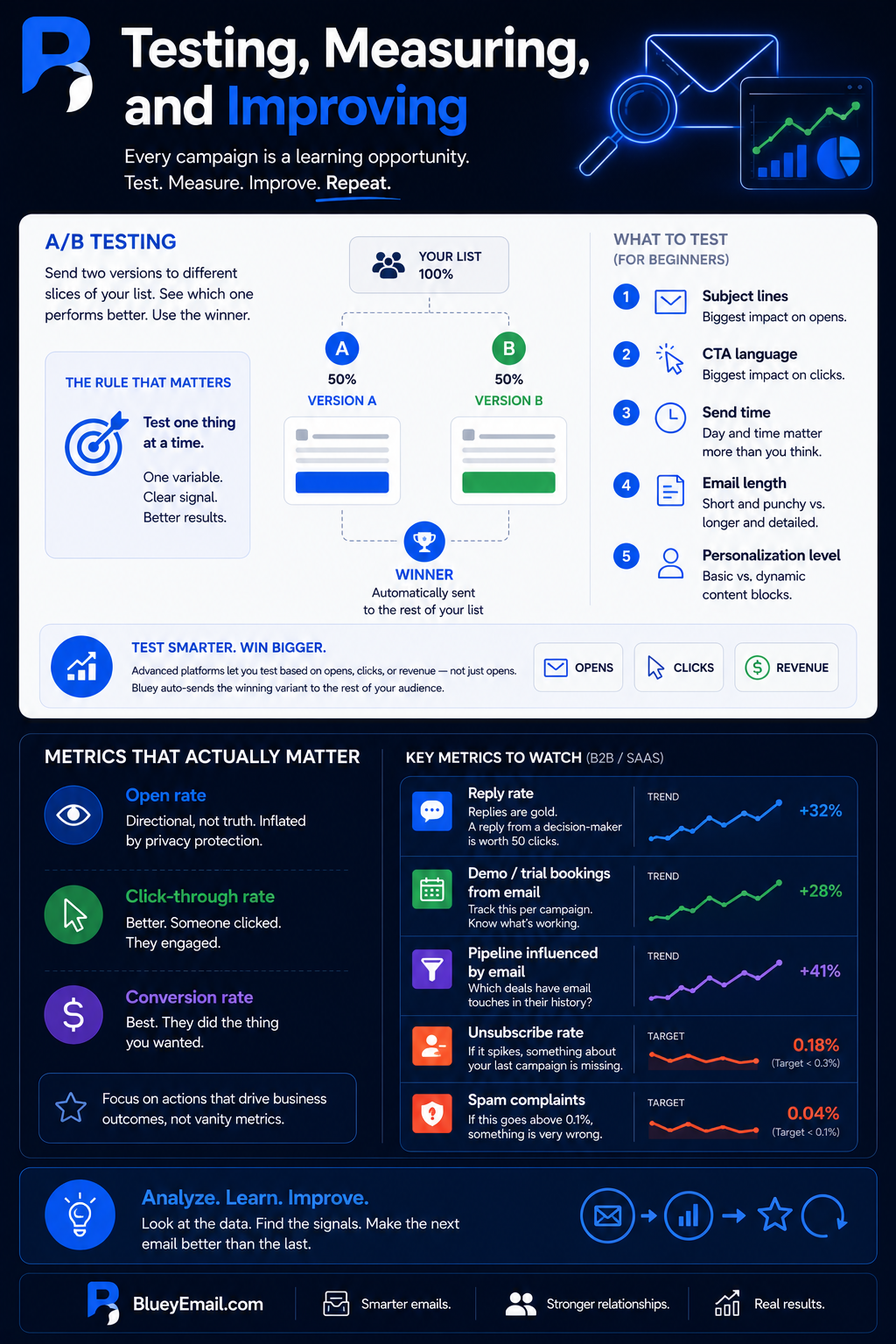
A/B testing (or “split testing”) means sending two versions of the same email to different slices of your list, seeing which one performs better, and using the winner going forward. That’s it.
The rule that matters: test one thing at a time. If you change the subject line, the CTA, and the sender name all at once, you’ll have no idea which change drove the result. Test one variable in isolation. Get a clear signal. Then test the next thing.
For beginners, I’d test in this order:
- Subject lines. Biggest impact on opens. Easiest to test.
- CTA language. Biggest impact on clicks. “Start your trial” vs. “See it in action.”
- Send time. Tuesday 10 am vs. Thursday 2 pm. Matters more than most people realize.
- Email length. Short and punchy vs. longer and detailed.
- Personalization level. Basic merge tags vs. dynamic content blocks.
More advanced platforms let you do revenue-based testing — measuring not just opens and clicks, but actual downstream revenue — which is where the real picture lives. Bluey, for example, lets you pick opens, clicks, or revenue as the winning metric and auto-sends the winning variant to the rest of your audience once a winner is determined. That takes a lot of the manual babysitting out of split testing, which is often what kills the habit for beginners.
Metrics That Actually Matter
Open rate is the metric everyone obsesses over. It’s also the least reliable — Apple’s Mail Privacy Protection inflates opens by auto-loading tracking pixels, and you can’t cleanly separate real opens from bot opens. Use open rate as directional, not as truth.
Click-through rate is better. If someone clicked, they actually engaged.
Conversion rate is best. If someone did the thing you wanted them to do — booked a demo, started a trial, replied — that’s the real signal.
For B2B/SaaS specifically, watch:
- Reply rate. Replies are gold. A reply from a decision-maker is worth 50 clicks.
- Demo/trial bookings from email. Track this per campaign.
- Pipeline influenced by email. Which deals have email touches in their history?
- Unsubscribe rate. If it spikes, something about your last campaign is missing.
- Spam complaints. If this goes above 0.1%, something is very wrong.
What is A/B testing in email marketing?
A/B testing (split testing) is sending two versions of the same email to different parts of your list to see which performs better. The winning variant becomes the new default. Common A/B tests include subject lines, CTAs, send times, and email content.
What should I A/B test in emails?
Start by A/B testing subject lines (biggest impact on opens), then CTA language (biggest impact on clicks), then send times, then email length, then personalization. Test one variable at a time to keep results clean.
How long should an email A/B test run?
A/B tests should run for at least 24-48 hours, with a minimum sample size of 1,000 recipients per variant for statistical significance. For low-volume lists, test over a longer period or test bigger differences.
What email marketing metrics should I track?
Track open rate, click-through rate (CTR), conversion rate, unsubscribe rate, bounce rate, and revenue per email. For B2B specifically, also track reply rate and demo/trial bookings. Conversion rate matters most — opens and clicks are means to that end.
Is open rate still a reliable metric?
Open rate is no longer fully reliable. Apple’s Mail Privacy Protection auto-loads tracking pixels, inflating opens artificially. Use open rate as a directional signal, but optimize for click-through and conversion rates instead.
What’s a good email conversion rate?
A good email conversion rate is 2-5% for B2B and 1-3% for ecommerce, depending on the offer and audience. Conversion rate is more meaningful than open or click rate because it reflects revenue.
Common Beginner Mistakes to Avoid: Email Marketing Guide
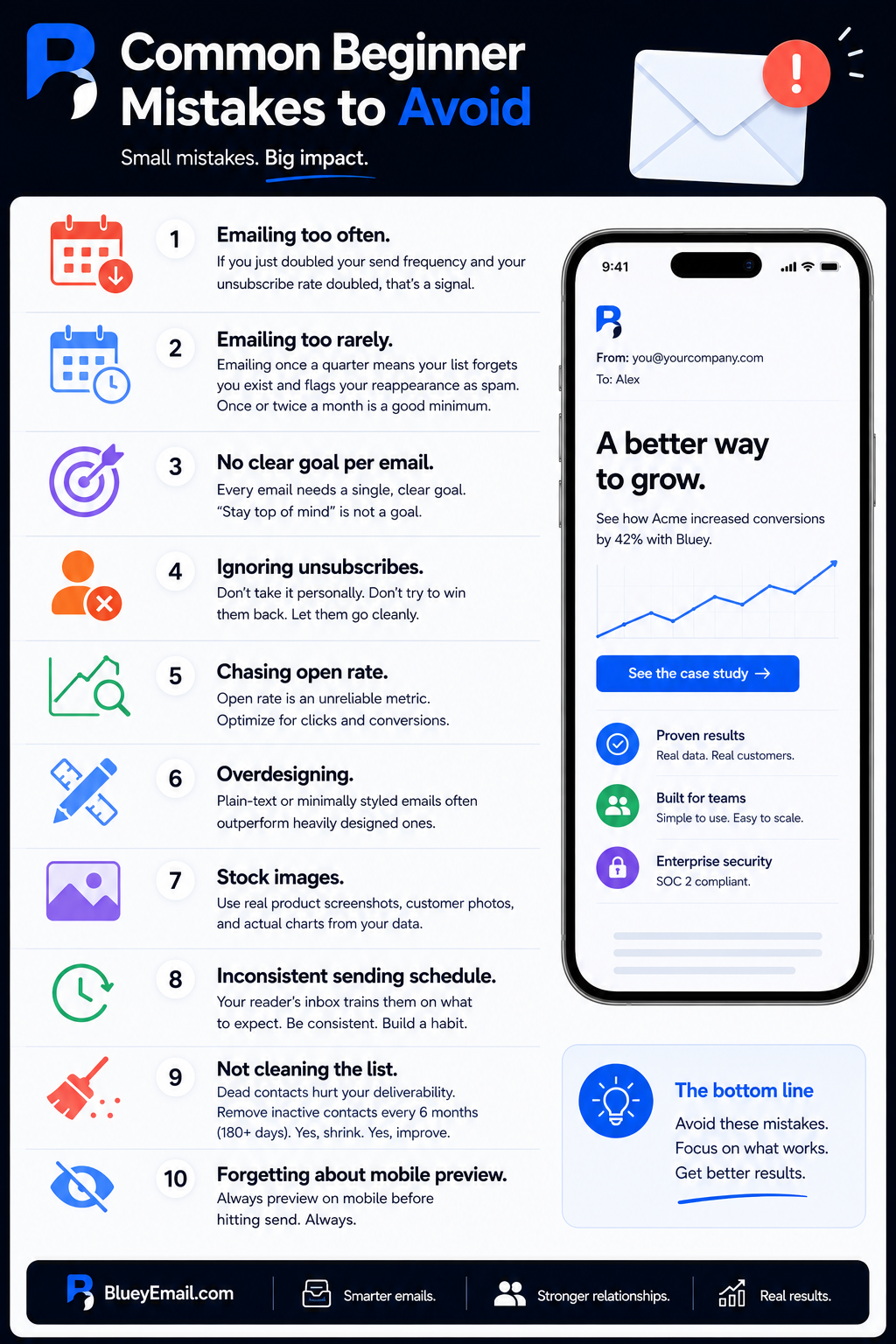
A quick, rapid-fire list of things I see new email marketers do that torpedo their results:
Emailing too often. If you just doubled your send frequency and your unsubscribe rate doubled, that’s a signal. More isn’t always better.
Emailing too rarely. On the flip side, emailing once a quarter means your list forgets you exist and flags your reappearance as spam. Once or twice a month is a reasonable minimum for most B2B/SaaS.
No clear goal per email. Every email needs a single, clear goal. “Stay top of mind” is not a goal.
Ignoring unsubscribes. Don’t take unsubscribes personally. Don’t try to win them back with a desperate last email. Let them go cleanly.
Chasing open rate. We covered this. Open rate is an unreliable metric. Optimize for clicks and conversions instead.
Overdesigning. Plain-text or minimally styled emails often outperform heavily designed ones, especially in B2B. Your reader isn’t judging the design; they’re evaluating the message.
Stock images. If you’re going to use an image, make it real. Product screenshots, real customer photos, and actual charts from your data. Stock photos of smiling professionals in conference rooms fool no one.
Inconsistent sending schedule. Your reader’s inbox trains them on what to expect. If you’re erratic, you never become a habit.
Not cleaning the list. Dead contacts drag down your deliverability. Every six months, remove people who haven’t engaged in 180+ days. Yes, this shrinks your list. Yes, it helps.
Forgetting about mobile preview. Always preview on mobile before hitting send. Always.
Why are my email open rates so low?
Low open rates are usually caused by: weak subject lines, poor sender reputation, missing SPF/DKIM/DMARC setup, emailing dormant subscribers, sending at the wrong time, or your brand name not being recognizable in the inbox.
How often should I send marketing emails?
For B2B/SaaS, 1-2 emails per week is a common cadence. Too few (less than once a month) makes you forgettable. Too many (more than 4 a week) drives unsubscribes. Test what your audience tolerates and engages with.
What is the best day to send marketing emails?
Studies suggest Tuesday, Wednesday, and Thursday tend to get the highest open rates, between 9 AM and 11 AM in the recipient’s timezone. But the best day varies by audience — test with your own list rather than relying on industry averages.
Why am I getting so many unsubscribes?
High unsubscribe rates usually mean: emailing too often, content isn’t relevant to subscribers, you’re attracting the wrong audience at signup, or you bought/scraped your list (which is illegal and ineffective). However, unsubscribes are good as it keep your list clean.
Should I clean my email list?
Yes. Remove unengaged subscribers (no opens or clicks in 90-180 days) every 3-6 months. A smaller, engaged list outperforms a larger, dormant one. Dead contacts hurt your sender reputation and increase bounce rates.
What’s the difference between an unsubscribe and a spam complaint?
An unsubscribe is when a recipient asks to be removed from your list — a normal, healthy outcome. A spam complaint is when a recipient marks you as spam, which is much more damaging. Always make unsubscribing easy to avoid complaints.
Your First 30 Days: An Action Plan: Email Marketing Guide
Let me leave you with something concrete. If you’re starting from zero, here’s a 30-day plan that will get you a functioning email marketing program.
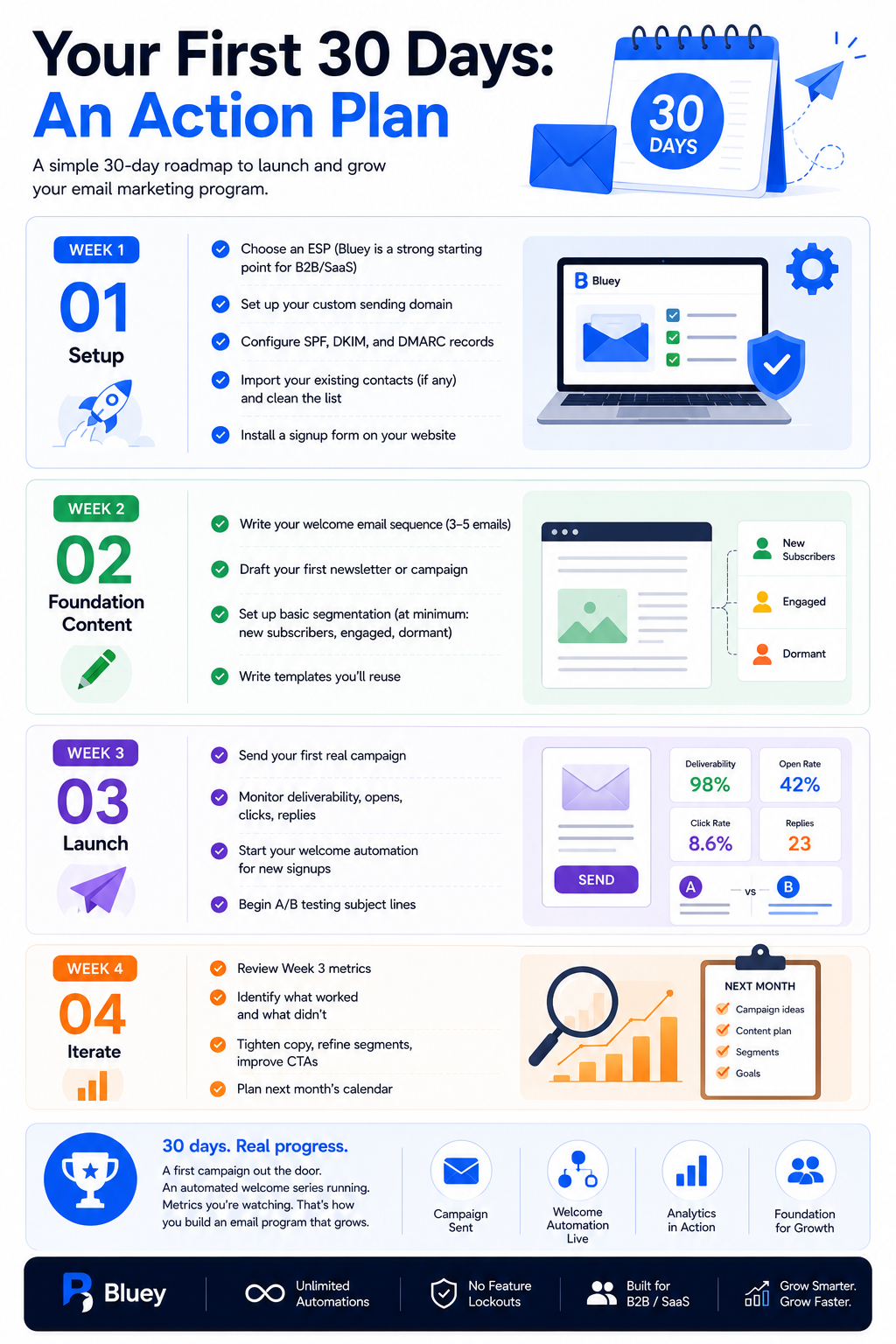
Week 1: Setup.
- Choose an ESP (Bluey, if you want a platform that doesn’t cap automations or hide features behind upgrade tiers, is a strong starting point for B2B/SaaS)
- Set up your custom sending domain
- Configure SPF, DKIM, and DMARC records
- Import your existing contacts (if any) and clean the list
- Install a signup form on your website
Week 2: Foundation content.
- Write your welcome email sequence (3–5 emails)
- Draft your first newsletter or campaign
- Set up basic segmentation (at minimum: new subscribers, engaged, dormant)
- Write templates you’ll reuse
Week 3: Launch.
- Send your first real campaign.
- Monitor deliverability, opens, clicks, replies
- Start your welcome automation for new signups
- Begin A/B testing subject lines
Week 4: Iterate.
- Review Week 3 metrics
- Identify what worked and what didn’t
- Tighten copy, refine segments, improve CTAs
- Plan next month’s calendar
That’s it. Nothing fancy. A first campaign out the door, an automated welcome series running in the background, basic analytics you’re actually watching. In 30 days, you’ll have built more than most B2B/SaaS companies have after a year.
How do I start email marketing for my business?
Start by choosing an email service provider, setting up domain authentication (SPF, DKIM, DMARC), creating a signup form, building a welcome email, and sending your first campaign. Most beginners can launch a basic program in 2-4 weeks.
Which email marketing platform is best for beginners?
The best platform for beginners depends on your needs. For B2B/SaaS with growth in mind, look for flat-rate pricing, included automations, and free migration help — Bluey is built specifically for this case. For free-tier-forever, Brevo or MailerLite work for very low volume.
Do I need a custom domain for email marketing?
Yes. Marketing emails sent from a free Gmail or Yahoo address have poor deliverability, hit sending limits quickly, and don’t pass authentication checks. Always use a custom domain (yourcompany.com) for marketing emails.
How long does it take to see results from email marketing?
You’ll typically see initial open and click data within 24-48 hours of sending. Meaningful list growth and revenue impact usually takes 60-90 days of consistent sending. Building real deliverability and trust takes 6+ months.
Is email marketing still effective in 2026?
Yes. Email marketing remains one of the highest-ROI marketing channels, returning roughly $36-42 for every $1 spent (industry average). For B2B/SaaS specifically, email is often the single best channel for nurturing leads and converting trials.
Final Word
Email marketing isn’t glamorous. You won’t post a viral thread about it on LinkedIn. There’s no trending buzzword that will save you. What works is the unsexy stuff — getting the technical setup right, writing like a human, segmenting thoughtfully, testing patiently, respecting your reader’s time.
Do those things consistently, for six months, for a year, and you’ll have built something genuinely valuable: a direct line to the people who care about what you do. No algorithm can take that away. No platform can price-gouge it. It’s yours.
Start small. Send the first email. Iterate from there. That’s how every successful email program in history got built.
We hope this email marketing guide helped you. If you are looking for a better tool, Consider Bluey Email.
Free tools for this
Put this into practice with our free, no-signup tools — everything runs in your browser:
Browse all 15 free tools →
The point about open rate unreliability is spot on — Apple’s MPP and now the upcoming Gmail/Yahoo sender requirements are eroding tracking further. One thing that helped us was aligning email identity signals (SPF, DKIM, DMARC) with our domain’s broader SEO authority. We ended up documenting our approach roughly like that across channels.