
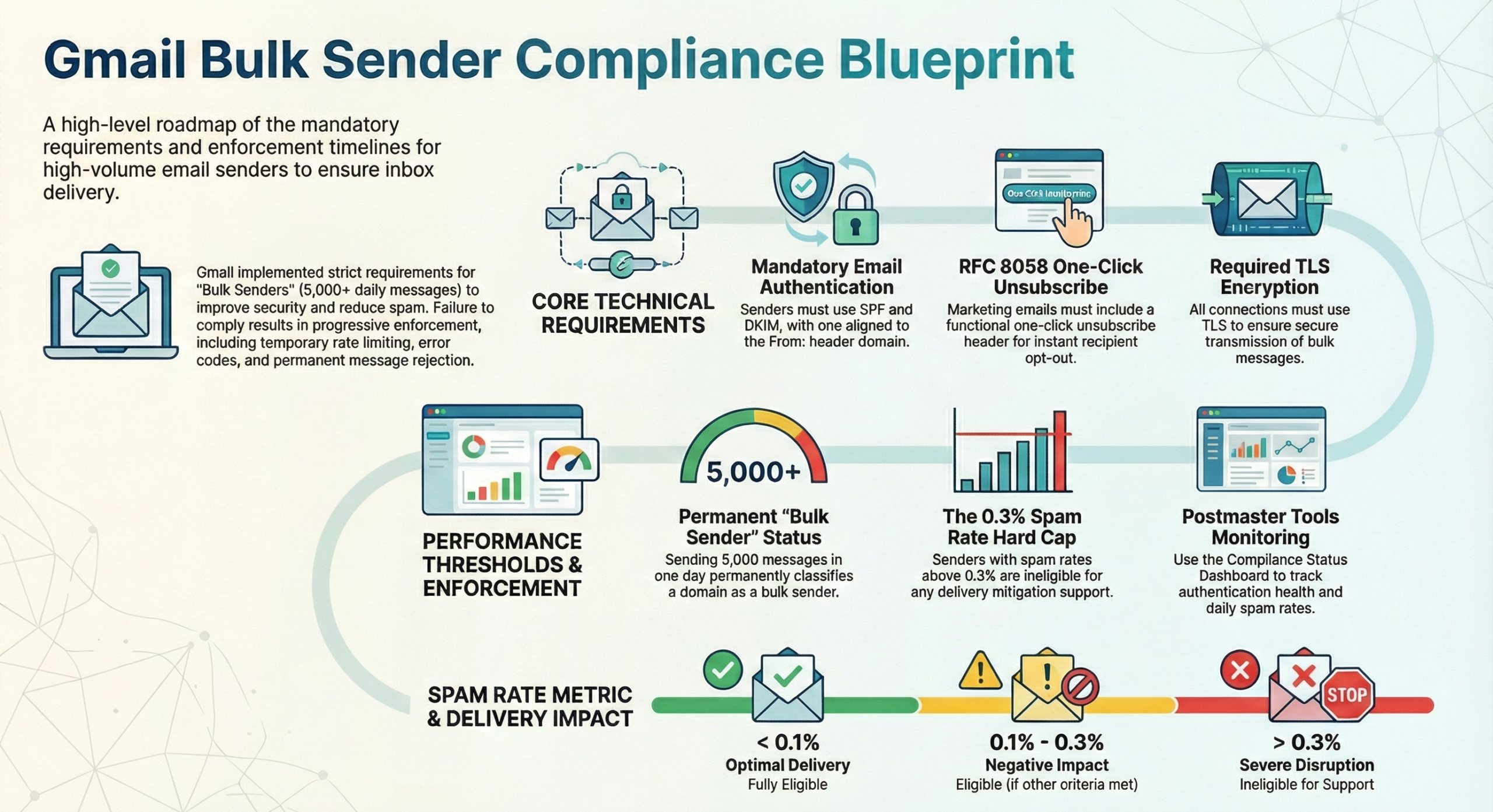
Starting in February 2024, Gmail introduced rigorous new standards for anyone sending high volumes of email to personal Gmail accounts. As of November 2025, Gmail is significantly ramping up enforcement, meaning non-compliant traffic will face serious disruptions, including temporary and even permanent message rejections.
If your organization relies on email for marketing or communications, understanding these rules is no longer optional—it is essential for survival in the inbox.
Are You a “Bulk Sender”?
Gmail defines a bulk sender as any entity that sends close to 5,000 or more messages to personal Gmail accounts within a 24-hour period.
Crucial details to keep in mind:
- Primary Domain Aggregation: The 5,000-limit is calculated based on your primary domain. If you send 2,500 emails from
news.yourbrand.comand 2,500 fromyourbrand.com, you have reached the threshold. - Permanence: Once you meet this criteria a single time, you are permanently considered a bulk sender. Changing your practices later will not remove this status.
- Target Scope: These rules apply specifically to mail sent to personal Gmail accounts, not to messages sent within Google Workspace environments.
The Three Pillars of Compliance
1. Ironclad Authentication
Bulk senders must prove they are who they say they are. This requires a combination of protocols:
- SPF and DKIM: You must authenticate outgoing mail with both Sender Policy Framework (SPF) and DomainKeys Identified Mail (DKIM).
- DMARC: You must have a DMARC record with at least a minimum policy of
p=none. - Alignment: The domain in your
From:header must align with either your SPF or DKIM organizational domain. - Encryption & Infrastructure: All messages must be sent over a TLS connection and follow RFC 5322 formatting. Additionally, your sending IP must have valid forward and reverse DNS (PTR) records.
2. The “One-Click” Unsubscribe Requirement
For all marketing and promotional messages, senders must make it incredibly easy for users to opt-out.
- RFC 8058 Compliance: You must implement a one-click unsubscribe using
List-Unsubscribeheaders that include an HTTPS URL. Standard “mailto” links or links buried in the message body do not satisfy this requirement. - 48-Hour Window: Once a user clicks unsubscribe, you should honor that request within 48 hours.
- Transactional Exemption: One-click unsubscribe is not required for transactional mail, such as password resets or reservation confirmations.
3. Managing the Spam Threshold
Gmail monitors your user-reported spam rate daily through Postmaster Tools.
- The Goal: Keep your spam rate below 0.1%.
- The Danger Zone: Never allow your spam rate to reach 0.3% or higher.
- The Penalty: If you hit the 0.3% mark, you become ineligible for delivery mitigation or technical support from Google. To regain eligibility, your rate must stay below 0.3% for seven consecutive days.
Enforcement and Monitoring
Gmail’s enforcement is “gradual and progressive”. If your mail fails to meet these standards, you will receive specific error codes to help you troubleshoot:
- Error 4.7.23 / 5.7.25: Issues with your PTR record or reverse DNS.
- Error 4.7.27 / 5.7.27: SPF authentication failure.
- Error 4.7.31: Missing or invalid DMARC record.
- Error 4.7.32: From: header alignment issues.
Note for New Domains: If your domain has not sent more than 5,000 emails a day since January 1, 2024, you are considered a “new domain” and will face an accelerated enforcement timetable.
Action Plan for Senders
To ensure your messages continue to reach the inbox, follow these steps immediately:
- Enroll in Postmaster Tools: Use the new Compliance status dashboard to monitor your SPF, DKIM, DMARC, and spam rate data.
- Audit Your Headers: Ensure your promotional mail includes the correct RFC 8058 one-click headers.
- Stop Spoofing: Never use a
@gmail.comaddress in yourFrom:header unless sending directly from a Gmail server, as this will trigger failures. - Gradual Warm-up: If you are a new sender, increase your volumes gradually while monitoring spam reports to maintain your reputation.
By staying ahead of these requirements, you not only avoid Gmail’s “spam foldering” but also build a stronger, more trusted relationship with your recipients.